
douwe2007 - Minecraft Skins & Skin History
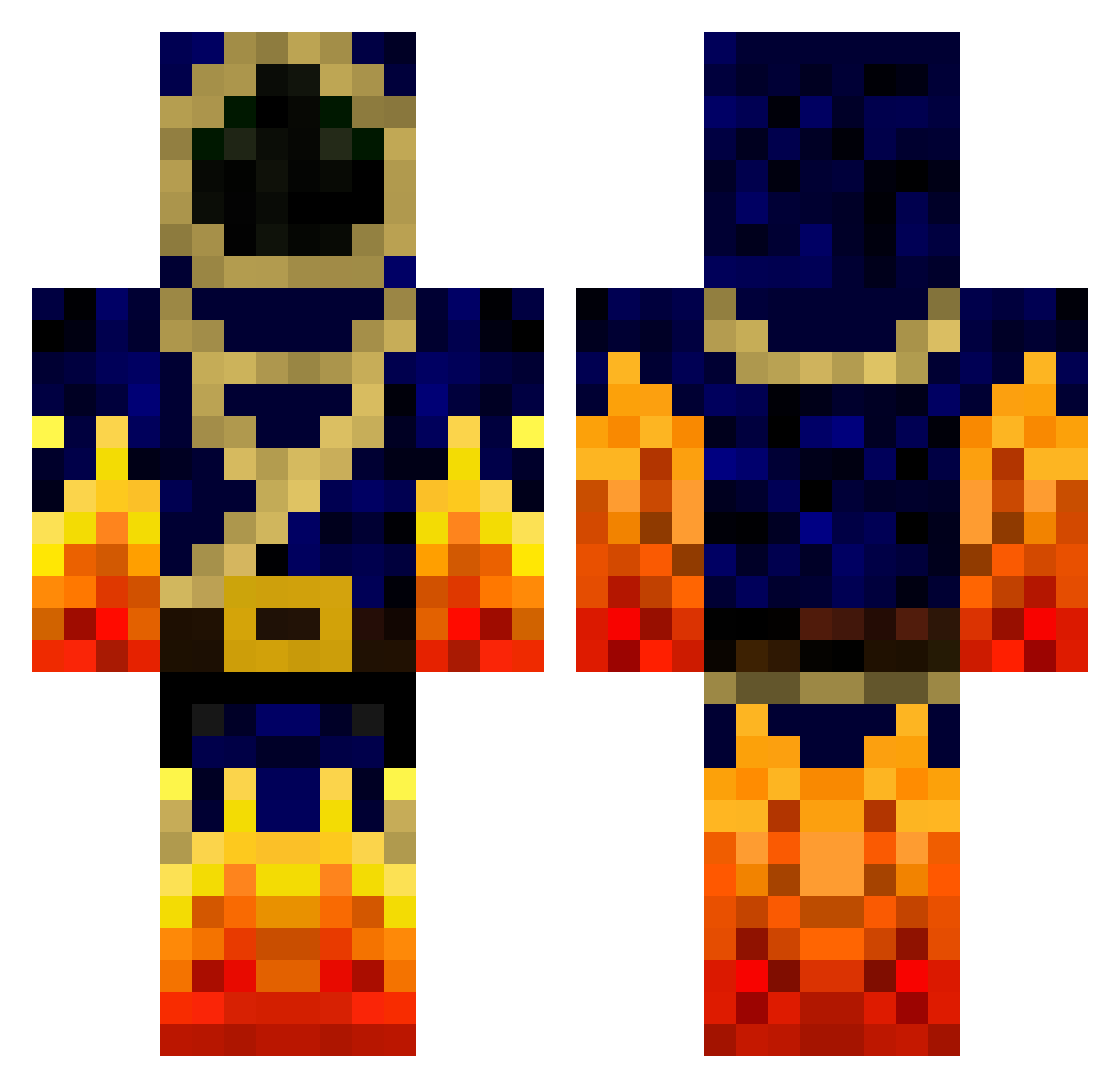
Current Minecraft skin of the player douwe2007, loaded from the official Mojang API. Rotate the 3D model with your mouse or finger, then download the skin as a PNG file and use it in Minecraft: Bedrock Edition or Java Edition for free. When douwe2007 changes their skin, this page updates automatically and the old skin stays in the history below.
Other players with this skin (778)
douwe2007 was the 420th player we have seen with this skin, first spotted on 24.09.2026. The same skin was seen on these players. Open a nickname to see their current skin and skin history.
 MafiS13 Jboss77 joshS_S Dapps MTROLOLOL TrymBoix gosty303 Derked SvenKing6 Sintex67 Verydarkknight2 Ahmet_Toprak backflip101 blockmainer Maxou192001 lucas260504 Spasticus campbellcampbell Birlived crz_choo_choo rythekidRN coolninja152 Saikodesu ZingyPies123 undersile codycool11 r427 LinusOuji gamelover102 O_oDrugs_FTW OpTic_Mads Qw1st BlockPie davidlim911 CaptainBoomen jalmlund firfoxy RhywXCian CRM717 patrik1918 ttemrowski1 dunnuck8 L_as Mac65 Pzomer rubberduck34 Giga102pl CDub1407 ElementProdigy Kill_Switch899 DrDurdle Sonic_Blast18 mehy298 Hobbes8 CraftWithTyler TheLionCrafter LavaStrike0511 Sam_ADTR daniel41 MagicThunder99
More Mage Minecraft skins
How to install the douwe2007 skin
- Press the Download button above to save the skin as a PNG file.
- Minecraft: Bedrock Edition (PE): open the Dressing Room from the main menu (or tap your character → Edit Character), go to Classic Skins → Owned, press the + (new skin) button, choose the downloaded PNG and pick the Classic (Steve) model. Works on PC and mobile; consoles cannot import custom skins.
- Minecraft: Java Edition: open the Minecraft Launcher, go to the Skins tab, click New Skin, load the PNG, pick the Classic (Steve) model and press Save & Use. You can also upload it at minecraft.net → Profile → Change Skin.
The skin does not show up after import - what should I do?
Restart Minecraft and open the Dressing Room again - imported skins sometimes appear only after a restart. Also make sure you selected the imported skin and picked the Classic (Steve) model.
Which model should I choose, Classic or Slim?
This skin is designed for the Classic (Steve) model. If you pick the wrong model, the arms of the skin will look stretched or squeezed.
Is the skin of douwe2007 free to download?
Yes. Press Download, save the PNG file and use it in Minecraft: Bedrock Edition or Java Edition - no payment or registration needed. The skin also works on multiplayer servers and Realms.
More skins
Looking for more? Go back to all Minecraft skins and check the top skins of the week, month and all time, or find any player's skin by nickname.