
diniedavincci - Minecraft Skins & Skin History
Current Minecraft skin of the player diniedavincci, loaded from the official Mojang API. Rotate the 3D model with your mouse or finger, then download the skin as a PNG file and use it in Minecraft: Bedrock Edition or Java Edition for free. When diniedavincci changes their skin, this page updates automatically and the old skin stays in the history below.
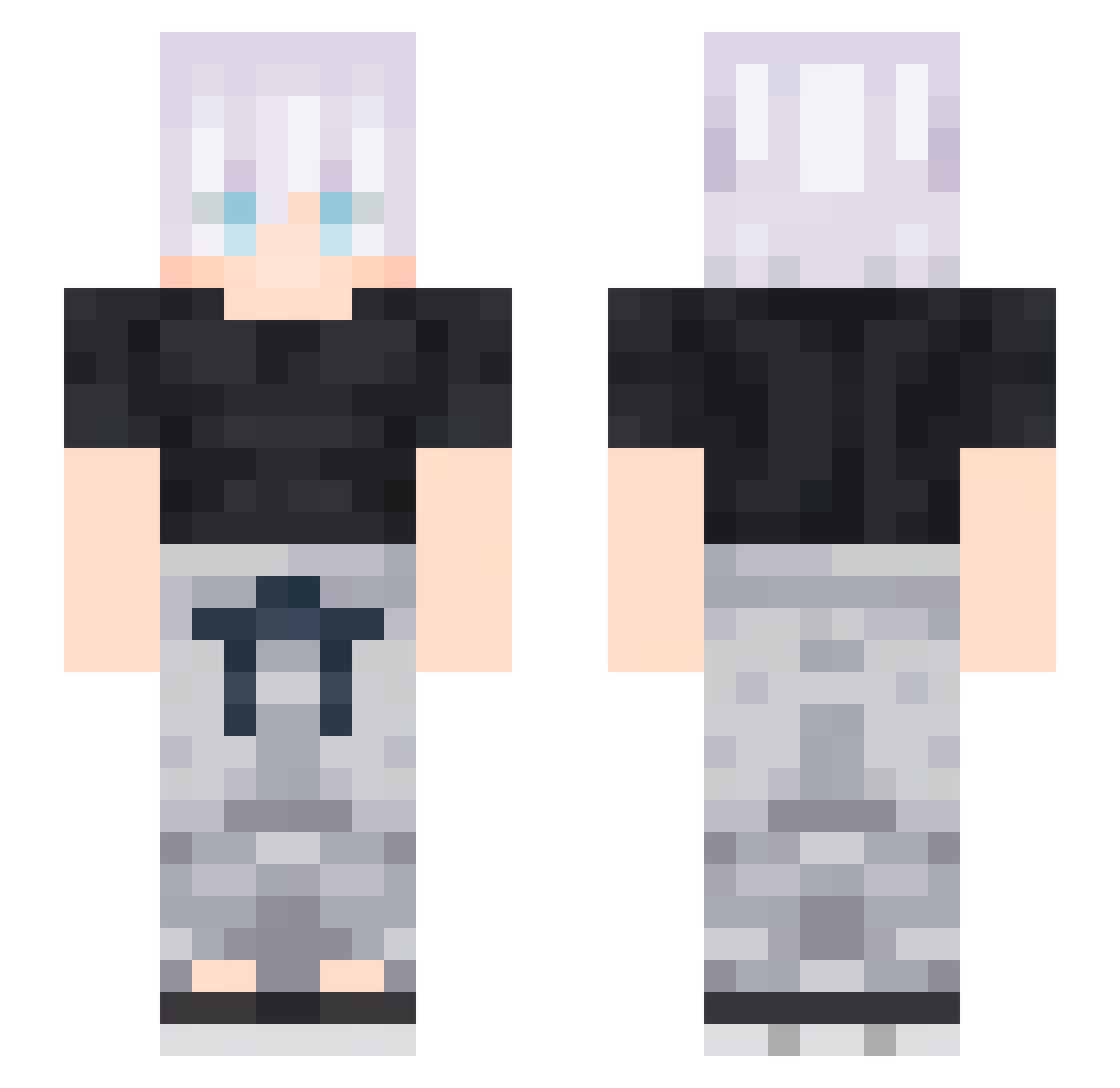
Other players with this skin (55)
diniedavincci was the 12th player we have seen with this skin, first spotted on 18.08.2026. The same skin was seen on these players. Open a nickname to see their current skin and skin history.
 Briano280
 GoldTitanium4028 AllanPadilla
 sans47 FIVESOME 2gajo swaged YB_DT Div___ GABBO03XI PandaNee Zennie_Yorii pushriathecat1 ZabaKumpel_ MewingGodAizen RterenZ flaming11 Mors_Scythe k0sta4ka mateodaa Kabrite TheGrabster21 _Wh1ted ikkimeI EstebanSuperPro
 Jackyssu AndreaDomingo kingjeyoen FeMiti Rdragoon33 KyoBlade11 ImNo4h blyskayt astravan21 Le_ii Zanthyn TRF_Drerrie Bartto_ tgce _ILOVEASIANS_ no_01692 Friendly8810 ORAGAMI1115 samiguoug Ppapaco ProutyMan ashybuns Gamerboy_00 Greige_ LilScxr hhonored1 Iurycxz GigachadTheKing Monster_Dong21 _Dignity_
More Satoru Gojo Minecraft skins
See all 1317 Satoru Gojo skins
How to install the diniedavincci skin
- Press the Download button above to save the skin as a PNG file.
- Minecraft: Bedrock Edition (PE): open the Dressing Room from the main menu (or tap your character → Edit Character), go to Classic Skins → Owned, press the + (new skin) button, choose the downloaded PNG and pick the Slim (Alex) model. Works on PC and mobile; consoles cannot import custom skins.
- Minecraft: Java Edition: open the Minecraft Launcher, go to the Skins tab, click New Skin, load the PNG, pick the Slim (Alex) model and press Save & Use. You can also upload it at minecraft.net → Profile → Change Skin.
The skin does not show up after import - what should I do?
Restart Minecraft and open the Dressing Room again - imported skins sometimes appear only after a restart. Also make sure you selected the imported skin and picked the Slim (Alex) model.
Which model should I choose, Classic or Slim?
This skin is designed for the Slim (Alex) model. If you pick the wrong model, the arms of the skin will look stretched or squeezed.
Is the skin of diniedavincci free to download?
Yes. Press Download, save the PNG file and use it in Minecraft: Bedrock Edition or Java Edition - no payment or registration needed. The skin also works on multiplayer servers and Realms.
More skins
Looking for more? Go back to all Minecraft skins and check the top skins of the week, month and all time, or find any player's skin by nickname.