
chump96 - Minecraft Skins & Skin History
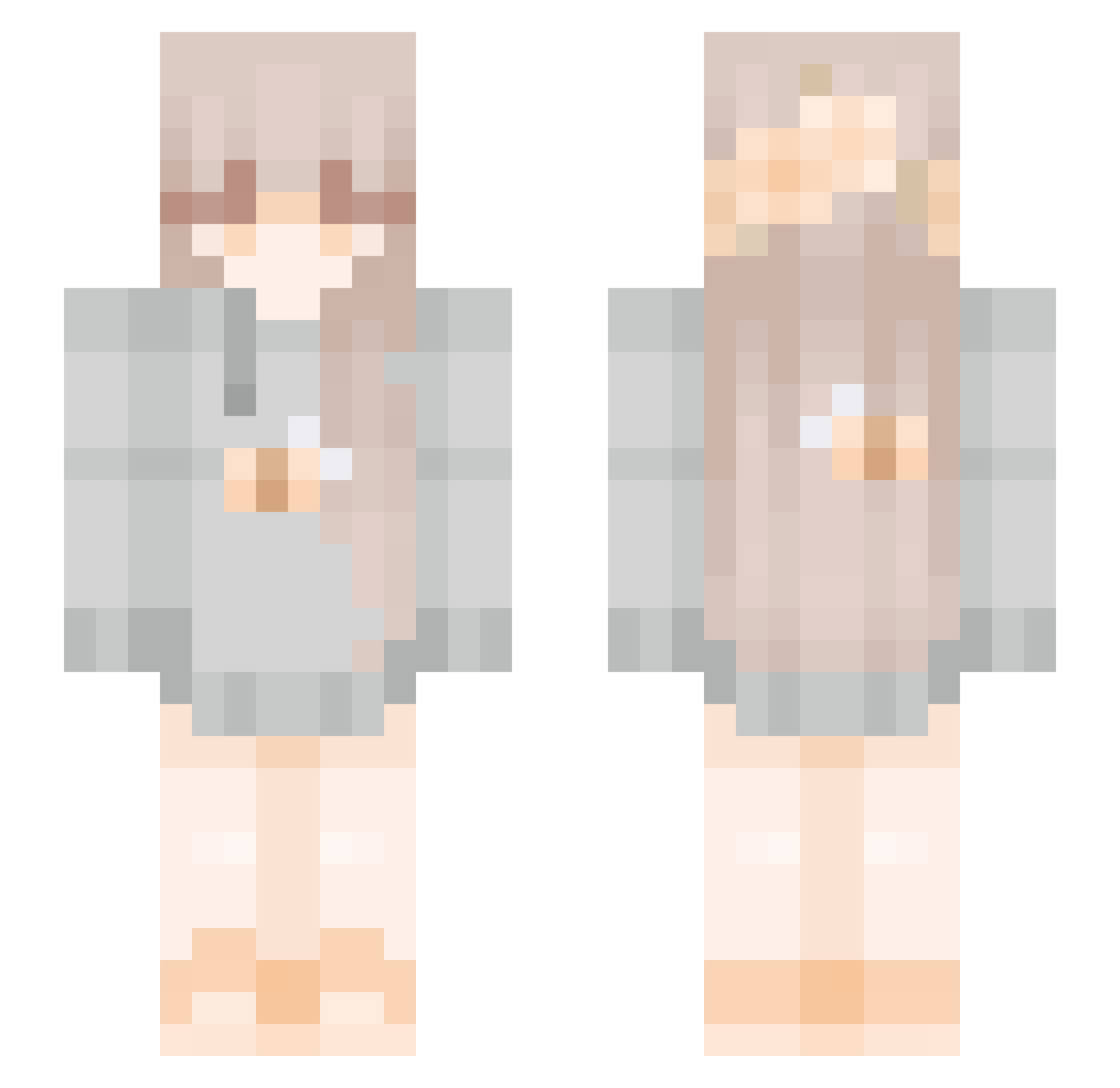
Current Minecraft skin of the player chump96, loaded from the official Mojang API. Rotate the 3D model with your mouse or finger, then download the skin as a PNG file and use it in Minecraft: Bedrock Edition or Java Edition for free. When chump96 changes their skin, this page updates automatically and the old skin stays in the history below.
Other players with this skin (272)
chump96 was the 67th player we have seen with this skin, first spotted on 24.08.2026. The same skin was seen on these players. Open a nickname to see their current skin and skin history.
 YunDanA rchll_nav DARTSSSSSSSS tora111111111 beelindaa CottonPony_YT Popicker123 like_curls Nisakura Mariachka Katamixer catatemyphone xAxtra iivvyy2007 chelsey2448 slippers23 Flola 03Cookie h3avensvalkyrie Lauhina H_wry16 bluemelon22255 awggiie Hears_life Emiii1i dandelionswirl MrsTeasty ChuChewy mango_11485 Valkiirae Bubblecat204 FrenchieLover PotatoLustere nyusteph CrackyBanana shookieh Fyshing dada1220 catterlol ShuMingdz StadiumArcadium Westspirit2 AgnesGilmore Hollywud29 FlapFlap232 kenzissad MeowClientVictim FionnaGames24 iiteddyxmia esotilin124 uuozzeni v_403_v Syrupmapple y0bella Marix89 CocoaPebble235 koiiyy nopogo1166 Hermione7831 boupon
More Bee Minecraft skins
How to install the chump96 skin
- Press the Download button above to save the skin as a PNG file.
- Minecraft: Bedrock Edition (PE): open the Dressing Room from the main menu (or tap your character → Edit Character), go to Classic Skins → Owned, press the + (new skin) button, choose the downloaded PNG and pick the Slim (Alex) model. Works on PC and mobile; consoles cannot import custom skins.
- Minecraft: Java Edition: open the Minecraft Launcher, go to the Skins tab, click New Skin, load the PNG, pick the Slim (Alex) model and press Save & Use. You can also upload it at minecraft.net → Profile → Change Skin.
The skin does not show up after import - what should I do?
Restart Minecraft and open the Dressing Room again - imported skins sometimes appear only after a restart. Also make sure you selected the imported skin and picked the Slim (Alex) model.
Which model should I choose, Classic or Slim?
This skin is designed for the Slim (Alex) model. If you pick the wrong model, the arms of the skin will look stretched or squeezed.
Is the skin of chump96 free to download?
Yes. Press Download, save the PNG file and use it in Minecraft: Bedrock Edition or Java Edition - no payment or registration needed. The skin also works on multiplayer servers and Realms.
More skins
Looking for more? Go back to all Minecraft skins and check the top skins of the week, month and all time, or find any player's skin by nickname.