
celticlad67 - Minecraft Skins & Skin History
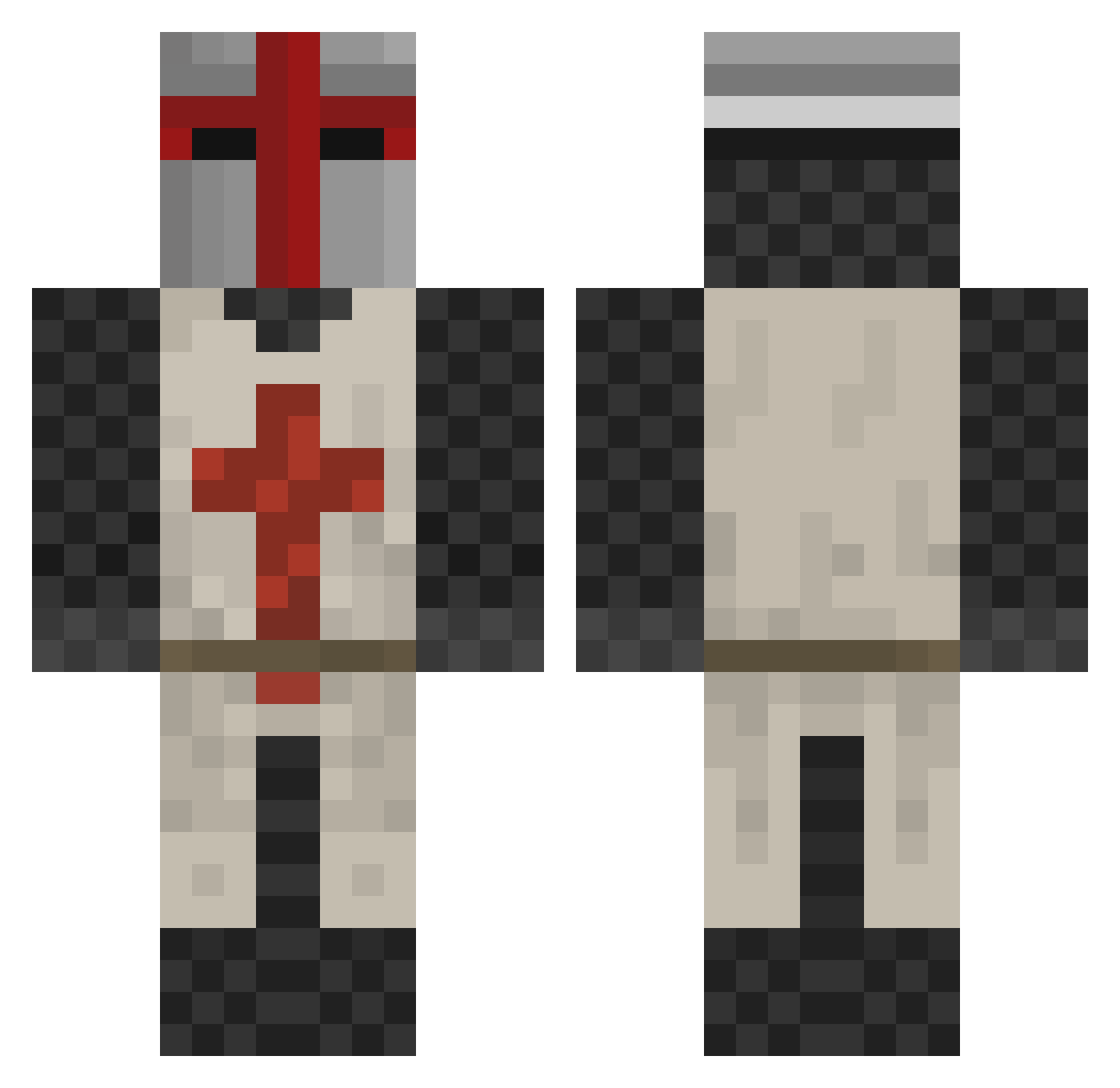
Current Minecraft skin of the player celticlad67, loaded from the official Mojang API. Rotate the 3D model with your mouse or finger, then download the skin as a PNG file and use it in Minecraft: Bedrock Edition or Java Edition for free. When celticlad67 changes their skin, this page updates automatically and the old skin stays in the history below.
Other players with this skin (413)
celticlad67 was the 313th player we have seen with this skin, first spotted on 11.10.2026. The same skin was seen on these players. Open a nickname to see their current skin and skin history.
 seraphimalia Jesselawls blacklight2207 Norsanar johnnydarksky Kane87dk xSalvation1x MartinTerlouw Andalf_the_Blue AnthonyPantano Robot_Gorilla Sir_Scottamis jdemoss17 JDougy Socke2501 HAWW3R01 Oscilanders HenkkaRF LittleEnvoy Danksu01 svyban Terrorhawk Dark0_0Star xions spike72800 HeartPupils Adastros novemonster Chris60190 seanorton123 Flaxoto dave_noob creeper_trail knightsofthe8 GoldenSpartan99 LiquidPlasmas Templar_Veteran pokerjake68 ChrisHansen1337 HankH Testament49 Stegtophen zberzon _Coley_ NerdBoy1110 grimaley floppy75 jugernautt Long7 ArtSta Jeviar ljkole MicroKeePer Mohrama19 Kegle96 Tigiy awesamdad Furank Mr__Hyde AudioSwitchblade
More Crusader Minecraft skins
How to install the celticlad67 skin
- Press the Download button above to save the skin as a PNG file.
- Minecraft: Bedrock Edition (PE): open the Dressing Room from the main menu (or tap your character → Edit Character), go to Classic Skins → Owned, press the + (new skin) button, choose the downloaded PNG and pick the Classic (Steve) model. Works on PC and mobile; consoles cannot import custom skins.
- Minecraft: Java Edition: open the Minecraft Launcher, go to the Skins tab, click New Skin, load the PNG, pick the Classic (Steve) model and press Save & Use. You can also upload it at minecraft.net → Profile → Change Skin.
The skin does not show up after import - what should I do?
Restart Minecraft and open the Dressing Room again - imported skins sometimes appear only after a restart. Also make sure you selected the imported skin and picked the Classic (Steve) model.
Which model should I choose, Classic or Slim?
This skin is designed for the Classic (Steve) model. If you pick the wrong model, the arms of the skin will look stretched or squeezed.
Is the skin of celticlad67 free to download?
Yes. Press Download, save the PNG file and use it in Minecraft: Bedrock Edition or Java Edition - no payment or registration needed. The skin also works on multiplayer servers and Realms.
More skins
Looking for more? Go back to all Minecraft skins and check the top skins of the week, month and all time, or find any player's skin by nickname.