
casablanca92 - Minecraft Skins & Skin History
Current Minecraft skin of the player casablanca92, loaded from the official Mojang API. Rotate the 3D model with your mouse or finger, then download the skin as a PNG file and use it in Minecraft: Bedrock Edition or Java Edition for free. When casablanca92 changes their skin, this page updates automatically and the old skin stays in the history below.
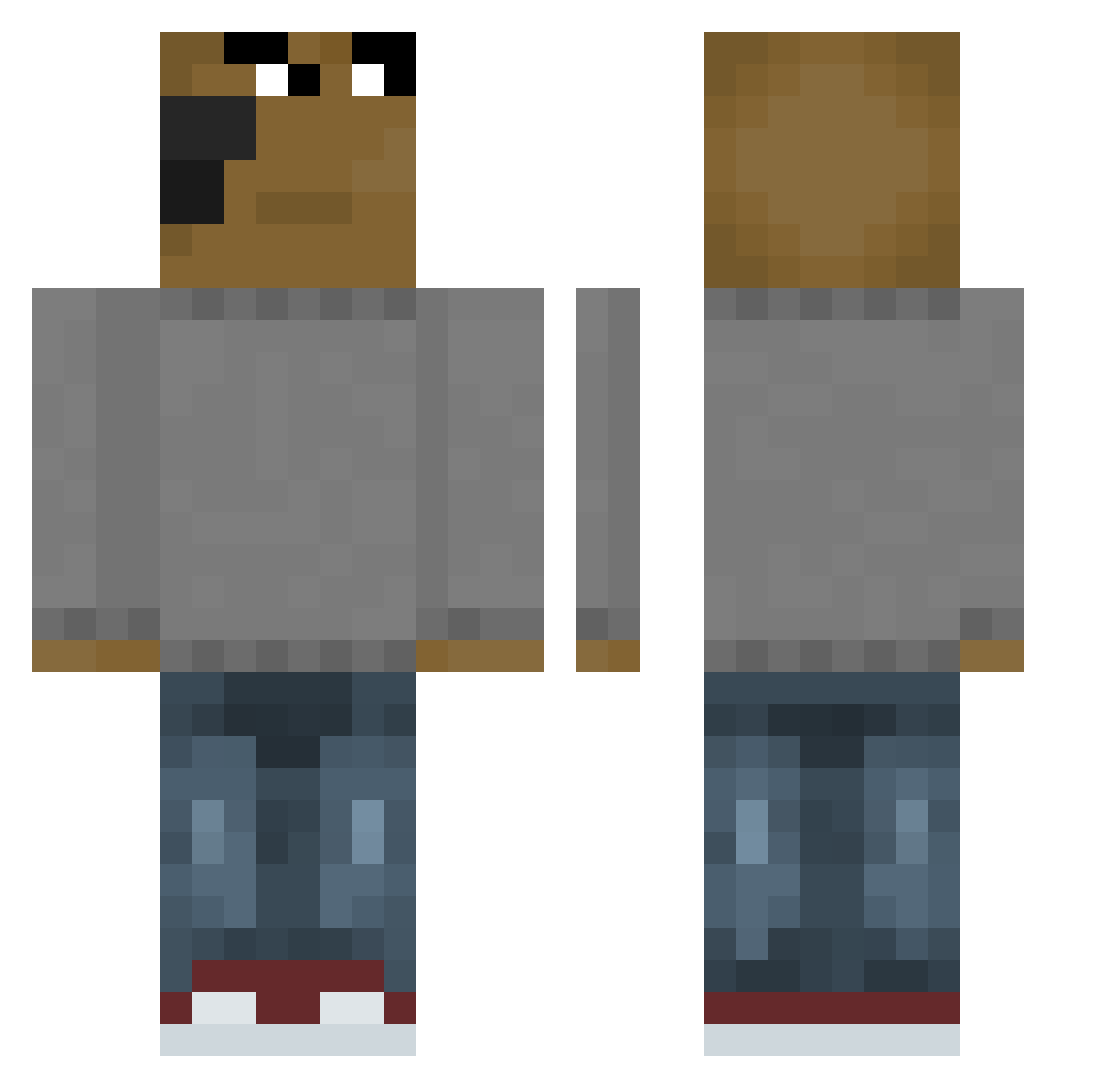
Other players with this skin (658)
casablanca92 was the 280th player we have seen with this skin, first spotted on 13.09.2026. The same skin was seen on these players. Open a nickname to see their current skin and skin history.
 MKkuy123415 Zhiynx anthony0o AriC4 HitmanMatt Trolly_Boi Narchii BigRook00 Maq97 ImGay69 goncho69 FORHOOD Danteadsw VitoRomero NTleDozo INJEOLMI_S2 DerNusnus IceArne Alwexandru AmoerAAA tukav Allpanda3232 H3lH3l DropStickNecron AVIL08 Ancelyse mibib13 kyungwon914 Grybotrong 420Pixel LaverionMine mbellaaa0 Pesto2304 MojangPVP304 vicky412 mqlte999 wggl_pbuQa_1203 niko261974 Noermeel RandomDude528 tna_zZz ForceRichard ILoveEatingRice LVK_Kruz BigKingKong222 Zopre X0T1Cz Ema9 ueberkingg 150Words Sky5818 TETEFF Chill__Guy ParuruDes Chillguy603 Gabs4 xBenn1 JAGUARDEF BestofWisconsin pwqb
How to install the casablanca92 skin
- Press the Download button above to save the skin as a PNG file.
- Minecraft: Bedrock Edition (PE): open the Dressing Room from the main menu (or tap your character → Edit Character), go to Classic Skins → Owned, press the + (new skin) button, choose the downloaded PNG and pick the Classic (Steve) model. Works on PC and mobile; consoles cannot import custom skins.
- Minecraft: Java Edition: open the Minecraft Launcher, go to the Skins tab, click New Skin, load the PNG, pick the Classic (Steve) model and press Save & Use. You can also upload it at minecraft.net → Profile → Change Skin.
The skin does not show up after import - what should I do?
Restart Minecraft and open the Dressing Room again - imported skins sometimes appear only after a restart. Also make sure you selected the imported skin and picked the Classic (Steve) model.
Which model should I choose, Classic or Slim?
This skin is designed for the Classic (Steve) model. If you pick the wrong model, the arms of the skin will look stretched or squeezed.
Is the skin of casablanca92 free to download?
Yes. Press Download, save the PNG file and use it in Minecraft: Bedrock Edition or Java Edition - no payment or registration needed. The skin also works on multiplayer servers and Realms.
More skins
Looking for more? Go back to all Minecraft skins and check the top skins of the week, month and all time, or find any player's skin by nickname.