
bragebarstrand - Minecraft Skins & Skin History
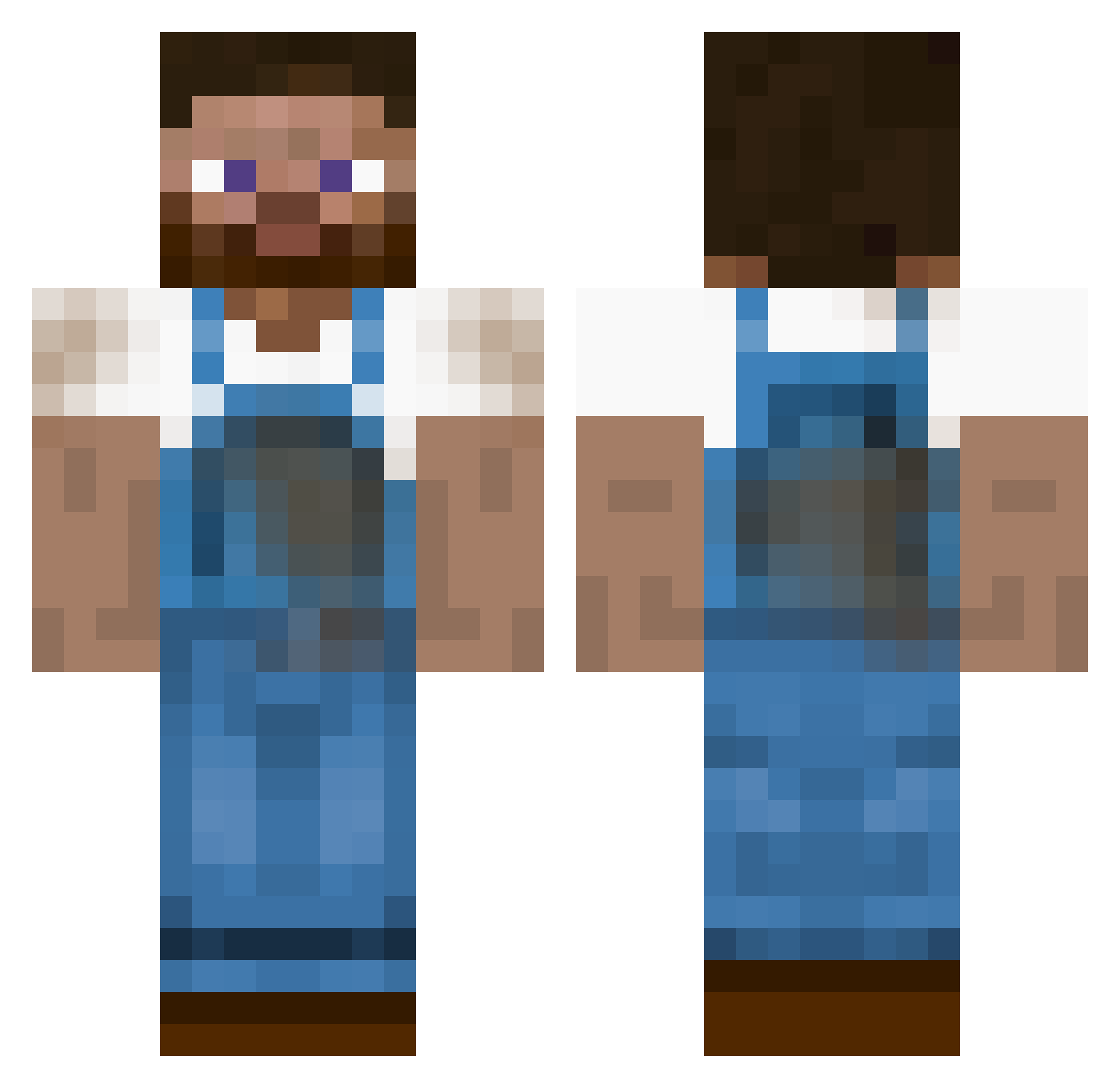
Current Minecraft skin of the player bragebarstrand, loaded from the official Mojang API. Rotate the 3D model with your mouse or finger, then download the skin as a PNG file and use it in Minecraft: Bedrock Edition or Java Edition for free. When bragebarstrand changes their skin, this page updates automatically and the old skin stays in the history below.
Other players with this skin (455)
bragebarstrand was the 55th player we have seen with this skin, first spotted on 08.08.2026. The same skin was seen on these players. Open a nickname to see their current skin and skin history.
 partypete8 lifeisflex DeviousEnemy ZSWilkins Juli_600 Coupes Electricrain Farmer_Lili Eurydices martingo420 3GD TheDiggingBoss kamme202 FarmerBrown97 lgh33 REAPER69 FarmerArlo bricohelico59 Moasterzedt Ruben_2014 mrkaotik BrownDog400 farmerlane15 Machocactus Yembooo Badlemu jacket1221 Gasoma legandaryisaac98 OVB123 suislide1987 PotatoChipJr Standoman benzofou Cheesry patricp40 MikeyMiner2000 technexx SpacyInvader Eddyve70 Metal_Cap Azzymor davethebrave468 Th3Syn Guslagratte BlakeBoy90 Freddi_2k19 TheRustyBanana pattty17 Sir_Chrissi AndyFarmer agaz90 Fixties lillebror2001 eikelol ldob endlessly92 TomDiBoo FS2004 warlord4678
More Farmer Minecraft skins
How to install the bragebarstrand skin
- Press the Download button above to save the skin as a PNG file.
- Minecraft: Bedrock Edition (PE): open the Dressing Room from the main menu (or tap your character → Edit Character), go to Classic Skins → Owned, press the + (new skin) button, choose the downloaded PNG and pick the Classic (Steve) model. Works on PC and mobile; consoles cannot import custom skins.
- Minecraft: Java Edition: open the Minecraft Launcher, go to the Skins tab, click New Skin, load the PNG, pick the Classic (Steve) model and press Save & Use. You can also upload it at minecraft.net → Profile → Change Skin.
The skin does not show up after import - what should I do?
Restart Minecraft and open the Dressing Room again - imported skins sometimes appear only after a restart. Also make sure you selected the imported skin and picked the Classic (Steve) model.
Which model should I choose, Classic or Slim?
This skin is designed for the Classic (Steve) model. If you pick the wrong model, the arms of the skin will look stretched or squeezed.
Is the skin of bragebarstrand free to download?
Yes. Press Download, save the PNG file and use it in Minecraft: Bedrock Edition or Java Edition - no payment or registration needed. The skin also works on multiplayer servers and Realms.
More skins
Looking for more? Go back to all Minecraft skins and check the top skins of the week, month and all time, or find any player's skin by nickname.