
boobee2002 - Minecraft Skins & Skin History
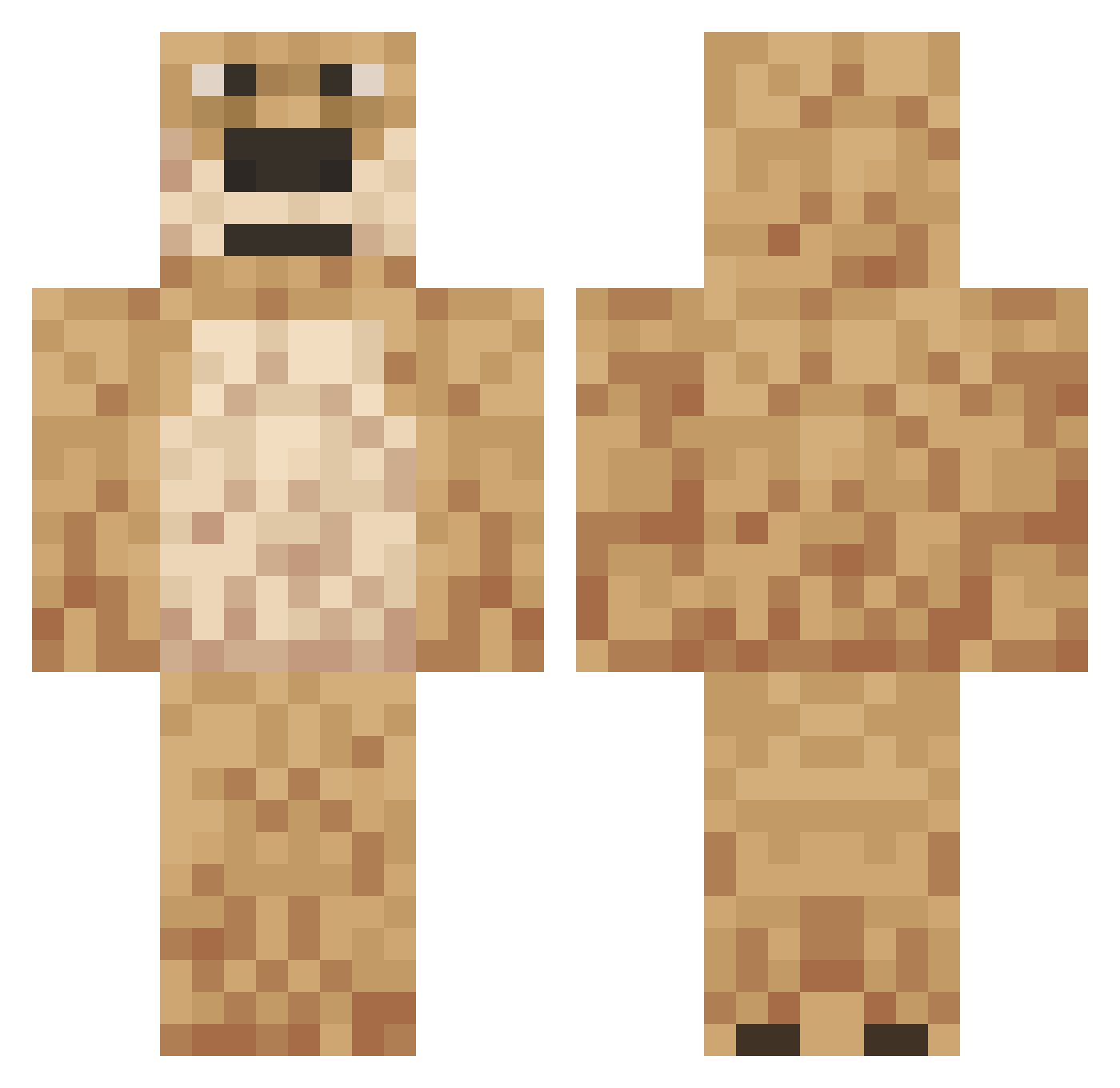
Current Minecraft skin of the player boobee2002, loaded from the official Mojang API. Rotate the 3D model with your mouse or finger, then download the skin as a PNG file and use it in Minecraft: Bedrock Edition or Java Edition for free. When boobee2002 changes their skin, this page updates automatically and the old skin stays in the history below.
Other players with this skin (558)
boobee2002 was the 259th player we have seen with this skin, first spotted on 17.09.2026. The same skin was seen on these players. Open a nickname to see their current skin and skin history.
 K0ggers Natzxy cutekani Thrip Zembiak DaSwagBrotha42 V1tsi Solreom B6ZO Ollaik Dama yunghockey Mike00756 DKEllioot vichouuu77 pork3340 AsainPleav quinn171 lhbbraga _Vardo lolbadlolV67 Gisepy lolbadlolV89 privaterserver billy_cronin Adler000 lolbadlolV91 IdiotManGaming Mordecca Views4Money Sinkameister Andrew3200 4m1n_ smsxl Rubo4K DaddyyyBennnV27 GrubyNews riley_padd avatarcam JordiB23 Digbick12345 esweeks Seb1214 Angerness Jml0 lolbadlolV57 Adam_Mur TheManTHAM Maniac_Necro Cozixyy DaddyBennV18 KFZRSRS HDWC markovca Expulsed Godzlonze JSK1003 NegativeForce dogetheswagger Tobibi99X2
More Talking Ben Minecraft skins
How to install the boobee2002 skin
- Press the Download button above to save the skin as a PNG file.
- Minecraft: Bedrock Edition (PE): open the Dressing Room from the main menu (or tap your character → Edit Character), go to Classic Skins → Owned, press the + (new skin) button, choose the downloaded PNG and pick the Classic (Steve) model. Works on PC and mobile; consoles cannot import custom skins.
- Minecraft: Java Edition: open the Minecraft Launcher, go to the Skins tab, click New Skin, load the PNG, pick the Classic (Steve) model and press Save & Use. You can also upload it at minecraft.net → Profile → Change Skin.
The skin does not show up after import - what should I do?
Restart Minecraft and open the Dressing Room again - imported skins sometimes appear only after a restart. Also make sure you selected the imported skin and picked the Classic (Steve) model.
Which model should I choose, Classic or Slim?
This skin is designed for the Classic (Steve) model. If you pick the wrong model, the arms of the skin will look stretched or squeezed.
Is the skin of boobee2002 free to download?
Yes. Press Download, save the PNG file and use it in Minecraft: Bedrock Edition or Java Edition - no payment or registration needed. The skin also works on multiplayer servers and Realms.
More skins
Looking for more? Go back to all Minecraft skins and check the top skins of the week, month and all time, or find any player's skin by nickname.