
bkwz777 - Minecraft Skins & Skin History
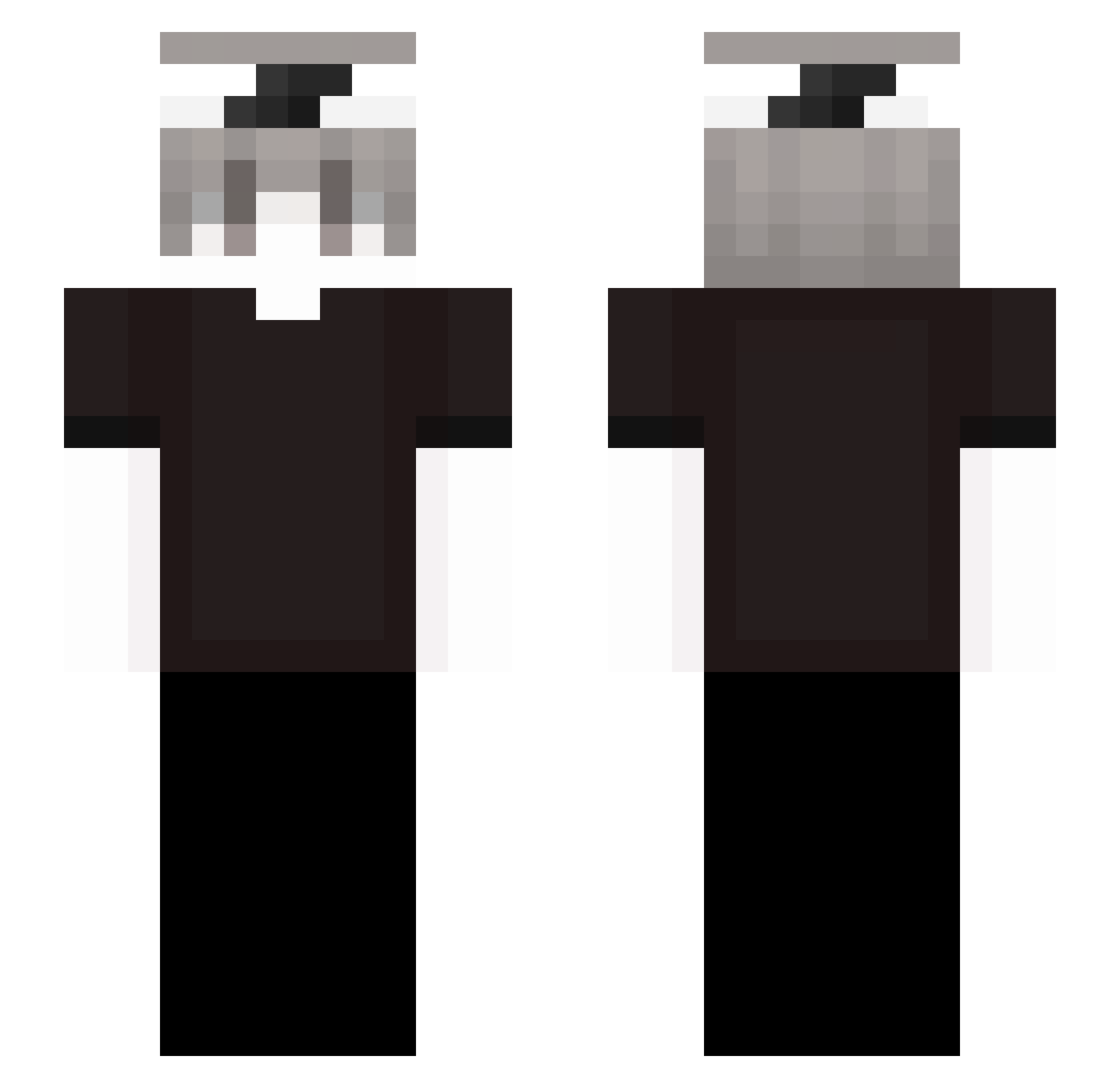
Current Minecraft skin of the player bkwz777, loaded from the official Mojang API. Rotate the 3D model with your mouse or finger, then download the skin as a PNG file and use it in Minecraft: Bedrock Edition or Java Edition for free. When bkwz777 changes their skin, this page updates automatically and the old skin stays in the history below.
Other players with this skin (237)
bkwz777 was the 161st player we have seen with this skin, first spotted on 01.10.2026. The same skin was seen on these players. Open a nickname to see their current skin and skin history.
 TW_MaoTim2024 nyrixx__ FPJ PR3EZES xiaogod623 Itscie Xcalliber97 2Lpiva _zres Gorvette LiveeForever o4erednoe322 FabioPro Shyrexs safhyr_ Nqkp0 metobabaa br5ks Ambition97 iMalicias_ Bidruv8 imbrahiam revoxuaa doktorek4433 wuv3 Ghq InTheNorth_ Achalado Uqded gvxy sreqz iiByel Elyesa1907 Sryu_b iverak BlqssedSaintDior JackQH Its_KanMC Thiago2024 Quanji432 Ter3s MR_BEDWARS1406 KR_mooon waksylink SOWNDWARF998668 flixstar05102010 kaxing Wrexps DEMON8673 bocatti marlonsml awaysera Walt4rBlack Gnitor didje_ xpp321 Linenbow Umeszz ZETTTTTTTTTTTT Zolvos
How to install the bkwz777 skin
- Press the Download button above to save the skin as a PNG file.
- Minecraft: Bedrock Edition (PE): open the Dressing Room from the main menu (or tap your character → Edit Character), go to Classic Skins → Owned, press the + (new skin) button, choose the downloaded PNG and pick the Slim (Alex) model. Works on PC and mobile; consoles cannot import custom skins.
- Minecraft: Java Edition: open the Minecraft Launcher, go to the Skins tab, click New Skin, load the PNG, pick the Slim (Alex) model and press Save & Use. You can also upload it at minecraft.net → Profile → Change Skin.
The skin does not show up after import - what should I do?
Restart Minecraft and open the Dressing Room again - imported skins sometimes appear only after a restart. Also make sure you selected the imported skin and picked the Slim (Alex) model.
Which model should I choose, Classic or Slim?
This skin is designed for the Slim (Alex) model. If you pick the wrong model, the arms of the skin will look stretched or squeezed.
Is the skin of bkwz777 free to download?
Yes. Press Download, save the PNG file and use it in Minecraft: Bedrock Edition or Java Edition - no payment or registration needed. The skin also works on multiplayer servers and Realms.
More skins
Looking for more? Go back to all Minecraft skins and check the top skins of the week, month and all time, or find any player's skin by nickname.