
beeeeez0 - Minecraft Skins & Skin History
Current Minecraft skin of the player beeeeez0, loaded from the official Mojang API. Rotate the 3D model with your mouse or finger, then download the skin as a PNG file and use it in Minecraft: Bedrock Edition or Java Edition for free. When beeeeez0 changes their skin, this page updates automatically and the old skin stays in the history below.
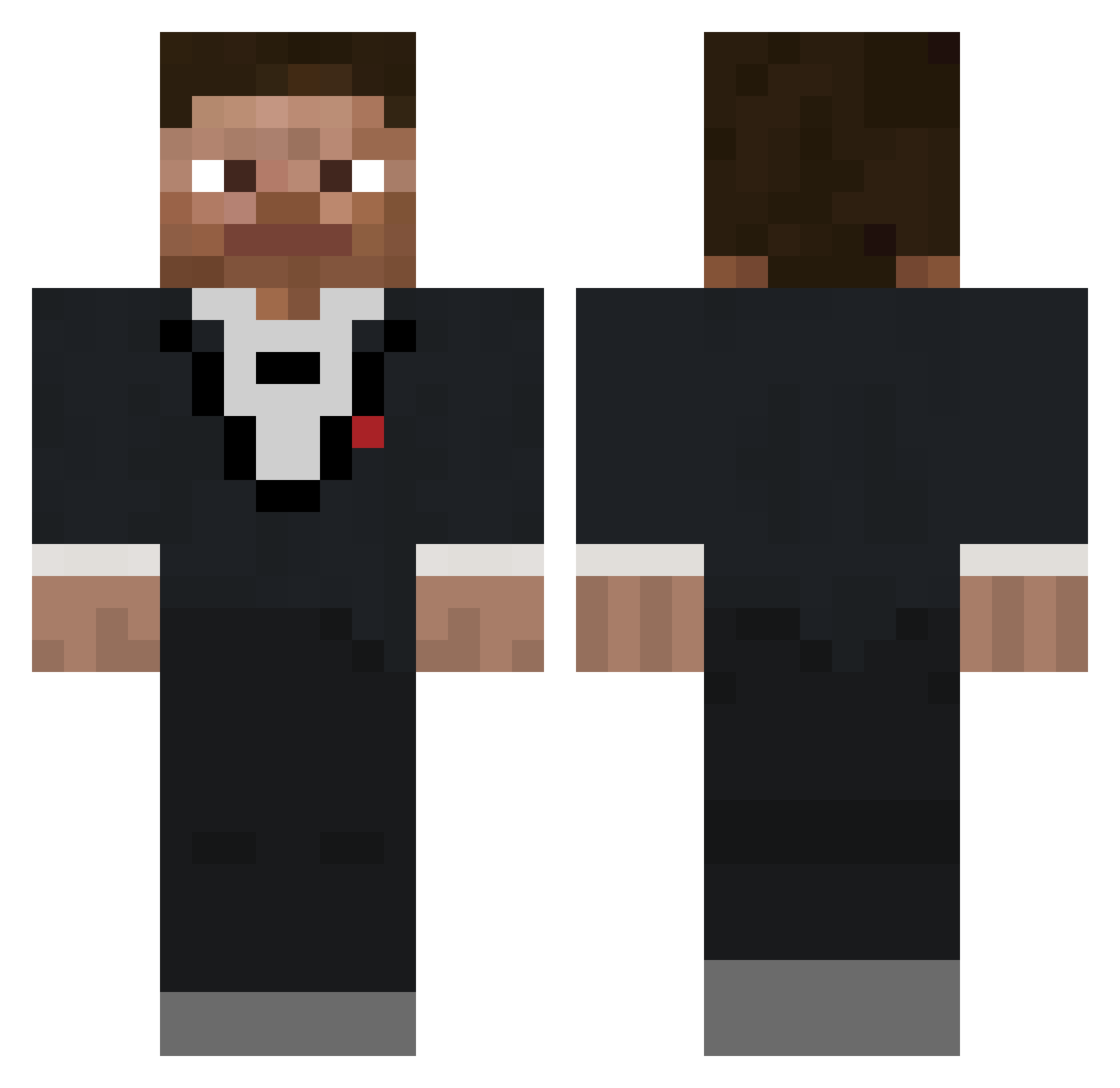
Other players with this skin (687)
beeeeez0 was the 216th player we have seen with this skin, first spotted on 30.08.2026. The same skin was seen on these players. Open a nickname to see their current skin and skin history.
 Aberrant28 spired44
 HIMSEDI _qvy BringThis7712 Ashispog_2006 7cwy moleman159 Avicirez borgareater bubblebazooka Jur Minecrafman2003 Zinbas Jeezy9916 qucaks Bast190 kevnix Kennyde17 Bruhbutton247 johnlacrosse skrollinator moonenic chorippan _bzee CapnMD FrxZ Vump1e mpaczes kylewow17 OLIWIER_TO_GARNE yabo1will m1chael717 Mythico_ Fulyl ndskywalker Motzne Steve_Aidan Gio60antonio OceanMan70 DrFirulais MarioKart8MOGI Itz_Jacoby not_huntxrr TheQwerty256 BruhYouFarted Viper_209
 Zacharyeb17 ItsLindgren BigSaltedToast blockpro333 Ghost1961 shortswimmer23 SneakiestBird80 kirko_chainz_ monkeenthusiast0 alpckayaa yesbroandmaybe szto_za D4rmsito
How to install the beeeeez0 skin
- Press the Download button above to save the skin as a PNG file.
- Minecraft: Bedrock Edition (PE): open the Dressing Room from the main menu (or tap your character → Edit Character), go to Classic Skins → Owned, press the + (new skin) button, choose the downloaded PNG and pick the Classic (Steve) model. Works on PC and mobile; consoles cannot import custom skins.
- Minecraft: Java Edition: open the Minecraft Launcher, go to the Skins tab, click New Skin, load the PNG, pick the Classic (Steve) model and press Save & Use. You can also upload it at minecraft.net → Profile → Change Skin.
The skin does not show up after import - what should I do?
Restart Minecraft and open the Dressing Room again - imported skins sometimes appear only after a restart. Also make sure you selected the imported skin and picked the Classic (Steve) model.
Which model should I choose, Classic or Slim?
This skin is designed for the Classic (Steve) model. If you pick the wrong model, the arms of the skin will look stretched or squeezed.
Is the skin of beeeeez0 free to download?
Yes. Press Download, save the PNG file and use it in Minecraft: Bedrock Edition or Java Edition - no payment or registration needed. The skin also works on multiplayer servers and Realms.
More skins
Looking for more? Go back to all Minecraft skins and check the top skins of the week, month and all time, or find any player's skin by nickname.