
adaliah04 - Minecraft Skins & Skin History
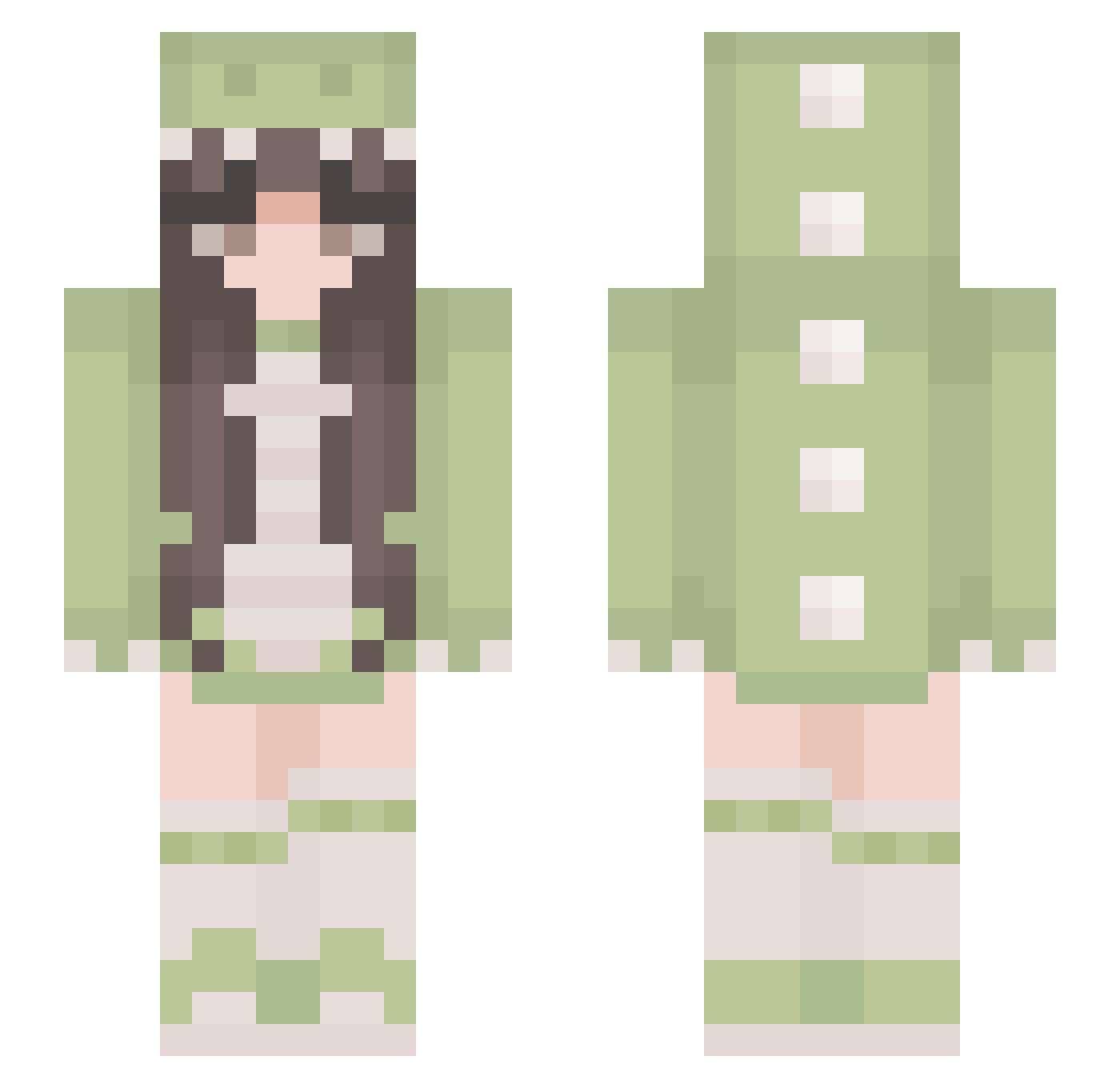
Current Minecraft skin of the player adaliah04, loaded from the official Mojang API. Rotate the 3D model with your mouse or finger, then download the skin as a PNG file and use it in Minecraft: Bedrock Edition or Java Edition for free. When adaliah04 changes their skin, this page updates automatically and the old skin stays in the history below.
Other players with this skin (384)
adaliah04 was the 385th player we have seen with this skin, first spotted on 31.10.2026. The same skin was seen on these players. Open a nickname to see their current skin and skin history.
 NaN347 zzynbe KatiKat428 Mochii_77 Simp_Violence minq1210 Sparkelhen1234 JustGiu bustychic101 Bluberry_Muffin Erika240106 mang017 ChattyMinly LOVE_RB Mosquitoesss EdgeChaos saraalb Jessxoxo44 _LittleRayy_ Eternal_Rosey EpicGirl20704 Violet_lulu xSuprr_ Hzlaa Davinky66 ruby_rosey MisleadSummer Dianita_ Lord_Nunni lezeuq Bbno__ Mobai_ME shinian113 turtletomato RCYing7010 pandasolis ray2911 addieeee04 Novaxx21 jopock13 Cipul15 luvchans2 LoafHeart Arkasza laaabo Yas16b Annime024 Nadelblatt HoneyIcedTeaaaaa hyeoniiiii yyy_3 ikumiiiiii LilPunkyBoi bellerose59 PepitaLuna15 Ykm_21 afejis chickenpieee Shelby_2540 denimpark
More Pastel Minecraft skins
How to install the adaliah04 skin
- Press the Download button above to save the skin as a PNG file.
- Minecraft: Bedrock Edition (PE): open the Dressing Room from the main menu (or tap your character → Edit Character), go to Classic Skins → Owned, press the + (new skin) button, choose the downloaded PNG and pick the Slim (Alex) model. Works on PC and mobile; consoles cannot import custom skins.
- Minecraft: Java Edition: open the Minecraft Launcher, go to the Skins tab, click New Skin, load the PNG, pick the Slim (Alex) model and press Save & Use. You can also upload it at minecraft.net → Profile → Change Skin.
The skin does not show up after import - what should I do?
Restart Minecraft and open the Dressing Room again - imported skins sometimes appear only after a restart. Also make sure you selected the imported skin and picked the Slim (Alex) model.
Which model should I choose, Classic or Slim?
This skin is designed for the Slim (Alex) model. If you pick the wrong model, the arms of the skin will look stretched or squeezed.
Is the skin of adaliah04 free to download?
Yes. Press Download, save the PNG file and use it in Minecraft: Bedrock Edition or Java Edition - no payment or registration needed. The skin also works on multiplayer servers and Realms.
More skins
Looking for more? Go back to all Minecraft skins and check the top skins of the week, month and all time, or find any player's skin by nickname.