
__Artyx__ - Minecraft Skins & Skin History
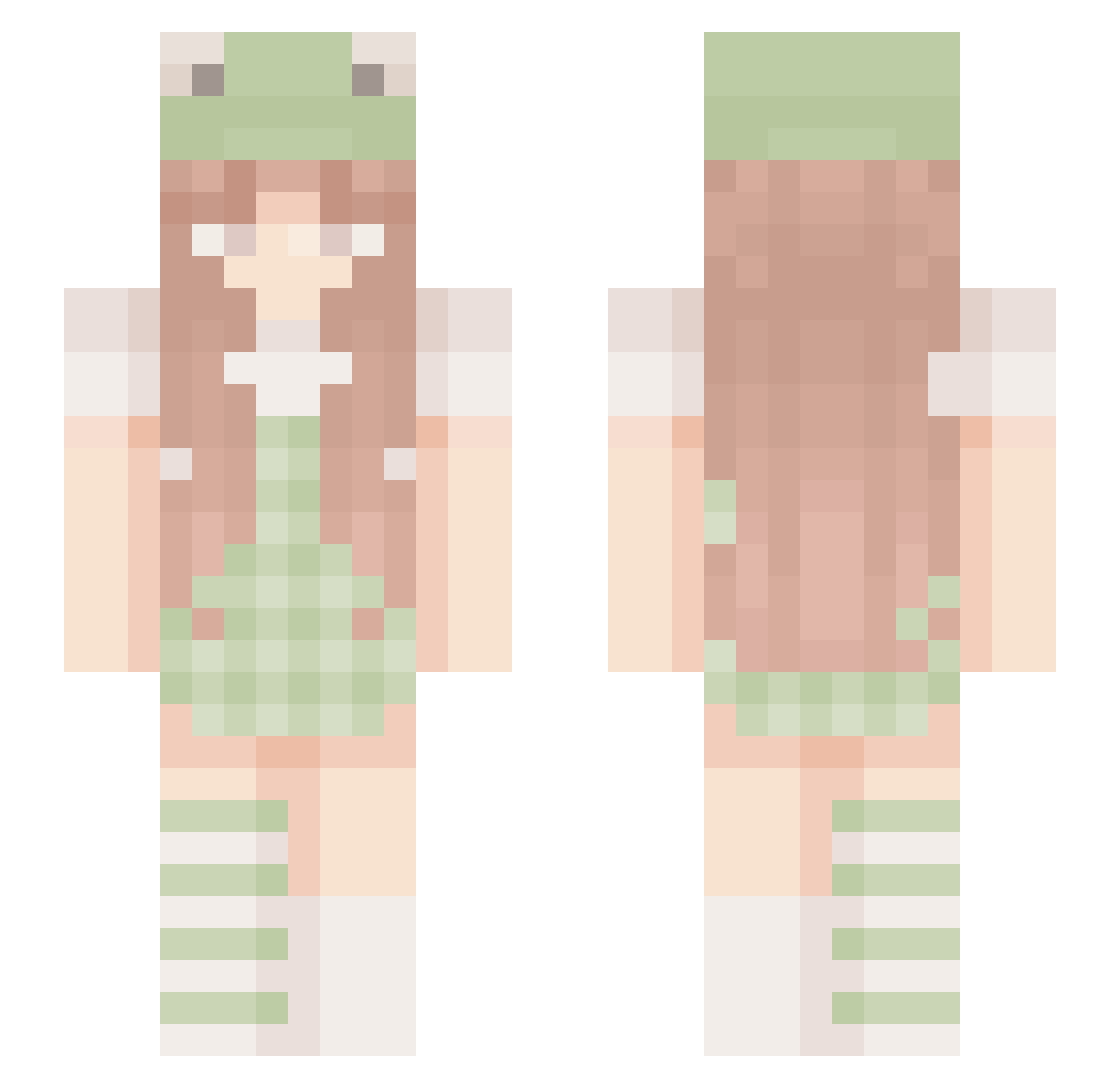
Current Minecraft skin of the player __Artyx__, loaded from the official Mojang API. Rotate the 3D model with your mouse or finger, then download the skin as a PNG file and use it in Minecraft: Bedrock Edition or Java Edition for free. When __Artyx__ changes their skin, this page updates automatically and the old skin stays in the history below.
Other players with this skin (202)
__Artyx__ was the 99th player we have seen with this skin, first spotted on 15.09.2026. The same skin was seen on these players. Open a nickname to see their current skin and skin history.
 MaxShild Asahi0923 yu_jin_1101 meganheartfilia quimo_ KittyIndia hotdemongirl kiwijoghurt stevesnare PubaLeanne jonesbug26 Frrog RioCalmo TbhGianna JuIie enerii shisunagi faerie7 snflkes curlywurly2054 shay_00 mhzzng BeatriceGreene ningen_1324 crystic_ Oabe sabina9690 XxRAISExX SixtyShadesOfGay ronnieraisin Eneruku khuwuii NaonA2010 strawbrrryfrog Shi_nai_nai Sweet_Carolina emwooo0 Yuzu_una microwavve YESI23AKABANG CreaiSuperFan sheeshaforlife iamshybean LoveStephyBear neecxle MilkPrincess Aylinoo froggytunes_ YYUKK MagicPheonix HumanThingo JikiDoll Fr0ggOoOO hallehaga softPeachy nootellea LifelongSloth Hanka3001 avopeanut airy52
More Frog Hat Minecraft skins
How to install the __Artyx__ skin
- Press the Download button above to save the skin as a PNG file.
- Minecraft: Bedrock Edition (PE): open the Dressing Room from the main menu (or tap your character → Edit Character), go to Classic Skins → Owned, press the + (new skin) button, choose the downloaded PNG and pick the Slim (Alex) model. Works on PC and mobile; consoles cannot import custom skins.
- Minecraft: Java Edition: open the Minecraft Launcher, go to the Skins tab, click New Skin, load the PNG, pick the Slim (Alex) model and press Save & Use. You can also upload it at minecraft.net → Profile → Change Skin.
The skin does not show up after import - what should I do?
Restart Minecraft and open the Dressing Room again - imported skins sometimes appear only after a restart. Also make sure you selected the imported skin and picked the Slim (Alex) model.
Which model should I choose, Classic or Slim?
This skin is designed for the Slim (Alex) model. If you pick the wrong model, the arms of the skin will look stretched or squeezed.
Is the skin of __Artyx__ free to download?
Yes. Press Download, save the PNG file and use it in Minecraft: Bedrock Edition or Java Edition - no payment or registration needed. The skin also works on multiplayer servers and Realms.
More skins
Looking for more? Go back to all Minecraft skins and check the top skins of the week, month and all time, or find any player's skin by nickname.