
_JJDAWG_ - Minecraft Skins & Skin History
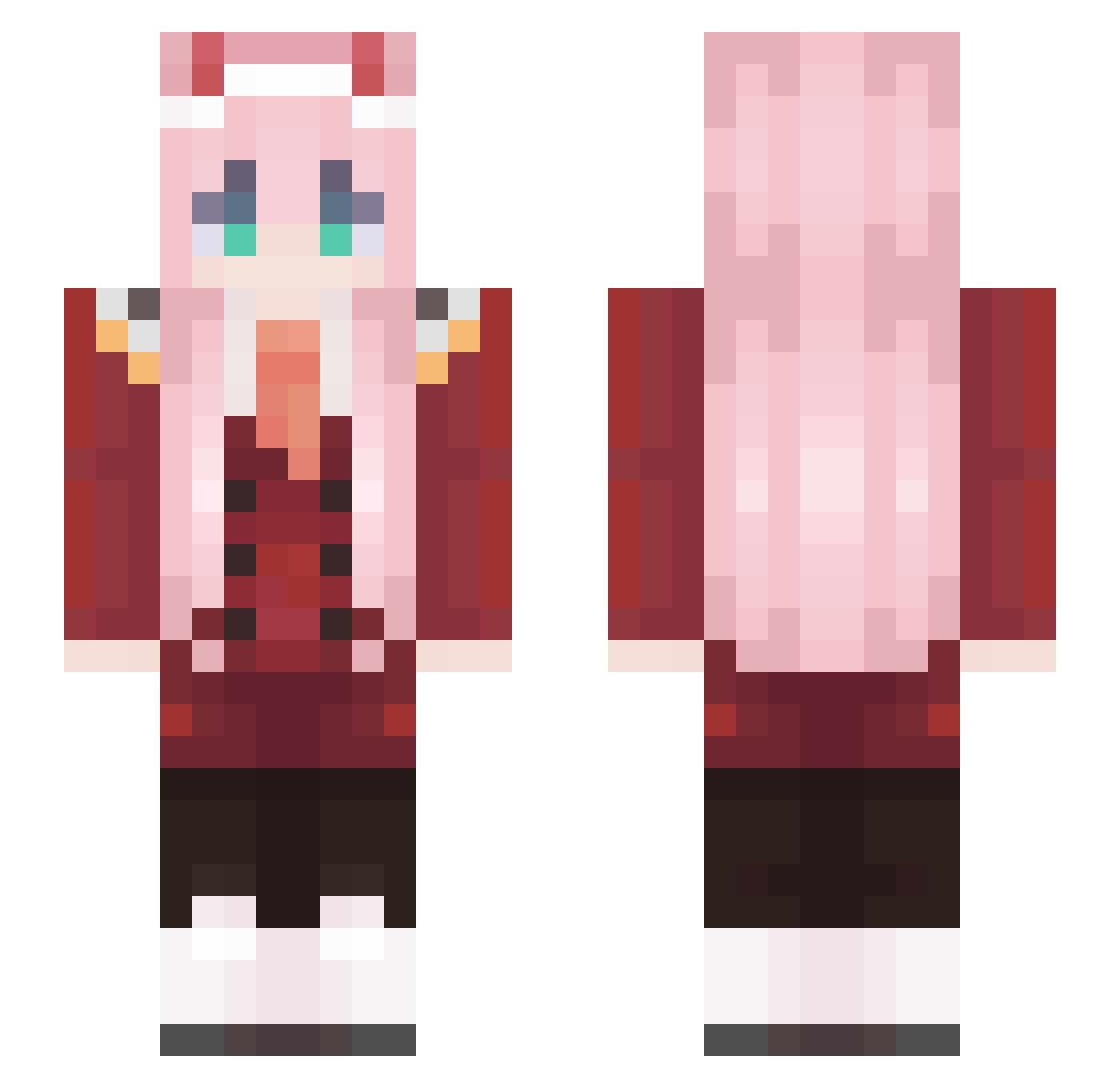
Current Minecraft skin of the player _JJDAWG_, loaded from the official Mojang API. Rotate the 3D model with your mouse or finger, then download the skin as a PNG file and use it in Minecraft: Bedrock Edition or Java Edition for free. When _JJDAWG_ changes their skin, this page updates automatically and the old skin stays in the history below.
Other players with this skin (493)
_JJDAWG_ was the 30th player we have seen with this skin, first spotted on 29.07.2026. The same skin was seen on these players. Open a nickname to see their current skin and skin history.
 liuciukas bubbasforever Willyy713 meliodiii mchenn ikasanmi The_Scogginator VulpesMalum IridescentGalaxy AliceHung evopowers Hopa3 PykeVibesTD3 AntekGaming26 BalaHong Cebupicca Jebini gzbde Mumuee ASN00 Pmax99 davidkingO9 yia0719 Cucky2k Kinggamja EQWQW Nejcpujsek932 rashiBEN Peric mrsyrex LibertyAngel MeiD_ __Aerials zerotwoshawty Hersom_TV2 REAtiik JustThatGuy24 ShParrk wuziwuu
 ImSelwin JavaPotatoX godspeedchen DGRC Mark40020 fuasss Dualiii7627 Cabytro McCleanDan Nathoooo Hammard13 franrosave ZulFall_ Neskes cracksbtw ZeroTwo9002 XiaokongHua mintvery GAAAART troll8246 Miallure
More Zero Two Minecraft skins
How to install the _JJDAWG_ skin
- Press the Download button above to save the skin as a PNG file.
- Minecraft: Bedrock Edition (PE): open the Dressing Room from the main menu (or tap your character → Edit Character), go to Classic Skins → Owned, press the + (new skin) button, choose the downloaded PNG and pick the Slim (Alex) model. Works on PC and mobile; consoles cannot import custom skins.
- Minecraft: Java Edition: open the Minecraft Launcher, go to the Skins tab, click New Skin, load the PNG, pick the Slim (Alex) model and press Save & Use. You can also upload it at minecraft.net → Profile → Change Skin.
The skin does not show up after import - what should I do?
Restart Minecraft and open the Dressing Room again - imported skins sometimes appear only after a restart. Also make sure you selected the imported skin and picked the Slim (Alex) model.
Which model should I choose, Classic or Slim?
This skin is designed for the Slim (Alex) model. If you pick the wrong model, the arms of the skin will look stretched or squeezed.
Is the skin of _JJDAWG_ free to download?
Yes. Press Download, save the PNG file and use it in Minecraft: Bedrock Edition or Java Edition - no payment or registration needed. The skin also works on multiplayer servers and Realms.
More skins
Looking for more? Go back to all Minecraft skins and check the top skins of the week, month and all time, or find any player's skin by nickname.