
ZeroRequiem20 - Minecraft Skins & Skin History
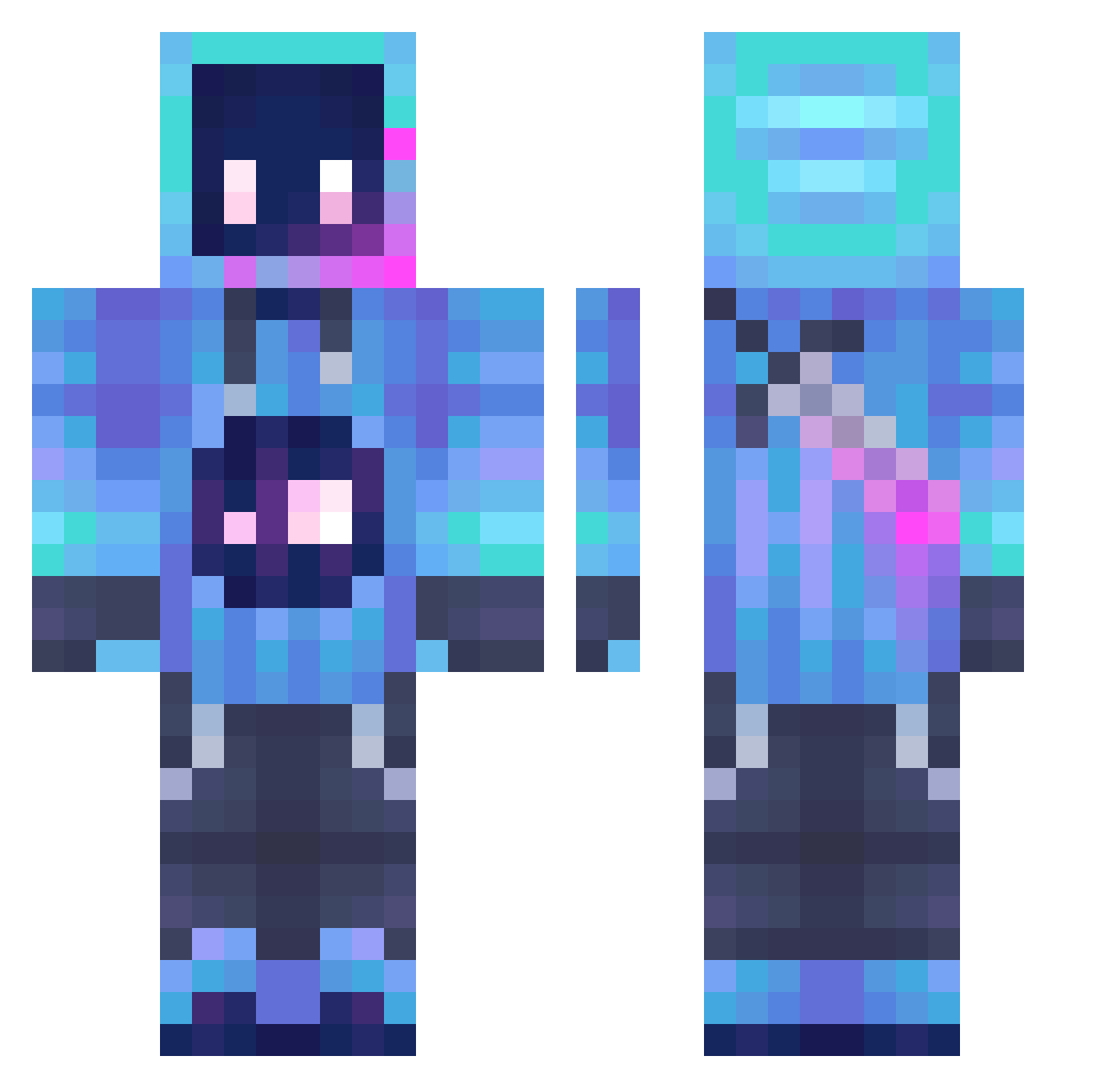
Current Minecraft skin of the player ZeroRequiem20, loaded from the official Mojang API. Rotate the 3D model with your mouse or finger, then download the skin as a PNG file and use it in Minecraft: Bedrock Edition or Java Edition for free. When ZeroRequiem20 changes their skin, this page updates automatically and the old skin stays in the history below.
Other players with this skin (1289)
ZeroRequiem20 was the 47th player we have seen with this skin, first spotted on 27.07.2026. The same skin was seen on these players. Open a nickname to see their current skin and skin history.
 MMADDOGGGG terrysetf0212 Lauiiro_5ui
 Just_That_Oneguy pikachu439 RicetTomy SneekZied Minghasty azok21 NU2 CGP27 ColtonZ71 EeveeGalaxy mu__so Byfarg MrWooood29 TotalChad csc0704 SpellBinder7 KOKOdadada Shvethy stoustou RebornRabbit EternalLighting luisilloillo StrikerMMK adada81 MONEY0506 Tygo12O MGW0001 jsorpc closerll Hazardvz Grulle DiduPioter adamixx192 fightfreezer NellieBean615 Chesscrafted lilo27murilo RncGinger HiImCorrupted Paflik137 Kong_Rim Puk3ko Duanga WCCPLAYER Shanen646 minerboyjj raydenwen MirZS MaD_x_Sparky DjParka Welioz Yahya353315 Ender_death07 Mr_mafia1 MK_Nonsense_ Zunaxx sonicpro1
More Sword Minecraft skins
How to install the ZeroRequiem20 skin
- Press the Download button above to save the skin as a PNG file.
- Minecraft: Bedrock Edition (PE): open the Dressing Room from the main menu (or tap your character → Edit Character), go to Classic Skins → Owned, press the + (new skin) button, choose the downloaded PNG and pick the Classic (Steve) model. Works on PC and mobile; consoles cannot import custom skins.
- Minecraft: Java Edition: open the Minecraft Launcher, go to the Skins tab, click New Skin, load the PNG, pick the Classic (Steve) model and press Save & Use. You can also upload it at minecraft.net → Profile → Change Skin.
The skin does not show up after import - what should I do?
Restart Minecraft and open the Dressing Room again - imported skins sometimes appear only after a restart. Also make sure you selected the imported skin and picked the Classic (Steve) model.
Which model should I choose, Classic or Slim?
This skin is designed for the Classic (Steve) model. If you pick the wrong model, the arms of the skin will look stretched or squeezed.
Is the skin of ZeroRequiem20 free to download?
Yes. Press Download, save the PNG file and use it in Minecraft: Bedrock Edition or Java Edition - no payment or registration needed. The skin also works on multiplayer servers and Realms.
More skins
Looking for more? Go back to all Minecraft skins and check the top skins of the week, month and all time, or find any player's skin by nickname.