
Zaten_ - Minecraft Skins & Skin History
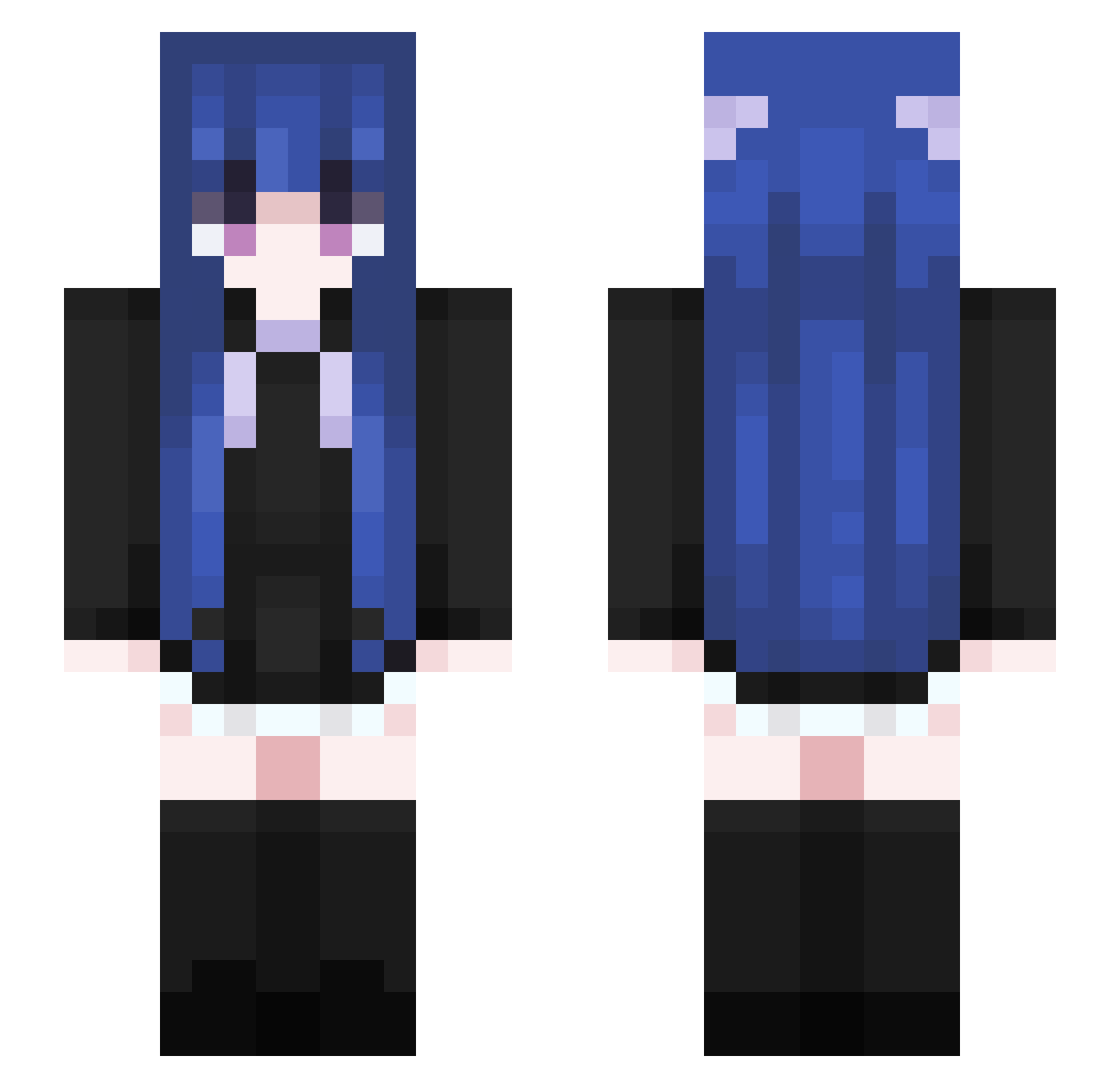
Current Minecraft skin of the player Zaten_, loaded from the official Mojang API. Rotate the 3D model with your mouse or finger, then download the skin as a PNG file and use it in Minecraft: Bedrock Edition or Java Edition for free. When Zaten_ changes their skin, this page updates automatically and the old skin stays in the history below.
Other players with this skin (460)
Zaten_ was the 48th player we have seen with this skin, first spotted on 01.08.2026. The same skin was seen on these players. Open a nickname to see their current skin and skin history.
 chuhanxing xiaoniaoai vSsU812 godwind2004 chaeyun_ Misia955 taffysuki maryjanejeje kracuvo Vinty_a Wantrain kiilin Jilblue Xiao_V_Ya zu7451 Ather_Mo Yleven BoyTickler QWqinwang Werther7 Scarl1rd xiao_jue13 zhengzhou toolazy1234 usizz ilkaim HXShun_ Hrnikrxm Bragancinha Maceg0d ziDuggan unikun666 liao3093 131_048 KYHDLS_ Ansgar712 Cherr_yichao cccdc Mandeok_0315 KartoffelGen0136 yue413 Bambes georgecr2766 eGoogleALT
 rourou333 HanSanZai AnnaJarvis Edwin039 Vxxdo Jackeylove366 Ksushka yaiaet Dragonsmoon SweetY_Meet Haien65 61106 Asakiew EtherealQing P1nkBerry sssg213
More Goth Minecraft skins
How to install the Zaten_ skin
- Press the Download button above to save the skin as a PNG file.
- Minecraft: Bedrock Edition (PE): open the Dressing Room from the main menu (or tap your character → Edit Character), go to Classic Skins → Owned, press the + (new skin) button, choose the downloaded PNG and pick the Slim (Alex) model. Works on PC and mobile; consoles cannot import custom skins.
- Minecraft: Java Edition: open the Minecraft Launcher, go to the Skins tab, click New Skin, load the PNG, pick the Slim (Alex) model and press Save & Use. You can also upload it at minecraft.net → Profile → Change Skin.
The skin does not show up after import - what should I do?
Restart Minecraft and open the Dressing Room again - imported skins sometimes appear only after a restart. Also make sure you selected the imported skin and picked the Slim (Alex) model.
Which model should I choose, Classic or Slim?
This skin is designed for the Slim (Alex) model. If you pick the wrong model, the arms of the skin will look stretched or squeezed.
Is the skin of Zaten_ free to download?
Yes. Press Download, save the PNG file and use it in Minecraft: Bedrock Edition or Java Edition - no payment or registration needed. The skin also works on multiplayer servers and Realms.
More skins
Looking for more? Go back to all Minecraft skins and check the top skins of the week, month and all time, or find any player's skin by nickname.