
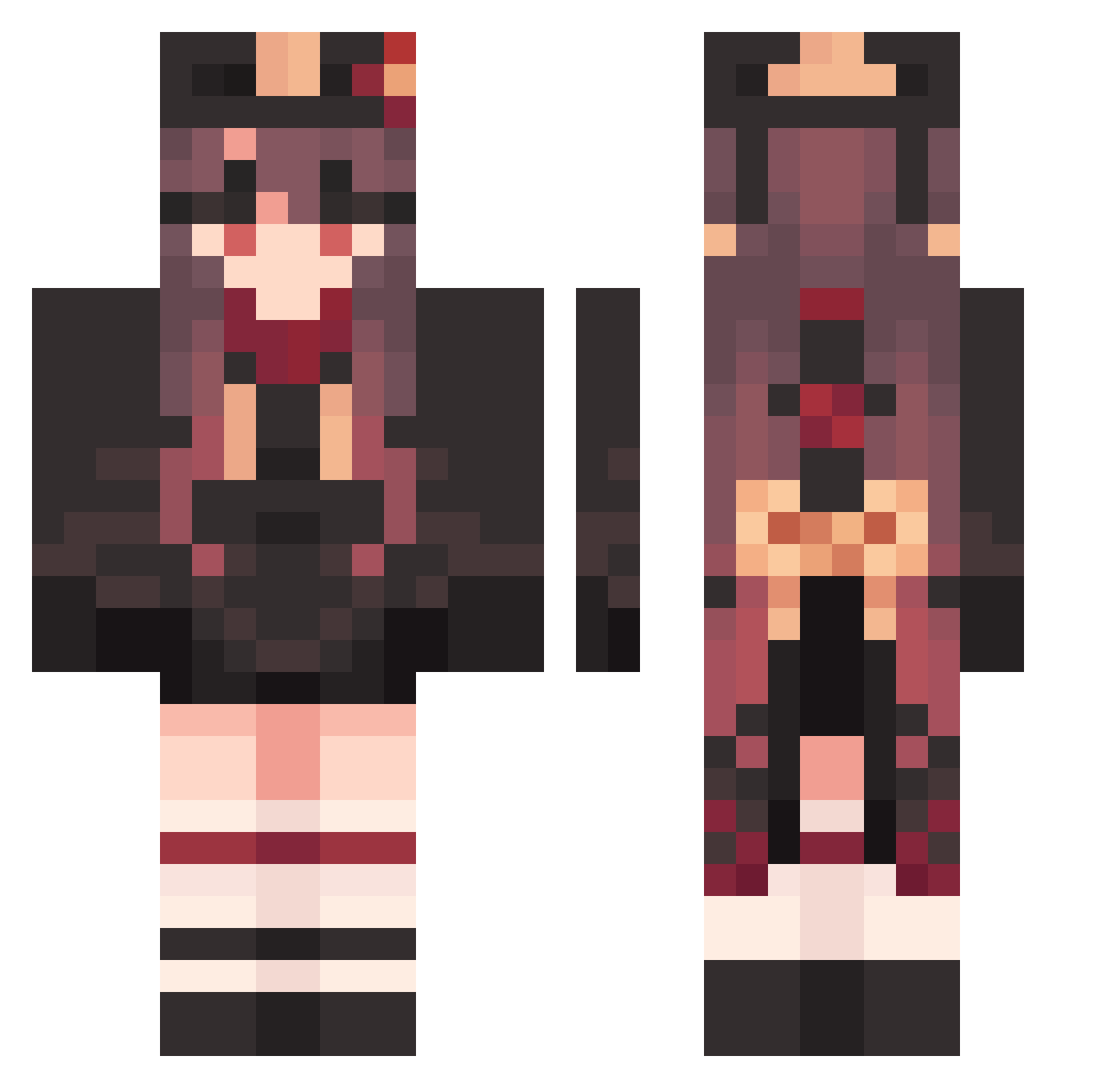
Current Minecraft skin of the player YzB619, loaded from the official Mojang API. Rotate the 3D model with your mouse or finger, then download the skin as a PNG file and use it in Minecraft: Bedrock Edition or Java Edition for free. When YzB619 changes their skin, this page updates automatically and the old skin stays in the history below.
Other players with this skin (1215)
YzB619 was the 1006th player we have seen with this skin, first spotted on 06.10.2026. The same skin was seen on these players. Open a nickname to see their current skin and skin history.
 Hutao_DmPNyvH158 MaterialFoamy184 hiroshimu2 Hutao_aIzVYtE404 pinkpunkRobster nesama LazyOverrated800 GracefulRural135 nkA394 ClearStraight879 PetitePainful756 MounRagE LovingIll942 YeoTaeju bebe0000 Kanaki HardForegoing419 honookaaa GrotesqueDark998 mingangseo NNDefdanik ZWG551 Hutao_BBSssiL987 StrongUseless879 abgeschieden NyaShinn TranquilSolid342 sIA43 Hutao_QMNexMR456 GratefulNimble52 ian900724 xYb536 SpottyAmazing853 HelplessYummy252 WholePowerful161 Yukino02_ Hutao_ZjDEDhv380 SAWODEX BlackAcoustic475 Hutao_NJTEOiF989 KentFC Hutao_CthVUyi692 TheRiverCR SteepBlushing951 AEUGHG Hutao_JrhJKFr720 NkP746 wwRAIN vanoant RobustTedious808 SuperVarious771 FineAdaptable129 Hutao_GBQaLsU796 BizarreSecond792 Hutao_uGx355 PillockSidePanda Korean_Ne4d suysama Ai_Tao_ Akary13
More Hu Tao Minecraft skins
How to install the YzB619 skin
- Press the Download button above to save the skin as a PNG file.
- Minecraft: Bedrock Edition (PE): open the Dressing Room from the main menu (or tap your character → Edit Character), go to Classic Skins → Owned, press the + (new skin) button, choose the downloaded PNG and pick the Classic (Steve) model. Works on PC and mobile; consoles cannot import custom skins.
- Minecraft: Java Edition: open the Minecraft Launcher, go to the Skins tab, click New Skin, load the PNG, pick the Classic (Steve) model and press Save & Use. You can also upload it at minecraft.net → Profile → Change Skin.
The skin does not show up after import - what should I do?
Restart Minecraft and open the Dressing Room again - imported skins sometimes appear only after a restart. Also make sure you selected the imported skin and picked the Classic (Steve) model.
Which model should I choose, Classic or Slim?
This skin is designed for the Classic (Steve) model. If you pick the wrong model, the arms of the skin will look stretched or squeezed.
Is the skin of YzB619 free to download?
Yes. Press Download, save the PNG file and use it in Minecraft: Bedrock Edition or Java Edition - no payment or registration needed. The skin also works on multiplayer servers and Realms.
More skins
Looking for more? Go back to all Minecraft skins and check the top skins of the week, month and all time, or find any player's skin by nickname.