
YoJann - Minecraft Skins & Skin History
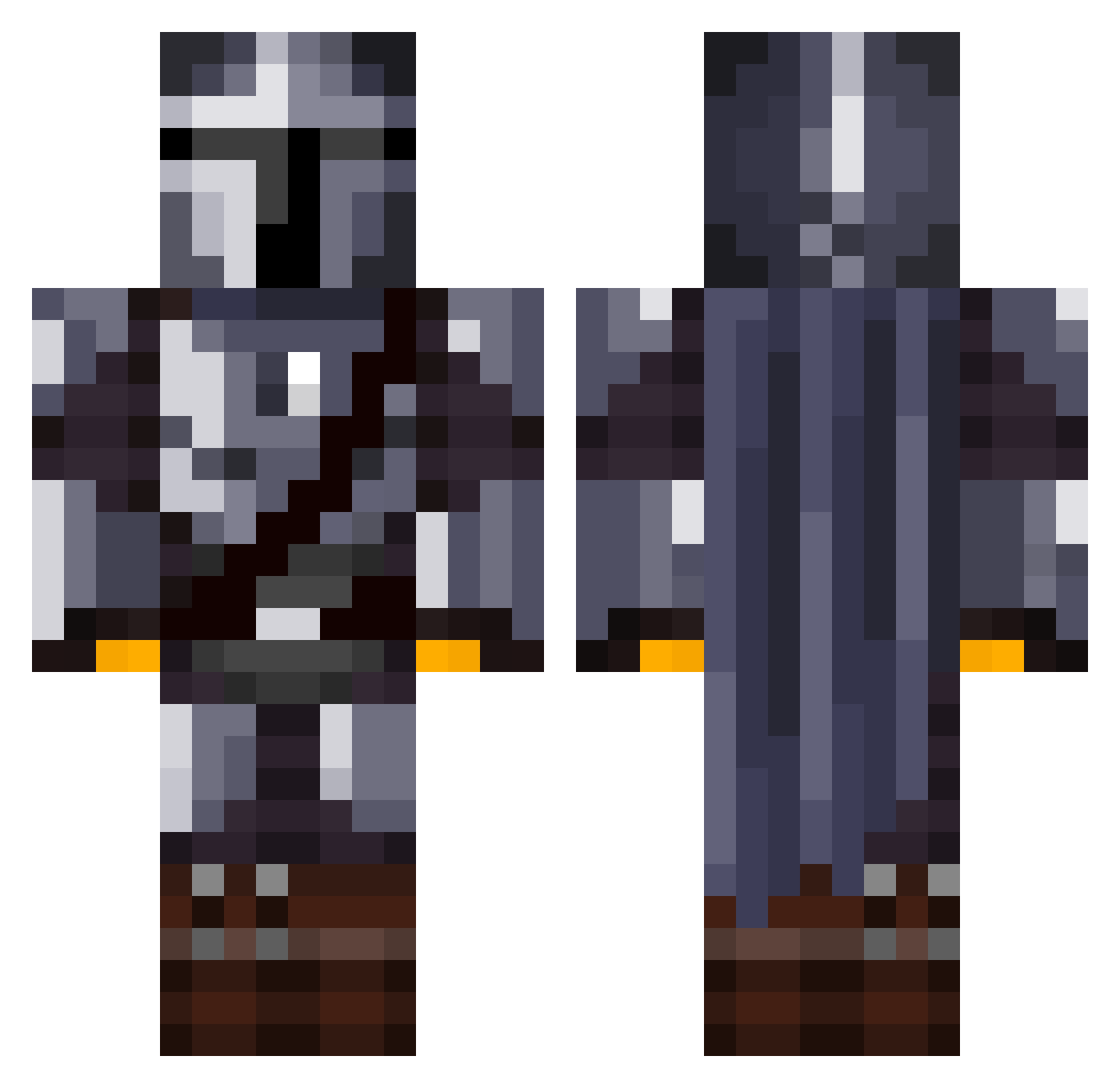
Current Minecraft skin of the player YoJann, loaded from the official Mojang API. Rotate the 3D model with your mouse or finger, then download the skin as a PNG file and use it in Minecraft: Bedrock Edition or Java Edition for free. When YoJann changes their skin, this page updates automatically and the old skin stays in the history below.
Other players with this skin (1082)
YoJann was the 51st player we have seen with this skin, first spotted on 28.07.2026. The same skin was seen on these players. Open a nickname to see their current skin and skin history.
 snipermonkee3000 TitanLink SniperhunterX Venus_Guardian BigDankChocolate Heinkess BackpackDog Herb402 Oishiiiii didierpredator creakyhips Derkaaa_x SunwithAGun chalajrc Dragoncrafter337 SultanOfStylin LuisEduardo117 CMO_2000 Asti36912 Uncle_Scrungus CharlieF5 Dalsoo19 pluntje RawrDawg69 Ozvaldez Lil_Langnek pmcg94 Sidon97 BruceAlm1ghty stargem18 Grinnsira wasesauchkostet TheDevilsLawyer Llurd benmitra CallumMac DarthPagett114 Ompiks ToddyTeddy Enmiyu jobuddyman Mitt_ DanialD4 sktopdrilla Jomar055 AkaniLive Gallon0 epelpaj Kahbeleth sqizzy Block_Man234 Gunman_87 ZanySim Jxhnne _Ogin_ pinkpanther997 pathomak Kalash7012 ALEX_02XD PopTheSmokes
More The Mandalorian Minecraft skins
See all 527 The Mandalorian skins
How to install the YoJann skin
- Press the Download button above to save the skin as a PNG file.
- Minecraft: Bedrock Edition (PE): open the Dressing Room from the main menu (or tap your character → Edit Character), go to Classic Skins → Owned, press the + (new skin) button, choose the downloaded PNG and pick the Classic (Steve) model. Works on PC and mobile; consoles cannot import custom skins.
- Minecraft: Java Edition: open the Minecraft Launcher, go to the Skins tab, click New Skin, load the PNG, pick the Classic (Steve) model and press Save & Use. You can also upload it at minecraft.net → Profile → Change Skin.
The skin does not show up after import - what should I do?
Restart Minecraft and open the Dressing Room again - imported skins sometimes appear only after a restart. Also make sure you selected the imported skin and picked the Classic (Steve) model.
Which model should I choose, Classic or Slim?
This skin is designed for the Classic (Steve) model. If you pick the wrong model, the arms of the skin will look stretched or squeezed.
Is the skin of YoJann free to download?
Yes. Press Download, save the PNG file and use it in Minecraft: Bedrock Edition or Java Edition - no payment or registration needed. The skin also works on multiplayer servers and Realms.
More skins
Looking for more? Go back to all Minecraft skins and check the top skins of the week, month and all time, or find any player's skin by nickname.