
YYYYYOU - Minecraft Skins & Skin History
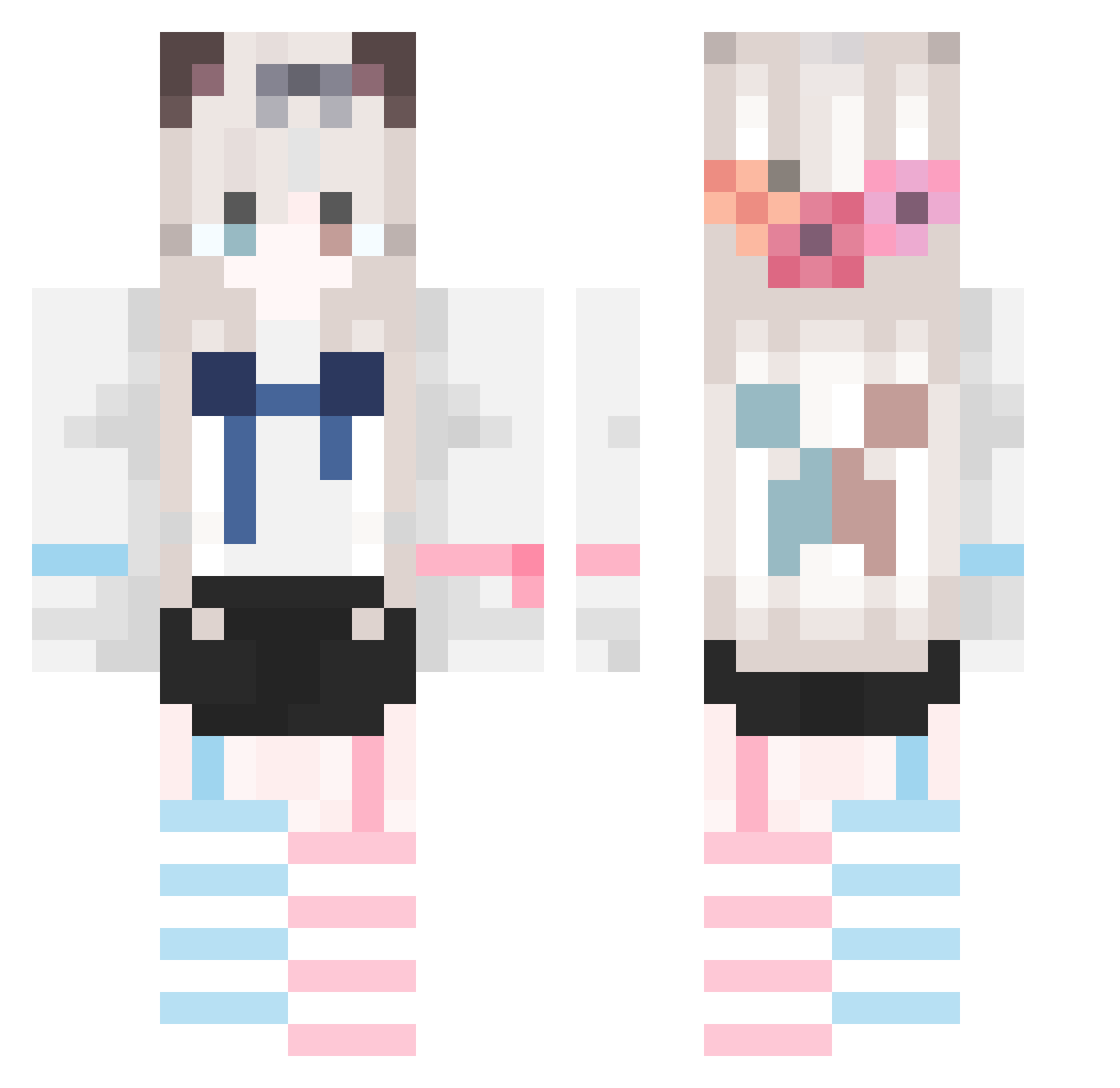
Current Minecraft skin of the player YYYYYOU, loaded from the official Mojang API. Rotate the 3D model with your mouse or finger, then download the skin as a PNG file and use it in Minecraft: Bedrock Edition or Java Edition for free. When YYYYYOU changes their skin, this page updates automatically and the old skin stays in the history below.
Other players with this skin (747)
YYYYYOU was the 336th player we have seen with this skin, first spotted on 16.09.2026. The same skin was seen on these players. Open a nickname to see their current skin and skin history.
 AemOVO liuhua2336 mengxingchen321 Yi_Lulu Dawn_77_ skrns YLC1014 timxxxu Flashandfish bon_fen EUMEJO shuibuzhao regression730 Yukarili siqing520 Doctarop luocha199 lingchen147 mengyousama zhenxun998 Yoimiya114 ZJXSXZ zhulin123 zxs137 4stral ultra_89 xunxun123 He_Hu battlefries SIYEEN w3309516794 741f KimmyXYC wenhao2012 whenst Ex_chong WhitePiao Minecraft_HanYu wlym233 Sakurasign_ flower_turkey LYayi Mu_Jun Threepan2850 xhrm123 U_Uzzzzz HeqingRE DrumcxDE gzhi QIANC0NG loumo233 NINGx2_ tjx123456 feifei_up bananammb Azurewroth lin0520 TheCatNana LPFHS Thuink
More Cat Ears Minecraft skins
How to install the YYYYYOU skin
- Press the Download button above to save the skin as a PNG file.
- Minecraft: Bedrock Edition (PE): open the Dressing Room from the main menu (or tap your character → Edit Character), go to Classic Skins → Owned, press the + (new skin) button, choose the downloaded PNG and pick the Classic (Steve) model. Works on PC and mobile; consoles cannot import custom skins.
- Minecraft: Java Edition: open the Minecraft Launcher, go to the Skins tab, click New Skin, load the PNG, pick the Classic (Steve) model and press Save & Use. You can also upload it at minecraft.net → Profile → Change Skin.
The skin does not show up after import - what should I do?
Restart Minecraft and open the Dressing Room again - imported skins sometimes appear only after a restart. Also make sure you selected the imported skin and picked the Classic (Steve) model.
Which model should I choose, Classic or Slim?
This skin is designed for the Classic (Steve) model. If you pick the wrong model, the arms of the skin will look stretched or squeezed.
Is the skin of YYYYYOU free to download?
Yes. Press Download, save the PNG file and use it in Minecraft: Bedrock Edition or Java Edition - no payment or registration needed. The skin also works on multiplayer servers and Realms.
More skins
Looking for more? Go back to all Minecraft skins and check the top skins of the week, month and all time, or find any player's skin by nickname.