
Wurst321 - Minecraft Skins & Skin History
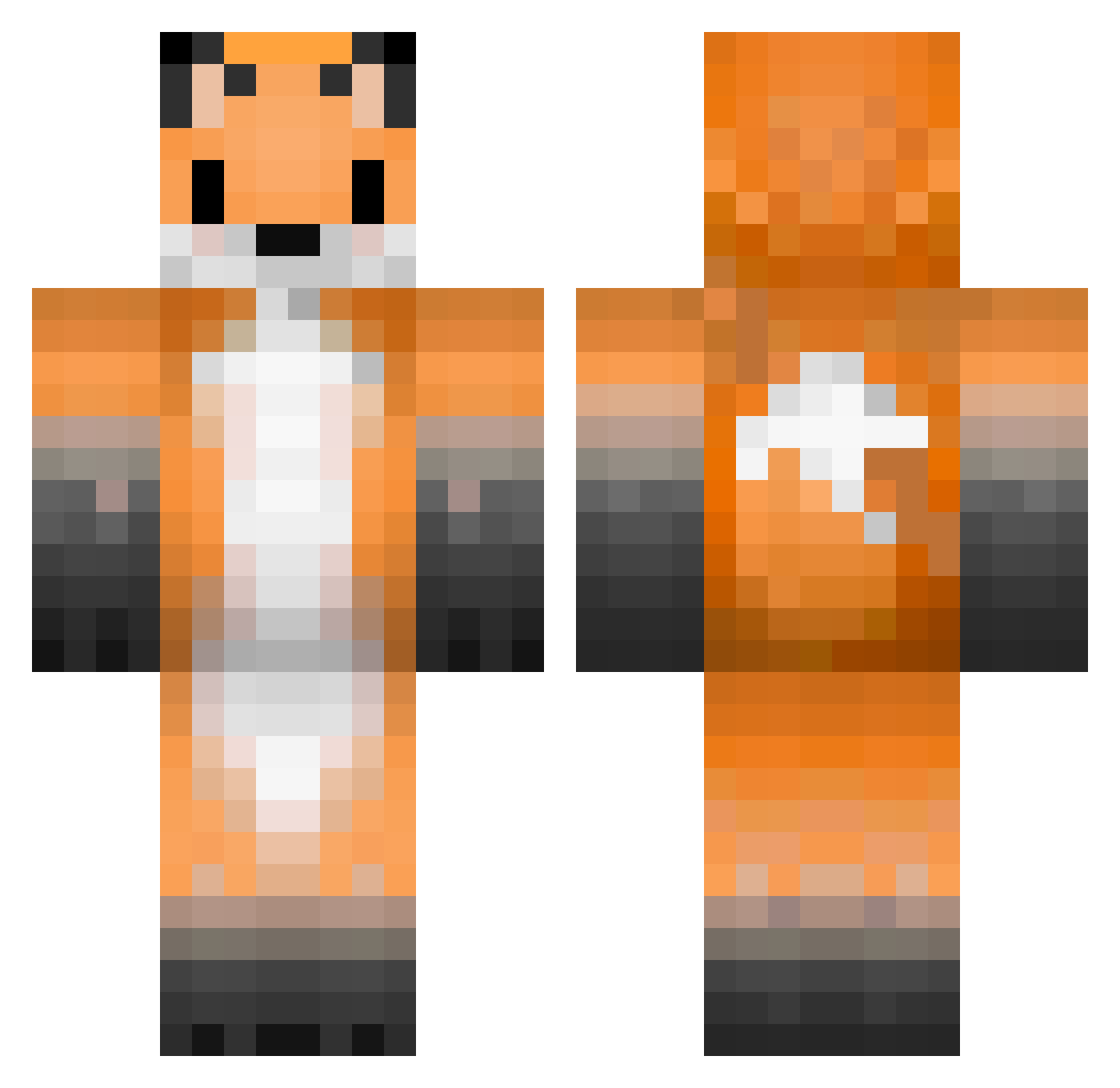
Current Minecraft skin of the player Wurst321, loaded from the official Mojang API. Rotate the 3D model with your mouse or finger, then download the skin as a PNG file and use it in Minecraft: Bedrock Edition or Java Edition for free. When Wurst321 changes their skin, this page updates automatically and the old skin stays in the history below.
Other players with this skin (336)
Wurst321 was the 86th player we have seen with this skin, first spotted on 22.08.2026. The same skin was seen on these players. Open a nickname to see their current skin and skin history.
 Luck3_Z0ura_570 AngellusMiles Magdalencjusz via_h mbbaddy nessa2204 Andrei_ro_Andrei KarlosElSerio shani602 jujublub AkuSukaMelon _auroraa Stoff_Tier Skylar_Cryost pululusa Lutierre _Eyko JdsFr noevlin xKit_Kat
 Robinmoussant Sutsuj2007 youngvicegrip KroxyRu Gooner91 DemonSoldier00 anmu1109 _9071_ DzabiDz furry_foxy BonesPawprint ShadowNyxx Syndicate_fox Berryy ArtsyFoxy gaymerfux _V0TY_ 0Zozokill0 Renardgoup TangentFox
 kelvingularte12 Fright49 Myrchar Mt_Fox Sato_Shine vandalik StepSis_gal Clerlc slimerkkj Vaarefev26 eurghh Seafoxlrt616 Foxyk24 Muffinz47 Fox_Come_10 raccon421 NieIts VulpesRueppellii LilyBean_22 Moster1335
More Animal Ears Minecraft skins
See all 1061 Animal Ears skins
How to install the Wurst321 skin
- Press the Download button above to save the skin as a PNG file.
- Minecraft: Bedrock Edition (PE): open the Dressing Room from the main menu (or tap your character → Edit Character), go to Classic Skins → Owned, press the + (new skin) button, choose the downloaded PNG and pick the Classic (Steve) model. Works on PC and mobile; consoles cannot import custom skins.
- Minecraft: Java Edition: open the Minecraft Launcher, go to the Skins tab, click New Skin, load the PNG, pick the Classic (Steve) model and press Save & Use. You can also upload it at minecraft.net → Profile → Change Skin.
The skin does not show up after import - what should I do?
Restart Minecraft and open the Dressing Room again - imported skins sometimes appear only after a restart. Also make sure you selected the imported skin and picked the Classic (Steve) model.
Which model should I choose, Classic or Slim?
This skin is designed for the Classic (Steve) model. If you pick the wrong model, the arms of the skin will look stretched or squeezed.
Is the skin of Wurst321 free to download?
Yes. Press Download, save the PNG file and use it in Minecraft: Bedrock Edition or Java Edition - no payment or registration needed. The skin also works on multiplayer servers and Realms.
More skins
Looking for more? Go back to all Minecraft skins and check the top skins of the week, month and all time, or find any player's skin by nickname.