
William4606 - Minecraft Skins & Skin History
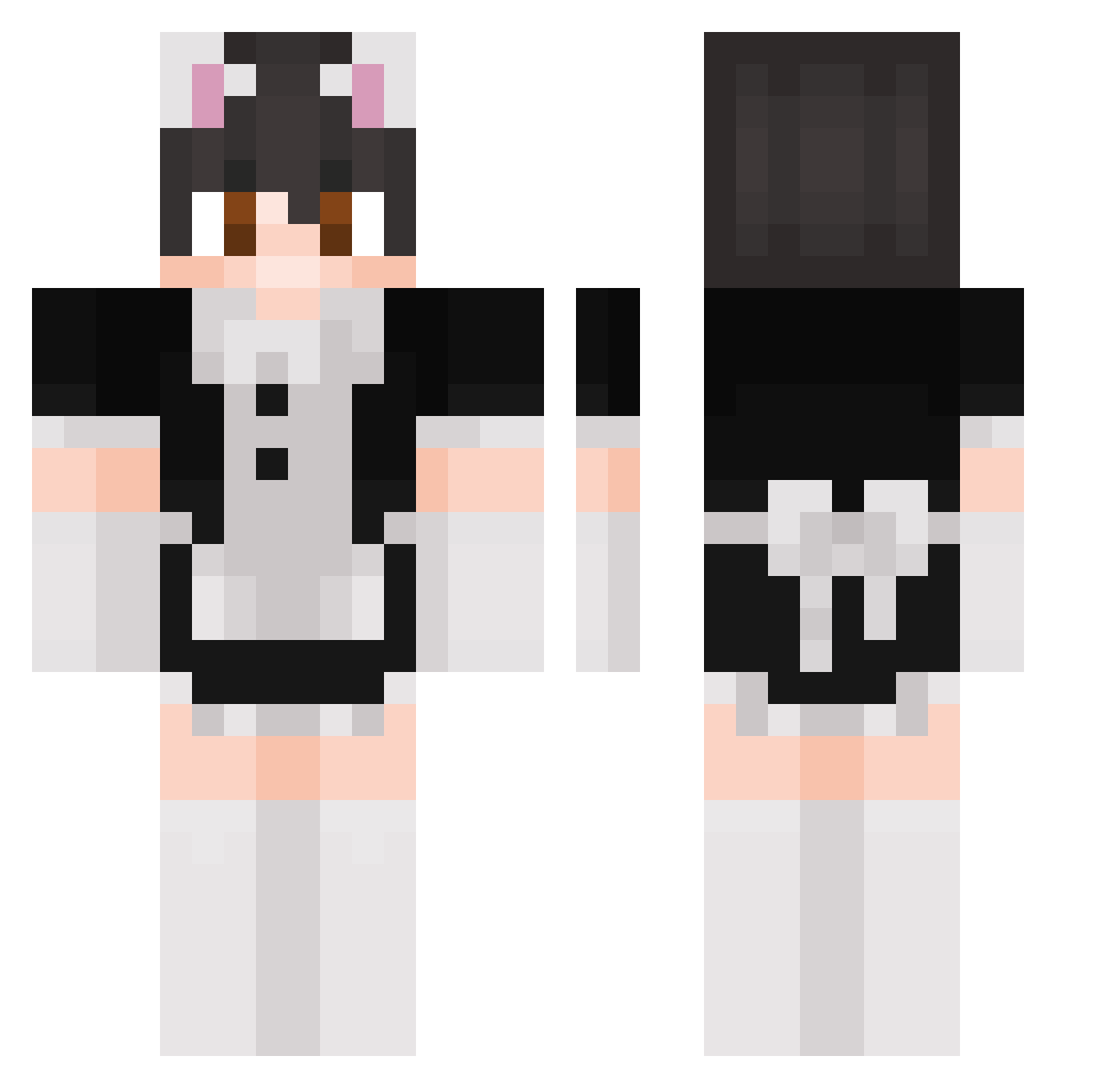
Current Minecraft skin of the player William4606, loaded from the official Mojang API. Rotate the 3D model with your mouse or finger, then download the skin as a PNG file and use it in Minecraft: Bedrock Edition or Java Edition for free. When William4606 changes their skin, this page updates automatically and the old skin stays in the history below.
Other players with this skin (82)
William4606 was the 35th player we have seen with this skin, first spotted on 01.09.2026. The same skin was seen on these players. Open a nickname to see their current skin and skin history.
 valkoinenmies DarlingPE Davidd429 Agrela Essa404 Jamedog79 Nand0uu NexiGaming22 Niffler4U
 Mr_Pickle3 ThisKid500_2 listennonyou Tiagolhito Ionfra
 CheDani Tidalgru BigFL0ppa_1337 snarflesss Drascow gunsndollar W_H_Y_Y DDD1P
 OreoOtter wkrp Daninsano51 zuzix2115 DrJackShephard love356 Juluch
 noahle FettnerTheKing HangmoY K0llixer WhiteTiger1912 Emirk52 yuumi_princess
 Adam_T13 VitozIsGreat 00Timmy dejvtouba Vasuthon Dark724 gothrought britq
 MoonlightCM_ hakhag67 Tomino331 TOMILANDIA YARENATOR
 makf12 Xuan_919
 DragonKing_MC509
 DuncanNoDonuts xJadoek H40505 Jtzoxx yougooboo12345 SayMeTTs
 Eliasnf_ Shammerr
More Maid Outfit Minecraft skins
How to install the William4606 skin
- Press the Download button above to save the skin as a PNG file.
- Minecraft: Bedrock Edition (PE): open the Dressing Room from the main menu (or tap your character → Edit Character), go to Classic Skins → Owned, press the + (new skin) button, choose the downloaded PNG and pick the Classic (Steve) model. Works on PC and mobile; consoles cannot import custom skins.
- Minecraft: Java Edition: open the Minecraft Launcher, go to the Skins tab, click New Skin, load the PNG, pick the Classic (Steve) model and press Save & Use. You can also upload it at minecraft.net → Profile → Change Skin.
The skin does not show up after import - what should I do?
Restart Minecraft and open the Dressing Room again - imported skins sometimes appear only after a restart. Also make sure you selected the imported skin and picked the Classic (Steve) model.
Which model should I choose, Classic or Slim?
This skin is designed for the Classic (Steve) model. If you pick the wrong model, the arms of the skin will look stretched or squeezed.
Is the skin of William4606 free to download?
Yes. Press Download, save the PNG file and use it in Minecraft: Bedrock Edition or Java Edition - no payment or registration needed. The skin also works on multiplayer servers and Realms.
More skins
Looking for more? Go back to all Minecraft skins and check the top skins of the week, month and all time, or find any player's skin by nickname.