
WaxArt - Minecraft Skins & Skin History
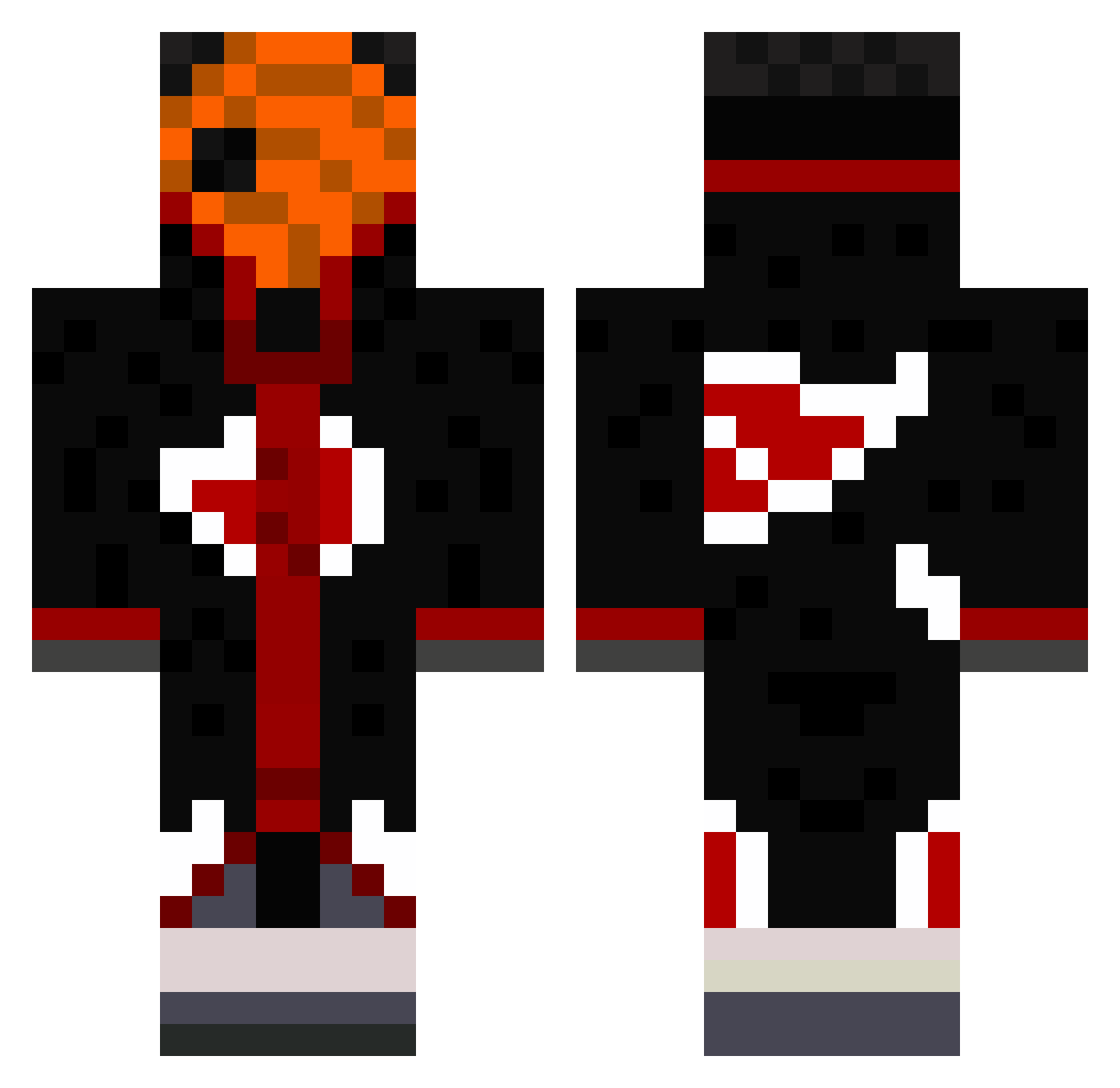
Current Minecraft skin of the player WaxArt, loaded from the official Mojang API. Rotate the 3D model with your mouse or finger, then download the skin as a PNG file and use it in Minecraft: Bedrock Edition or Java Edition for free. When WaxArt changes their skin, this page updates automatically and the old skin stays in the history below.
Other players with this skin (490)
WaxArt was the 145th player we have seen with this skin, first spotted on 28.08.2026. The same skin was seen on these players. Open a nickname to see their current skin and skin history.
 Luke_Picker Wavery Beerus2157 LeferGold MCBroO111 TobiElCrak Sloth322 BrayHeM iRushTrees LittleCelso iRatatosk HemmeDk SaltyNic k9das123 MindfangMarilu Arcxi_Ario DankChem lucalucajm Griffith_Hawk cthulhu155 Majestic_03 MineralCola sneezay_ risket0 Niruka_V2 Emkkkkk Cano005 RainbowKiller54 Killnay StarDemen CRIINK Bobinou_ NiglarBalls SpicySergio20 Felipin7654 JzillaD JayTDoggzoneIII herr_daddyy NoupeX 13Sen37 AlexBds1 Dreycko AbyssTobi Kai_sh1239 NightBuilder Shadow_Person11 Ech0l0cal Liquid00 Kamayuko tizz781 Astrowes Mohsen200620 Tzicox Ayranjy haarigespony jimmythedon Overose Miracle_Delta_YT ViniciusLima188 Dammriss
More Obito Uchiha Minecraft skins
See all 171 Obito Uchiha skins
How to install the WaxArt skin
- Press the Download button above to save the skin as a PNG file.
- Minecraft: Bedrock Edition (PE): open the Dressing Room from the main menu (or tap your character → Edit Character), go to Classic Skins → Owned, press the + (new skin) button, choose the downloaded PNG and pick the Classic (Steve) model. Works on PC and mobile; consoles cannot import custom skins.
- Minecraft: Java Edition: open the Minecraft Launcher, go to the Skins tab, click New Skin, load the PNG, pick the Classic (Steve) model and press Save & Use. You can also upload it at minecraft.net → Profile → Change Skin.
The skin does not show up after import - what should I do?
Restart Minecraft and open the Dressing Room again - imported skins sometimes appear only after a restart. Also make sure you selected the imported skin and picked the Classic (Steve) model.
Which model should I choose, Classic or Slim?
This skin is designed for the Classic (Steve) model. If you pick the wrong model, the arms of the skin will look stretched or squeezed.
Is the skin of WaxArt free to download?
Yes. Press Download, save the PNG file and use it in Minecraft: Bedrock Edition or Java Edition - no payment or registration needed. The skin also works on multiplayer servers and Realms.
More skins
Looking for more? Go back to all Minecraft skins and check the top skins of the week, month and all time, or find any player's skin by nickname.