
Walshy114 - Minecraft Skins & Skin History
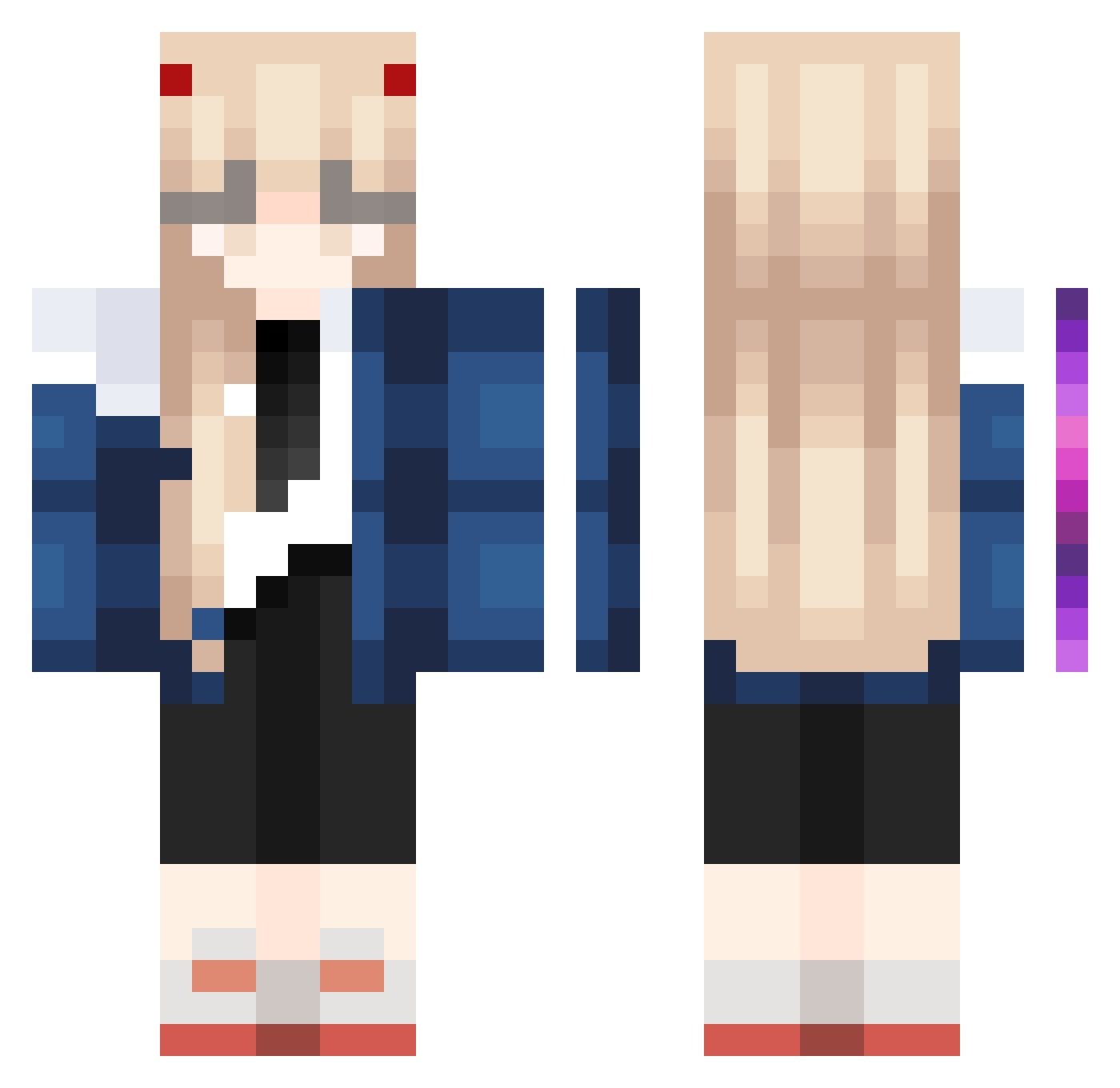
Current Minecraft skin of the player Walshy114, loaded from the official Mojang API. Rotate the 3D model with your mouse or finger, then download the skin as a PNG file and use it in Minecraft: Bedrock Edition or Java Edition for free. When Walshy114 changes their skin, this page updates automatically and the old skin stays in the history below.
Other players with this skin (1172)
Walshy114 was the 1141st player we have seen with this skin, first spotted on 15.11.2026. The same skin was seen on these players. Open a nickname to see their current skin and skin history.
 suyoung28 doxel_archive wbnmrcx ohmrubyjane maikizzz GoDotb Buttcrevice kabansakasama okratgirl CH0HKUS OwanyneO zValeryx OutrunMyGunn XuanyuLi lsunnnn puppycat_a Drale15 x54dbdx EM0tional69 ItsYayaK conocon3o DearHibiki TomoCat42 ian1996 VincentandCat Xloya Minight_au I048 SrSanti420 King9ni1 FlexRoler OakenMango30723 lenoa211 kou1203 Ayeal Friedfish61 Bel0125 triedcash seeyoy chenxi2005 bvazil Aries9721 Cheri_Wen Emmola24 Loreen_17 BeetleNT timatoichy szw1314 Llin_zi QiYaoY DarkSkies1 SassyBicycle EgirlsCatcher tres732 TalenWind Abstract_Z Aksh03010 CatnipTower CreVVV kimses20080906
More Zero Two Minecraft skins
How to install the Walshy114 skin
- Press the Download button above to save the skin as a PNG file.
- Minecraft: Bedrock Edition (PE): open the Dressing Room from the main menu (or tap your character → Edit Character), go to Classic Skins → Owned, press the + (new skin) button, choose the downloaded PNG and pick the Classic (Steve) model. Works on PC and mobile; consoles cannot import custom skins.
- Minecraft: Java Edition: open the Minecraft Launcher, go to the Skins tab, click New Skin, load the PNG, pick the Classic (Steve) model and press Save & Use. You can also upload it at minecraft.net → Profile → Change Skin.
The skin does not show up after import - what should I do?
Restart Minecraft and open the Dressing Room again - imported skins sometimes appear only after a restart. Also make sure you selected the imported skin and picked the Classic (Steve) model.
Which model should I choose, Classic or Slim?
This skin is designed for the Classic (Steve) model. If you pick the wrong model, the arms of the skin will look stretched or squeezed.
Is the skin of Walshy114 free to download?
Yes. Press Download, save the PNG file and use it in Minecraft: Bedrock Edition or Java Edition - no payment or registration needed. The skin also works on multiplayer servers and Realms.
More skins
Looking for more? Go back to all Minecraft skins and check the top skins of the week, month and all time, or find any player's skin by nickname.