
ViperN05 - Minecraft Skins & Skin History
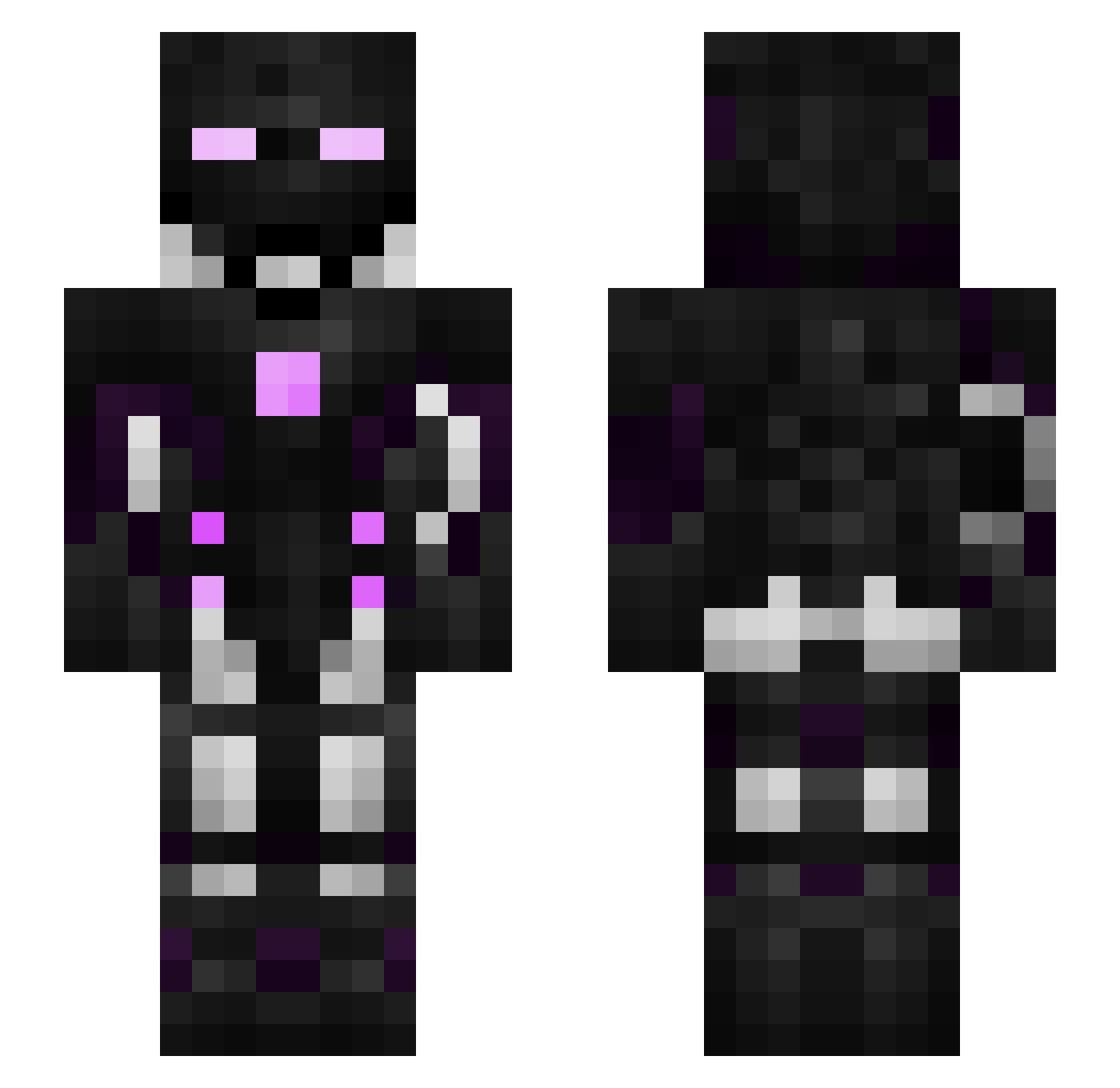
Current Minecraft skin of the player ViperN05, loaded from the official Mojang API. Rotate the 3D model with your mouse or finger, then download the skin as a PNG file and use it in Minecraft: Bedrock Edition or Java Edition for free. When ViperN05 changes their skin, this page updates automatically and the old skin stays in the history below.
Other players with this skin (390)
ViperN05 was the 334th player we have seen with this skin, first spotted on 07.11.2026. The same skin was seen on these players. Open a nickname to see their current skin and skin history.
 matta98 YTSpikeKillerYT LepGaming123 Rividium SwaqOG SeekNDestroy597 Cammoelvis DUDE531 StalePotatoChip Lackingbrowine benjaminbryn 360NoKeem Darkdesire95 TheDarkStrix Warapat Nathanc21 Uniformbogen PixelmasterAlpha nucleartoaster13 ItsReusta_ theophileJ eraser0010 FabianICM_ SuperComboGamer Maximumboss2 TinYanBBG Hopinz xMastermind5D manumanele WarFight_FR tenochca228822 Blockierer Greenlukky Qadtos casher2456 Scroodo Tamatiscool fedelaro Volseminator PHOENIXBOYY Hazardous1614 ICYadik imViru5x Ipick1 FLK44 Sarabades shimadaaa woodtick DreamMaster21 FuriousHurricane ZinqyXD DrummerWiz DarkFurious Blanka69 ROMAN6969 Ideaass cesarion31 12345175l this_is_burnsy Kensotensa
More Cyborg Minecraft skins
How to install the ViperN05 skin
- Press the Download button above to save the skin as a PNG file.
- Minecraft: Bedrock Edition (PE): open the Dressing Room from the main menu (or tap your character → Edit Character), go to Classic Skins → Owned, press the + (new skin) button, choose the downloaded PNG and pick the Slim (Alex) model. Works on PC and mobile; consoles cannot import custom skins.
- Minecraft: Java Edition: open the Minecraft Launcher, go to the Skins tab, click New Skin, load the PNG, pick the Slim (Alex) model and press Save & Use. You can also upload it at minecraft.net → Profile → Change Skin.
The skin does not show up after import - what should I do?
Restart Minecraft and open the Dressing Room again - imported skins sometimes appear only after a restart. Also make sure you selected the imported skin and picked the Slim (Alex) model.
Which model should I choose, Classic or Slim?
This skin is designed for the Slim (Alex) model. If you pick the wrong model, the arms of the skin will look stretched or squeezed.
Is the skin of ViperN05 free to download?
Yes. Press Download, save the PNG file and use it in Minecraft: Bedrock Edition or Java Edition - no payment or registration needed. The skin also works on multiplayer servers and Realms.
More skins
Looking for more? Go back to all Minecraft skins and check the top skins of the week, month and all time, or find any player's skin by nickname.