
Unkload52 - Minecraft Skins & Skin History
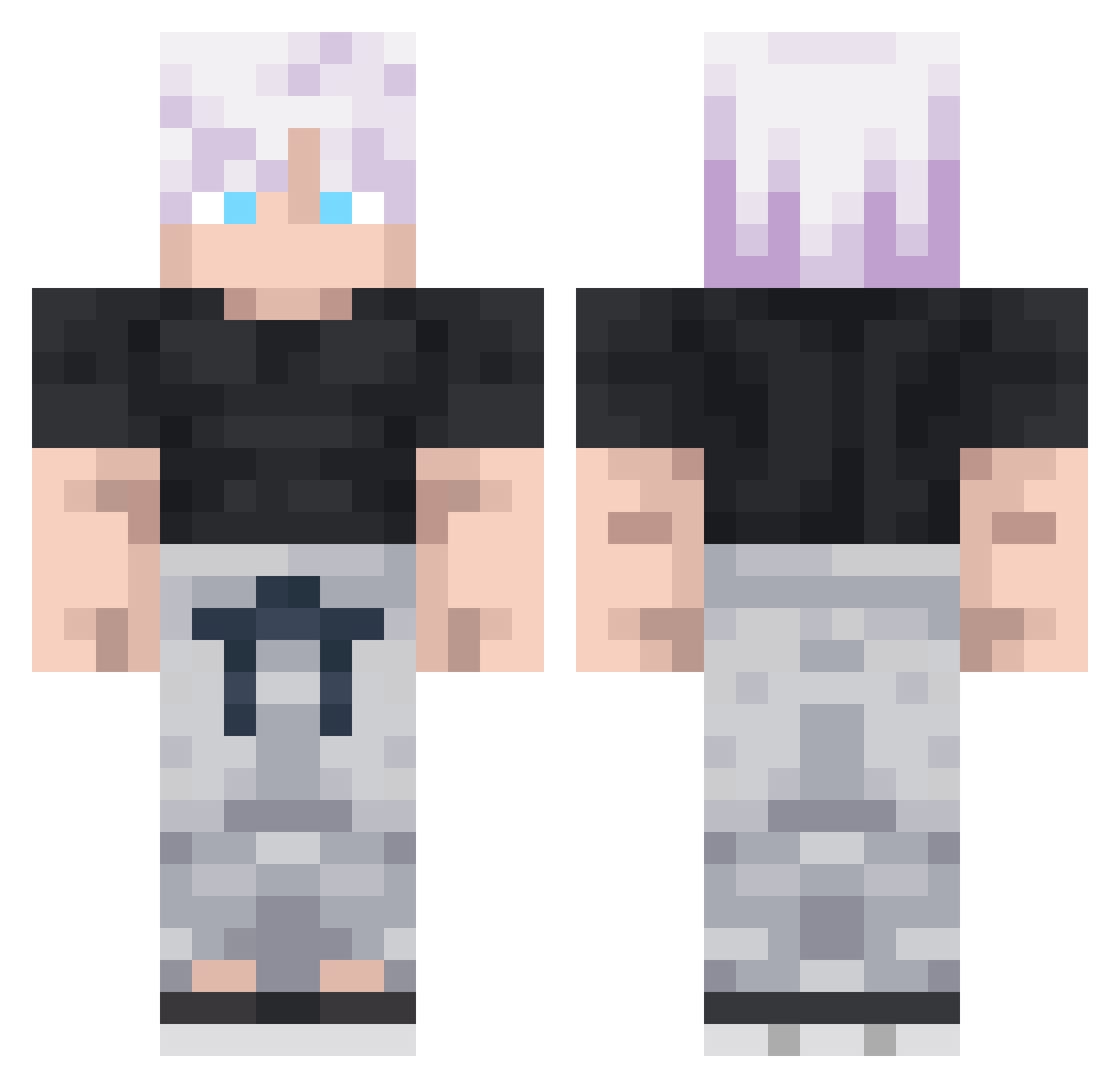
Current Minecraft skin of the player Unkload52, loaded from the official Mojang API. Rotate the 3D model with your mouse or finger, then download the skin as a PNG file and use it in Minecraft: Bedrock Edition or Java Edition for free. When Unkload52 changes their skin, this page updates automatically and the old skin stays in the history below.
Other players with this skin (292)
Unkload52 was the 134th player we have seen with this skin, first spotted on 15.09.2026. The same skin was seen on these players. Open a nickname to see their current skin and skin history.
 XCARL12 m3rtoski WilliamAntuneta MistahAdogap Kronoshi VersoGreen23 ZedsQ nk_1606 Guettapen Sympified StormClark XNavinX OoopyGooopy Godjo_Satoru misguidancee NINJADEFUSEZ rikugan_grim Alydons darkangelkingx crxckzyy Parzival_1337 hadopal Laurin_17 AleeMarinn05 NikkeJoku Luzinas Ferill zZuko_ supergaren YOKBE Idrahxx Monkeuser MikouDogZ suisse_ x_iden Demonicyeet23 FireBird21 Funtimegamertv Joseland
 Fhex_ Abs0lut4 Deathjeet GraczykalskiA Corayami gdgdfg Ra1ye Evers360 Swiipht Thrawn1234 ihatetreegrws
 Fari_TMC Chube04_ titanrn012 Luffy_88 kou_mori_626 Xenexsus ParasyteGS RRequiem_ vincigutti
 Galest
More Satoru Gojo Minecraft skins
See all 1317 Satoru Gojo skins
How to install the Unkload52 skin
- Press the Download button above to save the skin as a PNG file.
- Minecraft: Bedrock Edition (PE): open the Dressing Room from the main menu (or tap your character → Edit Character), go to Classic Skins → Owned, press the + (new skin) button, choose the downloaded PNG and pick the Classic (Steve) model. Works on PC and mobile; consoles cannot import custom skins.
- Minecraft: Java Edition: open the Minecraft Launcher, go to the Skins tab, click New Skin, load the PNG, pick the Classic (Steve) model and press Save & Use. You can also upload it at minecraft.net → Profile → Change Skin.
The skin does not show up after import - what should I do?
Restart Minecraft and open the Dressing Room again - imported skins sometimes appear only after a restart. Also make sure you selected the imported skin and picked the Classic (Steve) model.
Which model should I choose, Classic or Slim?
This skin is designed for the Classic (Steve) model. If you pick the wrong model, the arms of the skin will look stretched or squeezed.
Is the skin of Unkload52 free to download?
Yes. Press Download, save the PNG file and use it in Minecraft: Bedrock Edition or Java Edition - no payment or registration needed. The skin also works on multiplayer servers and Realms.
More skins
Looking for more? Go back to all Minecraft skins and check the top skins of the week, month and all time, or find any player's skin by nickname.