
Tremmer86 - Minecraft Skins & Skin History
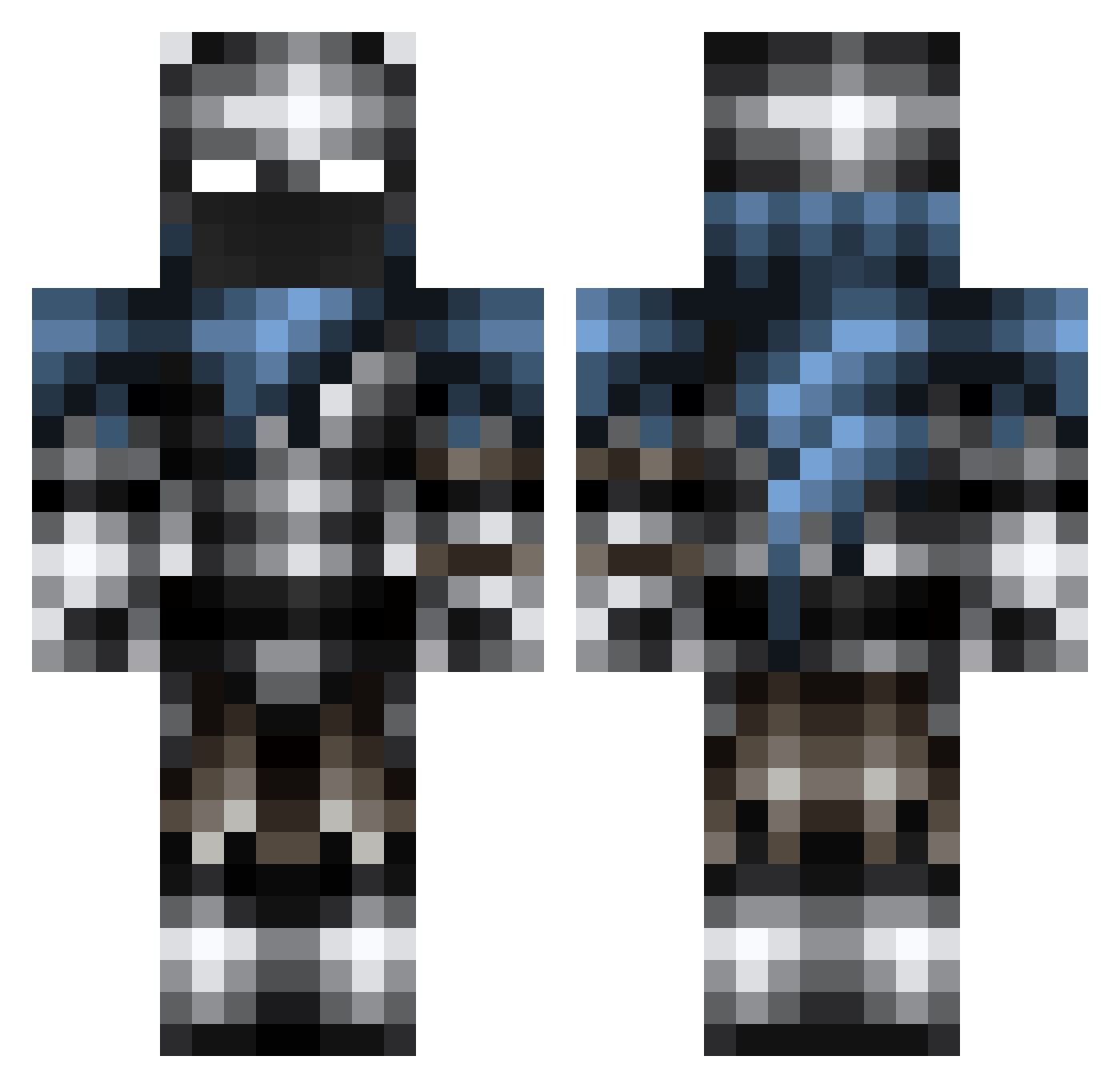
Current Minecraft skin of the player Tremmer86, loaded from the official Mojang API. Rotate the 3D model with your mouse or finger, then download the skin as a PNG file and use it in Minecraft: Bedrock Edition or Java Edition for free. When Tremmer86 changes their skin, this page updates automatically and the old skin stays in the history below.
Other players with this skin (277)
Tremmer86 was the 198th player we have seen with this skin, first spotted on 11.10.2026. The same skin was seen on these players. Open a nickname to see their current skin and skin history.
 OnlyHarambe PhantomLordz Bippityboopbop Statham00 _Damascus_ lazerkiller12345 Tube1992 lisaman D_Stinger Shadow83 Alfred828 Sudamericano Ryuwo_ Petr_Pan xinyangchina Casua1Autist Starslayer500 Nilvar Blakiechan SpikyManPvP Vallyyyy Emerald85811 Crafter35B6 yodaarvid Over_Kill976 iflyg nothingopen infernofireblaze Verstus jul122 9hood hewkii110 LyingLouie Keegs2 senateno joakimks Sako2006 carrickshock essie92 NSDeedee M3ta1head Albin11 spacecake63 ccskDD exploringmoon Zacharai PandaBiscuit27 Odine773 LCD2001 justusklapwijk PhoenixTehFeg GasterBlaster01 WarriorUK13 Groktheworld MI5PLACED Fezor_ Frozen233 sniperhitman123 Keithpatrick123 cgroff2001
More Warrior Minecraft skins
How to install the Tremmer86 skin
- Press the Download button above to save the skin as a PNG file.
- Minecraft: Bedrock Edition (PE): open the Dressing Room from the main menu (or tap your character → Edit Character), go to Classic Skins → Owned, press the + (new skin) button, choose the downloaded PNG and pick the Classic (Steve) model. Works on PC and mobile; consoles cannot import custom skins.
- Minecraft: Java Edition: open the Minecraft Launcher, go to the Skins tab, click New Skin, load the PNG, pick the Classic (Steve) model and press Save & Use. You can also upload it at minecraft.net → Profile → Change Skin.
The skin does not show up after import - what should I do?
Restart Minecraft and open the Dressing Room again - imported skins sometimes appear only after a restart. Also make sure you selected the imported skin and picked the Classic (Steve) model.
Which model should I choose, Classic or Slim?
This skin is designed for the Classic (Steve) model. If you pick the wrong model, the arms of the skin will look stretched or squeezed.
Is the skin of Tremmer86 free to download?
Yes. Press Download, save the PNG file and use it in Minecraft: Bedrock Edition or Java Edition - no payment or registration needed. The skin also works on multiplayer servers and Realms.
More skins
Looking for more? Go back to all Minecraft skins and check the top skins of the week, month and all time, or find any player's skin by nickname.