
Torgus212 - Minecraft Skins & Skin History
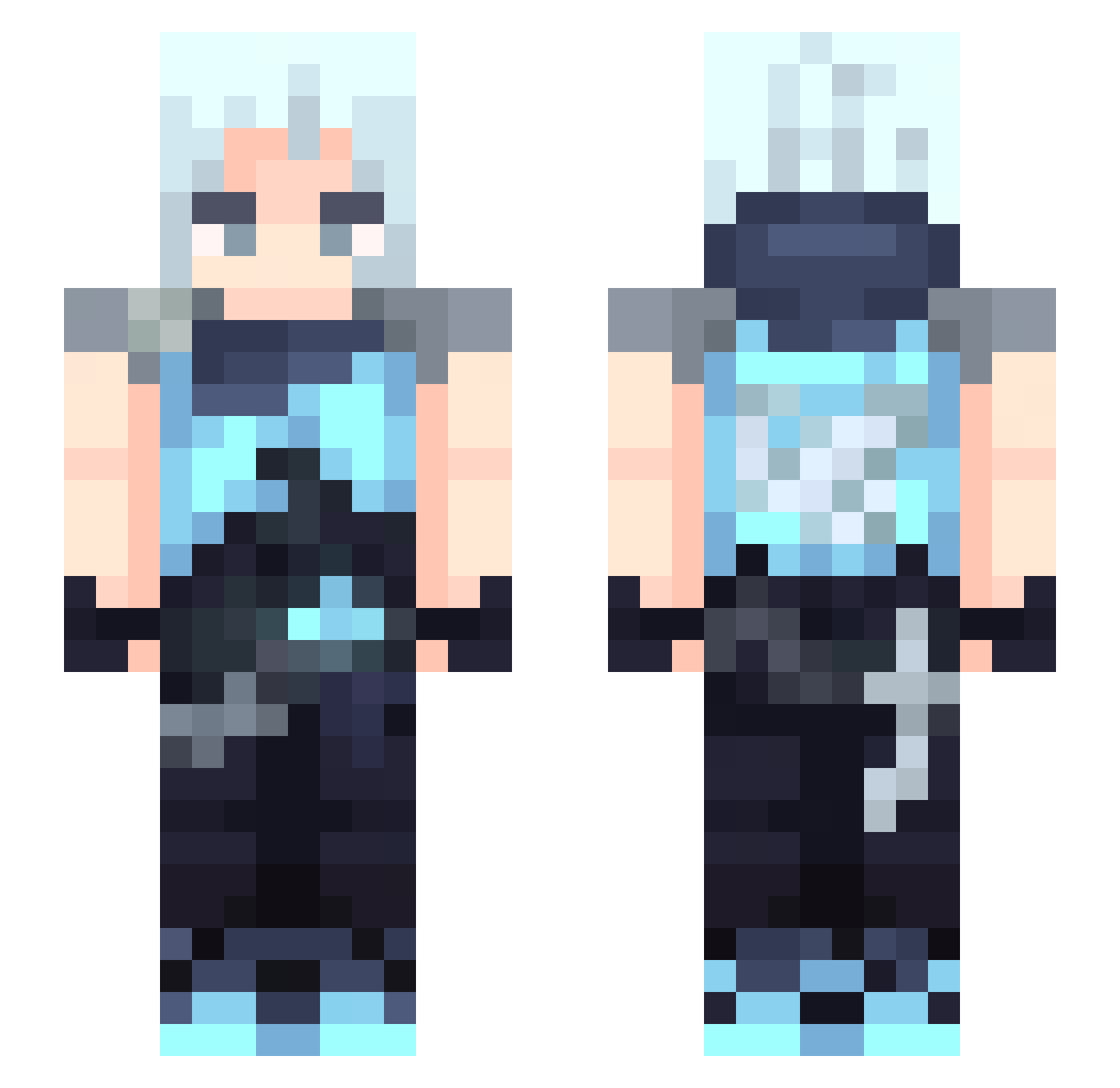
Current Minecraft skin of the player Torgus212, loaded from the official Mojang API. Rotate the 3D model with your mouse or finger, then download the skin as a PNG file and use it in Minecraft: Bedrock Edition or Java Edition for free. When Torgus212 changes their skin, this page updates automatically and the old skin stays in the history below.
Other players with this skin (391)
Torgus212 was the 118th player we have seen with this skin, first spotted on 24.08.2026. The same skin was seen on these players. Open a nickname to see their current skin and skin history.
 tsuboda TofaDev Niniyyuh Smoosher feather_kks kaitoqtt ZM_0616 evanko0817 JETT_ILOHAS Nightmonkey121 morais4l DRAGONBLOOD_X ZJAEKING dltjdgusnswj FancySome1 sadhal28 NmS0 7yyf Slyrakz AbsGemini P3luchinasies kermitshrek leongamer919 Wolfik333 JonathanFunez DeathPresto ElGabo5cm
 Fire_Five xiangyiw sosopanda76 akame383 rztt Solak019 SYOSHINSYA111 norpor_x liu87 Linetrace Yuann0802
 Xendha14 Bxmbxx JVFINALBOSS zzhlittle2k gbjl556 Cinder_____ Azu6e Hwa_baeg Lumiers Lil_Alba qojn Azuki_okashi harryren_12 MlleHailey okaayanna moshiVAL 199140 ColoColito Ashi2cm sattzz MVS_56 Chromize
More Jett Minecraft skins
How to install the Torgus212 skin
- Press the Download button above to save the skin as a PNG file.
- Minecraft: Bedrock Edition (PE): open the Dressing Room from the main menu (or tap your character → Edit Character), go to Classic Skins → Owned, press the + (new skin) button, choose the downloaded PNG and pick the Slim (Alex) model. Works on PC and mobile; consoles cannot import custom skins.
- Minecraft: Java Edition: open the Minecraft Launcher, go to the Skins tab, click New Skin, load the PNG, pick the Slim (Alex) model and press Save & Use. You can also upload it at minecraft.net → Profile → Change Skin.
The skin does not show up after import - what should I do?
Restart Minecraft and open the Dressing Room again - imported skins sometimes appear only after a restart. Also make sure you selected the imported skin and picked the Slim (Alex) model.
Which model should I choose, Classic or Slim?
This skin is designed for the Slim (Alex) model. If you pick the wrong model, the arms of the skin will look stretched or squeezed.
Is the skin of Torgus212 free to download?
Yes. Press Download, save the PNG file and use it in Minecraft: Bedrock Edition or Java Edition - no payment or registration needed. The skin also works on multiplayer servers and Realms.
More skins
Looking for more? Go back to all Minecraft skins and check the top skins of the week, month and all time, or find any player's skin by nickname.