
SwaglordJayden - Minecraft Skins & Skin History
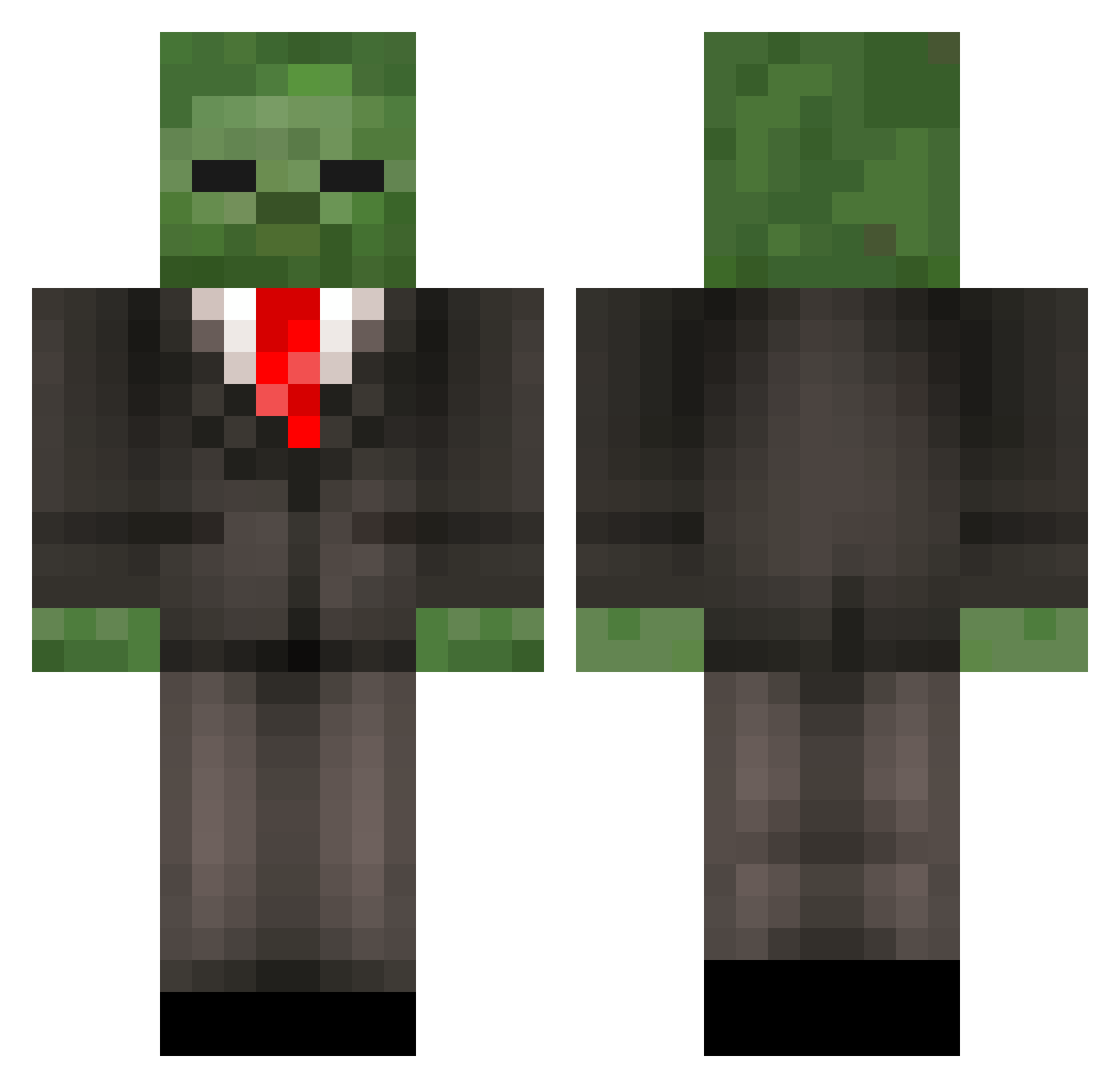
Current Minecraft skin of the player SwaglordJayden, loaded from the official Mojang API. Rotate the 3D model with your mouse or finger, then download the skin as a PNG file and use it in Minecraft: Bedrock Edition or Java Edition for free. When SwaglordJayden changes their skin, this page updates automatically and the old skin stays in the history below.
Other players with this skin (452)
SwaglordJayden was the 351st player we have seen with this skin, first spotted on 18.10.2026. The same skin was seen on these players. Open a nickname to see their current skin and skin history.
 SOCK_monkey669 MaxAndroid barneyhardwood GavinRocks22 ICantForgetYou Tho2Luc xXSuperXxLoL Payton9151 Zombieman_CC olav__n GCheatZenonV2 Raquisar159 GrimReaper3097 BlueStreakHD TheMiiWii22 Nkleitz8693 mattchuu Goatbreasts2121 Greenbean3610 TomSargent1 RagVax yoyo0609 Xyrokie917 Runced thequeenmyra shusai89 blast1113 Errka_7 MashedMohetoes buttsagginton taaffeyHD mschroeder223 rhysjones45 Jameswolfy Tbakken4 gmendonca white4502 SergeantCuddle Hudella JumpinFabulous MichaelHill MattnJames2631 tigersor BeepyBeepYT Kevinlanc11 BurstCookie123 T_R_Evil wetsock99 Alberto_Bro99 Nureddin albail Happilly MrJohnnyP IbeezJay Thomasseverin MazaBaza Fire_Krakken ShotgunWedding Deviouschef Dooltie
More Zombie Minecraft skins
How to install the SwaglordJayden skin
- Press the Download button above to save the skin as a PNG file.
- Minecraft: Bedrock Edition (PE): open the Dressing Room from the main menu (or tap your character → Edit Character), go to Classic Skins → Owned, press the + (new skin) button, choose the downloaded PNG and pick the Classic (Steve) model. Works on PC and mobile; consoles cannot import custom skins.
- Minecraft: Java Edition: open the Minecraft Launcher, go to the Skins tab, click New Skin, load the PNG, pick the Classic (Steve) model and press Save & Use. You can also upload it at minecraft.net → Profile → Change Skin.
The skin does not show up after import - what should I do?
Restart Minecraft and open the Dressing Room again - imported skins sometimes appear only after a restart. Also make sure you selected the imported skin and picked the Classic (Steve) model.
Which model should I choose, Classic or Slim?
This skin is designed for the Classic (Steve) model. If you pick the wrong model, the arms of the skin will look stretched or squeezed.
Is the skin of SwaglordJayden free to download?
Yes. Press Download, save the PNG file and use it in Minecraft: Bedrock Edition or Java Edition - no payment or registration needed. The skin also works on multiplayer servers and Realms.
More skins
Looking for more? Go back to all Minecraft skins and check the top skins of the week, month and all time, or find any player's skin by nickname.