
Subeer6 - Minecraft Skins & Skin History
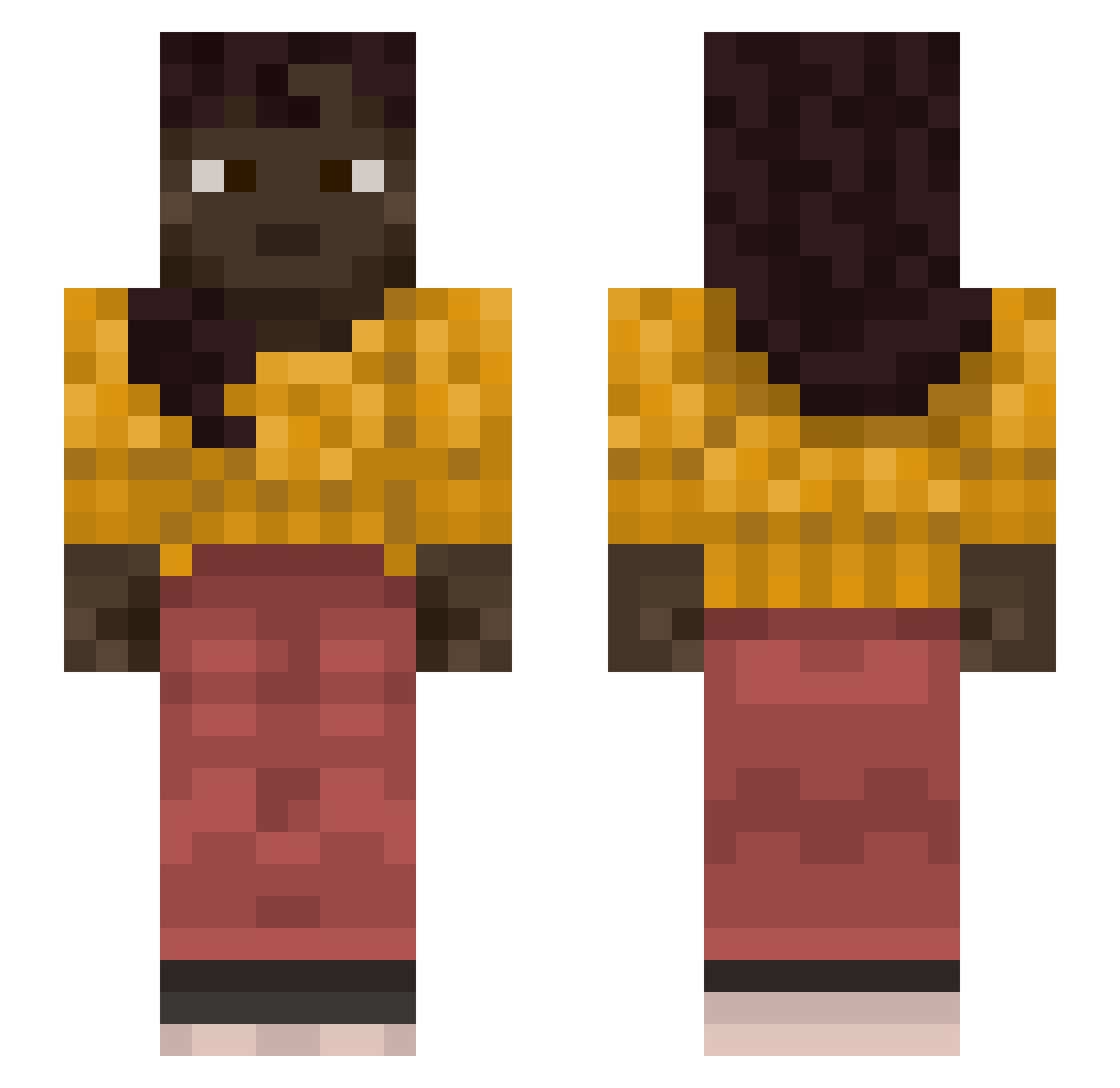
Current Minecraft skin of the player Subeer6, loaded from the official Mojang API. Rotate the 3D model with your mouse or finger, then download the skin as a PNG file and use it in Minecraft: Bedrock Edition or Java Edition for free. When Subeer6 changes their skin, this page updates automatically and the old skin stays in the history below.
Other players with this skin (1212)
Subeer6 was the 438th player we have seen with this skin, first spotted on 05.09.2026. The same skin was seen on these players. Open a nickname to see their current skin and skin history.
 CohenS canoeing HiperZer0 Malarious cozysocks
 awedaeffae634 wincrestor JohnnyRhoades hbhhh LucasParalelo StenDeBeast Im_NotShadow Reshuffled unhatchable mr_mirza ShayanTheMan
 arnauWP7 TheAlmightyBri xXJERRY_SMITHXx OverSoft Fuci pierug007 okayasian Ninthlor Hjallefromsweden Exarchy spyroz3 Subet Trikala HNFOIClBr Beader CICINDELIDAE Efflorescency Tantin95 gunpower Ardoxy scoreunbroken Stalkerka_ Scott__Chegg dydulek420_
 ikke7 Salesperson mortice Pullers peepeefartface Ging cokey Godvito actualize RoboBozo2 Fruit_Math CrashLanding812 SweetLeaf kangsany BanksSlugger immeasurably ZiELaK_144Hz champangemango Dronzig Iliacus
More Braid Minecraft skins
How to install the Subeer6 skin
- Press the Download button above to save the skin as a PNG file.
- Minecraft: Bedrock Edition (PE): open the Dressing Room from the main menu (or tap your character → Edit Character), go to Classic Skins → Owned, press the + (new skin) button, choose the downloaded PNG and pick the Slim (Alex) model. Works on PC and mobile; consoles cannot import custom skins.
- Minecraft: Java Edition: open the Minecraft Launcher, go to the Skins tab, click New Skin, load the PNG, pick the Slim (Alex) model and press Save & Use. You can also upload it at minecraft.net → Profile → Change Skin.
The skin does not show up after import - what should I do?
Restart Minecraft and open the Dressing Room again - imported skins sometimes appear only after a restart. Also make sure you selected the imported skin and picked the Slim (Alex) model.
Which model should I choose, Classic or Slim?
This skin is designed for the Slim (Alex) model. If you pick the wrong model, the arms of the skin will look stretched or squeezed.
Is the skin of Subeer6 free to download?
Yes. Press Download, save the PNG file and use it in Minecraft: Bedrock Edition or Java Edition - no payment or registration needed. The skin also works on multiplayer servers and Realms.
More skins
Looking for more? Go back to all Minecraft skins and check the top skins of the week, month and all time, or find any player's skin by nickname.