
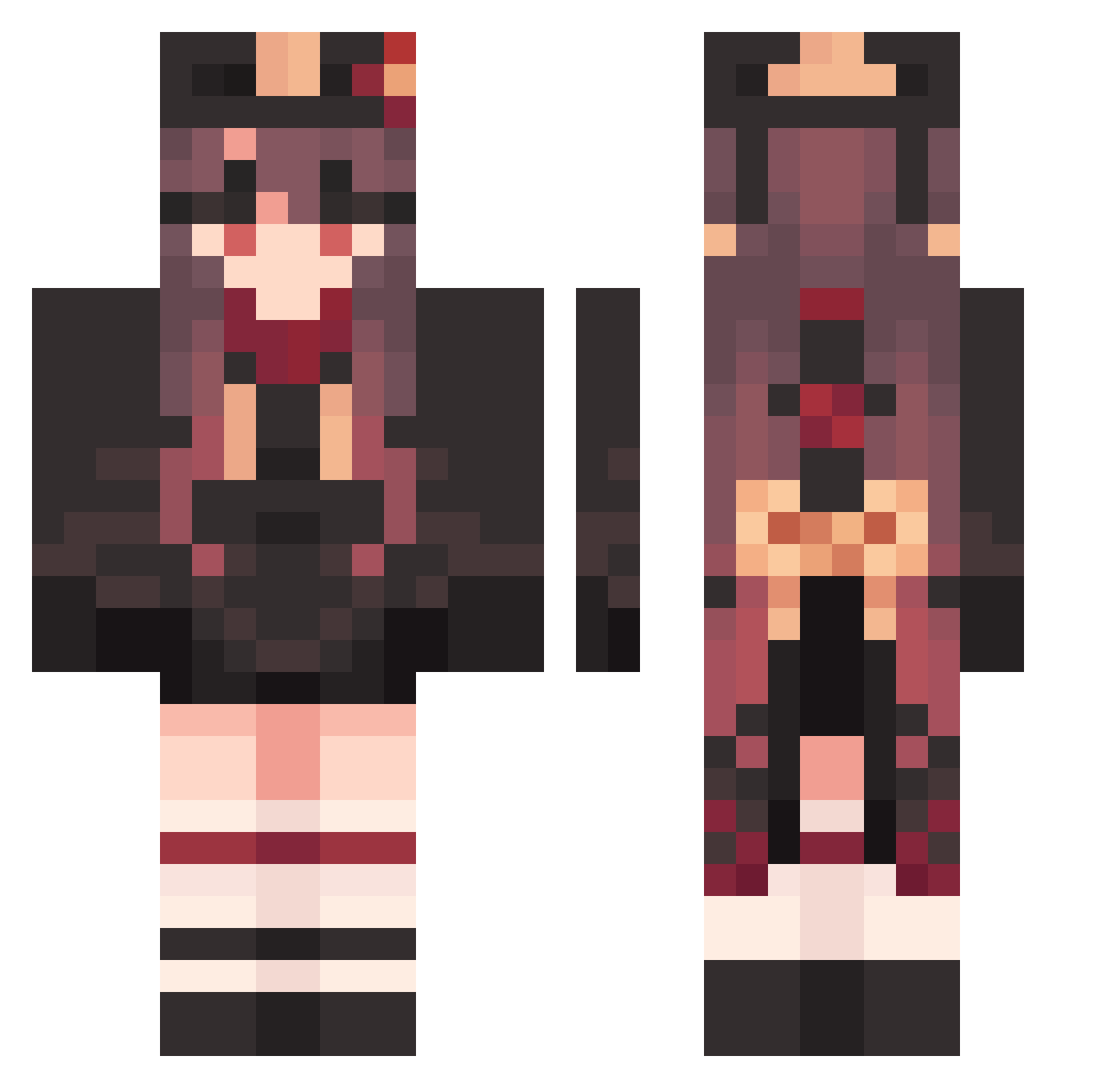
Current Minecraft skin of the player SomberComplex623, loaded from the official Mojang API. Rotate the 3D model with your mouse or finger, then download the skin as a PNG file and use it in Minecraft: Bedrock Edition or Java Edition for free. When SomberComplex623 changes their skin, this page updates automatically and the old skin stays in the history below.
Other players with this skin (1212)
SomberComplex623 was the 753rd player we have seen with this skin, first spotted on 20.09.2026. The same skin was seen on these players. Open a nickname to see their current skin and skin history.
 wmz1209 BillowyClammy135 soliuy premiere_q7 AbandonedVast779 ErraticDreary751 WickedSqualid359 Hutao_gJEhGcb105 HappyURT Vireimi jrajabi7888 EducatedChief500 BoorishSecond992 WorthlessHalf664 Firefly_baby Hutao_mERyxyD461 GeneralCalm13 InnocentTough558 Hutao_kIv662 Hutao_vTpJCjl129 FriendlyDaffy118 HaplessCrabby868 RoastedBreezy295 NotNetix MagentaUnruly488 Brung999 Hutao_tpPrHUw799 SmokeGotBands Jadeger9 pola572 Hutao_CWpcORR478 SGT0Ghost TinyMighty632 AVA586 HideousFluffy233 HandyFaithful880 Hutao_yKJbXFN572 cahrel Hutao_HIkHBzc478 xianyu06 storm_math Helloworkd1 Hutao_TzoVrNA712 shQ880 Juridicalant HappyCalm23 V_AlexHenry_H ZazKence luobu04 nianqing3 Speachka7 LoveDaHai_vEximc nxd1027 GardenT00L Hutao_nbFXVHa794 BreezyStaking846 FixedFuture69 oFrod xiaomengxin1231 Hutao_LezSUVd934
More Hu Tao Minecraft skins
How to install the SomberComplex623 skin
- Press the Download button above to save the skin as a PNG file.
- Minecraft: Bedrock Edition (PE): open the Dressing Room from the main menu (or tap your character → Edit Character), go to Classic Skins → Owned, press the + (new skin) button, choose the downloaded PNG and pick the Classic (Steve) model. Works on PC and mobile; consoles cannot import custom skins.
- Minecraft: Java Edition: open the Minecraft Launcher, go to the Skins tab, click New Skin, load the PNG, pick the Classic (Steve) model and press Save & Use. You can also upload it at minecraft.net → Profile → Change Skin.
The skin does not show up after import - what should I do?
Restart Minecraft and open the Dressing Room again - imported skins sometimes appear only after a restart. Also make sure you selected the imported skin and picked the Classic (Steve) model.
Which model should I choose, Classic or Slim?
This skin is designed for the Classic (Steve) model. If you pick the wrong model, the arms of the skin will look stretched or squeezed.
Is the skin of SomberComplex623 free to download?
Yes. Press Download, save the PNG file and use it in Minecraft: Bedrock Edition or Java Edition - no payment or registration needed. The skin also works on multiplayer servers and Realms.
More skins
Looking for more? Go back to all Minecraft skins and check the top skins of the week, month and all time, or find any player's skin by nickname.