
Snow_jad - Minecraft Skins & Skin History
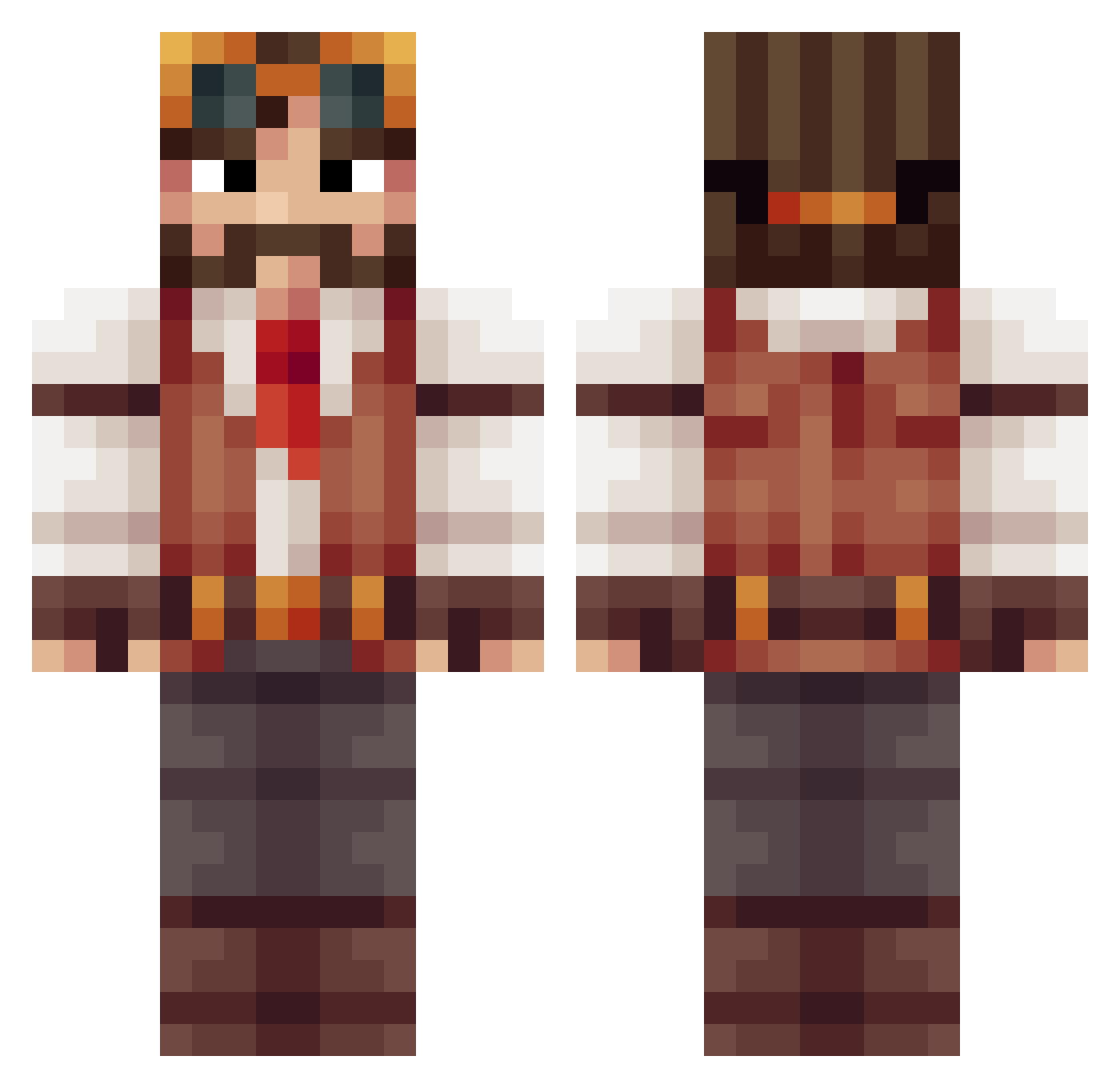
Current Minecraft skin of the player Snow_jad, loaded from the official Mojang API. Rotate the 3D model with your mouse or finger, then download the skin as a PNG file and use it in Minecraft: Bedrock Edition or Java Edition for free. When Snow_jad changes their skin, this page updates automatically and the old skin stays in the history below.
Other players with this skin (415)
Snow_jad was the 65th player we have seen with this skin, first spotted on 12.08.2026. The same skin was seen on these players. Open a nickname to see their current skin and skin history.
 Chloroquine AcousticVodka77 wjc133 KlumpenHill Soledris Azenaf Matpatt_ SilverOfM KEYSSIDI jutylo201990 SirAstrix Mr_Blasi Sngok Pepelepiew MaxNoye ArdicZekeriyya Polkagris23 Tootelz estribos YimwangMR Fulfilijus StarkisekyaS19 SuperPepperoni Putsch Yama_1291 IKayab Ghislord EmirhancCc Graf_Rotzz Crayfe GamerMB_Explorer
 Yootooo Snow58 Arbustine ctigs28 Dartisan Decoder_ BLegion _Papa_Dragon_ xEpicz97 VeraciousClown Bluesman8492 Drakoweed Dim04kaaa Unknown8921 mtandy FOGbside Happypancakes56 DerSchIosser Donkao SemiQDOne bryce0110 Kyopiri InsaneOak philipxjm Rholvaff Styx_Erebus HeroThomas yigitonem CaptainNubNub
More Explorer Minecraft skins
How to install the Snow_jad skin
- Press the Download button above to save the skin as a PNG file.
- Minecraft: Bedrock Edition (PE): open the Dressing Room from the main menu (or tap your character → Edit Character), go to Classic Skins → Owned, press the + (new skin) button, choose the downloaded PNG and pick the Classic (Steve) model. Works on PC and mobile; consoles cannot import custom skins.
- Minecraft: Java Edition: open the Minecraft Launcher, go to the Skins tab, click New Skin, load the PNG, pick the Classic (Steve) model and press Save & Use. You can also upload it at minecraft.net → Profile → Change Skin.
The skin does not show up after import - what should I do?
Restart Minecraft and open the Dressing Room again - imported skins sometimes appear only after a restart. Also make sure you selected the imported skin and picked the Classic (Steve) model.
Which model should I choose, Classic or Slim?
This skin is designed for the Classic (Steve) model. If you pick the wrong model, the arms of the skin will look stretched or squeezed.
Is the skin of Snow_jad free to download?
Yes. Press Download, save the PNG file and use it in Minecraft: Bedrock Edition or Java Edition - no payment or registration needed. The skin also works on multiplayer servers and Realms.
More skins
Looking for more? Go back to all Minecraft skins and check the top skins of the week, month and all time, or find any player's skin by nickname.