
SkelerBr - Minecraft Skins & Skin History
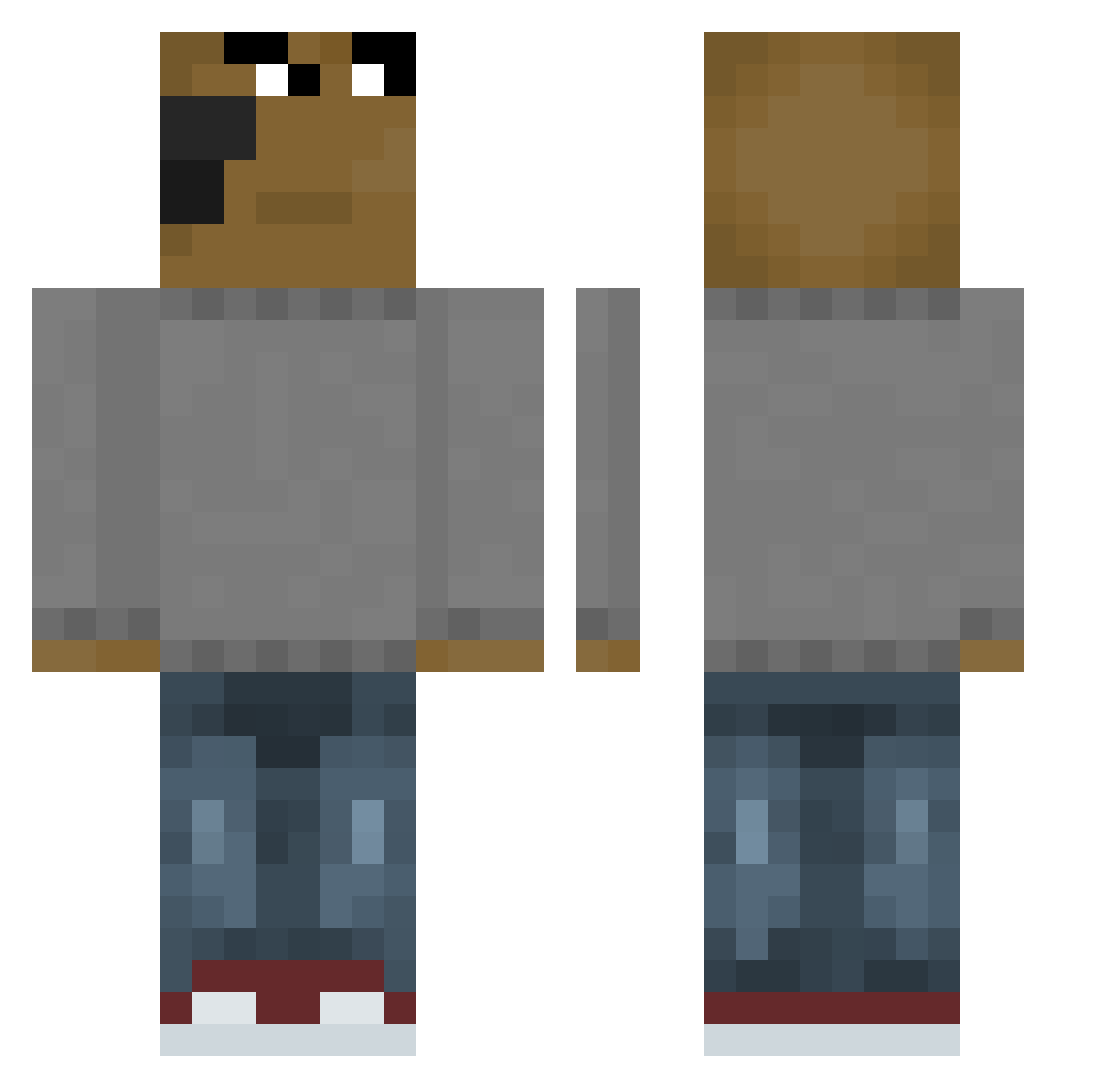
Current Minecraft skin of the player SkelerBr, loaded from the official Mojang API. Rotate the 3D model with your mouse or finger, then download the skin as a PNG file and use it in Minecraft: Bedrock Edition or Java Edition for free. When SkelerBr changes their skin, this page updates automatically and the old skin stays in the history below.
Other players with this skin (651)
SkelerBr was the 59th player we have seen with this skin, first spotted on 03.08.2026. The same skin was seen on these players. Open a nickname to see their current skin and skin history.
 Apayy DanielaOrO littlemonkeynjs Its_Andreswifi mscRob sobrangpanget Hantaviruss Matutej7 Jqnii Blackdark17 Domme1113 poolpa CookaDaPizza_ xNormanRitter iPuckett lalkagamer Noah2438 rederyo Operatorek69 tlsalsrb123 laurenwatt8 SCHERE_HOCH ThomYorke27 Storm13247 _Hermann__ Dh4y nobdog Jagoran Frederikke707 VIVI3R Hyeokjaelee hellcat_lover 95to5_groundbeef The_PG5 SlackFish rbwls2 Echu22 UNLIVED_MAGICAN lRVllN TRAKKKKKKKKKKKKK Kyumyum DoggoDrip ReinDrop123 kizzy312 Salem_aoues Epiketh James_Aguirre07 __Cackledad956 swaddyy21 saaamuras koks5 Walt3r_White OUTangel lhv2129 tachi_zzz LeKurico Hanshose_here
 DahBoes
 UchihaSaid Nulleum
How to install the SkelerBr skin
- Press the Download button above to save the skin as a PNG file.
- Minecraft: Bedrock Edition (PE): open the Dressing Room from the main menu (or tap your character → Edit Character), go to Classic Skins → Owned, press the + (new skin) button, choose the downloaded PNG and pick the Classic (Steve) model. Works on PC and mobile; consoles cannot import custom skins.
- Minecraft: Java Edition: open the Minecraft Launcher, go to the Skins tab, click New Skin, load the PNG, pick the Classic (Steve) model and press Save & Use. You can also upload it at minecraft.net → Profile → Change Skin.
The skin does not show up after import - what should I do?
Restart Minecraft and open the Dressing Room again - imported skins sometimes appear only after a restart. Also make sure you selected the imported skin and picked the Classic (Steve) model.
Which model should I choose, Classic or Slim?
This skin is designed for the Classic (Steve) model. If you pick the wrong model, the arms of the skin will look stretched or squeezed.
Is the skin of SkelerBr free to download?
Yes. Press Download, save the PNG file and use it in Minecraft: Bedrock Edition or Java Edition - no payment or registration needed. The skin also works on multiplayer servers and Realms.
More skins
Looking for more? Go back to all Minecraft skins and check the top skins of the week, month and all time, or find any player's skin by nickname.