
RossDood - Minecraft Skins & Skin History
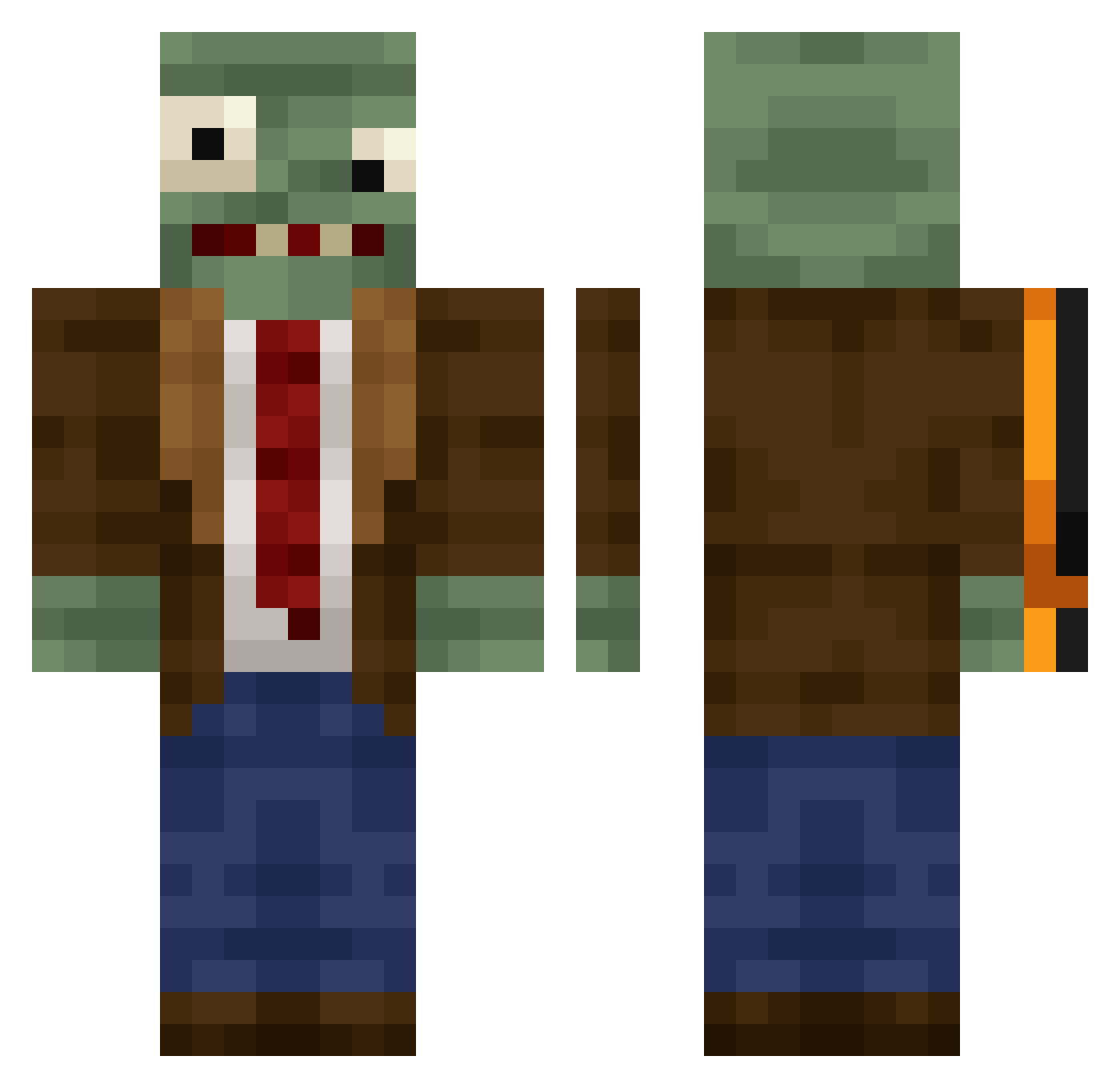
Current Minecraft skin of the player RossDood, loaded from the official Mojang API. Rotate the 3D model with your mouse or finger, then download the skin as a PNG file and use it in Minecraft: Bedrock Edition or Java Edition for free. When RossDood changes their skin, this page updates automatically and the old skin stays in the history below.
Other players with this skin (444)
RossDood was the 270th player we have seen with this skin, first spotted on 04.10.2026. The same skin was seen on these players. Open a nickname to see their current skin and skin history.
 JMEK wuuhao11 slayeroftheape swagsceo yiyuming PALADYN927 G3orgeHarrison MakaGOD12 PiastowskiKing ShockcolateAHU slotkakotka420 Grampa_Kush TheBaconPirate bird_167 bbq_banane Valliex Xi_Mengsi Noctambulo8 DiEn212 548266 DbaezR lladiesman TioCastillo hengqi12 1025_ Datboi1172 sadMoon35 PaT SoUmFree DiamondXD10 GreyBarry Machette76 Divot1109 Pugfartinspace MatveyStarcha iamm3rry Remytherat98 Egorchi NLWX FR099 itsdannnyyy DePelos Arzuz87 Emperor_DinoicXs Radxhn kiritofff ppcece Maniacal00 Cream4ik luzti AlceAzul TNTboy_05 ErkutOzeklioglu DumbCrafter Sunset715 LexiNoxi Cxn_Dyx AMTXYZ Liuxueqiyinsheng sugarbush911
More Plants Vs Zombies Minecraft skins
See all 57 Plants Vs Zombies skins
How to install the RossDood skin
- Press the Download button above to save the skin as a PNG file.
- Minecraft: Bedrock Edition (PE): open the Dressing Room from the main menu (or tap your character → Edit Character), go to Classic Skins → Owned, press the + (new skin) button, choose the downloaded PNG and pick the Classic (Steve) model. Works on PC and mobile; consoles cannot import custom skins.
- Minecraft: Java Edition: open the Minecraft Launcher, go to the Skins tab, click New Skin, load the PNG, pick the Classic (Steve) model and press Save & Use. You can also upload it at minecraft.net → Profile → Change Skin.
The skin does not show up after import - what should I do?
Restart Minecraft and open the Dressing Room again - imported skins sometimes appear only after a restart. Also make sure you selected the imported skin and picked the Classic (Steve) model.
Which model should I choose, Classic or Slim?
This skin is designed for the Classic (Steve) model. If you pick the wrong model, the arms of the skin will look stretched or squeezed.
Is the skin of RossDood free to download?
Yes. Press Download, save the PNG file and use it in Minecraft: Bedrock Edition or Java Edition - no payment or registration needed. The skin also works on multiplayer servers and Realms.
More skins
Looking for more? Go back to all Minecraft skins and check the top skins of the week, month and all time, or find any player's skin by nickname.