
RonniSZ - Minecraft Skins & Skin History
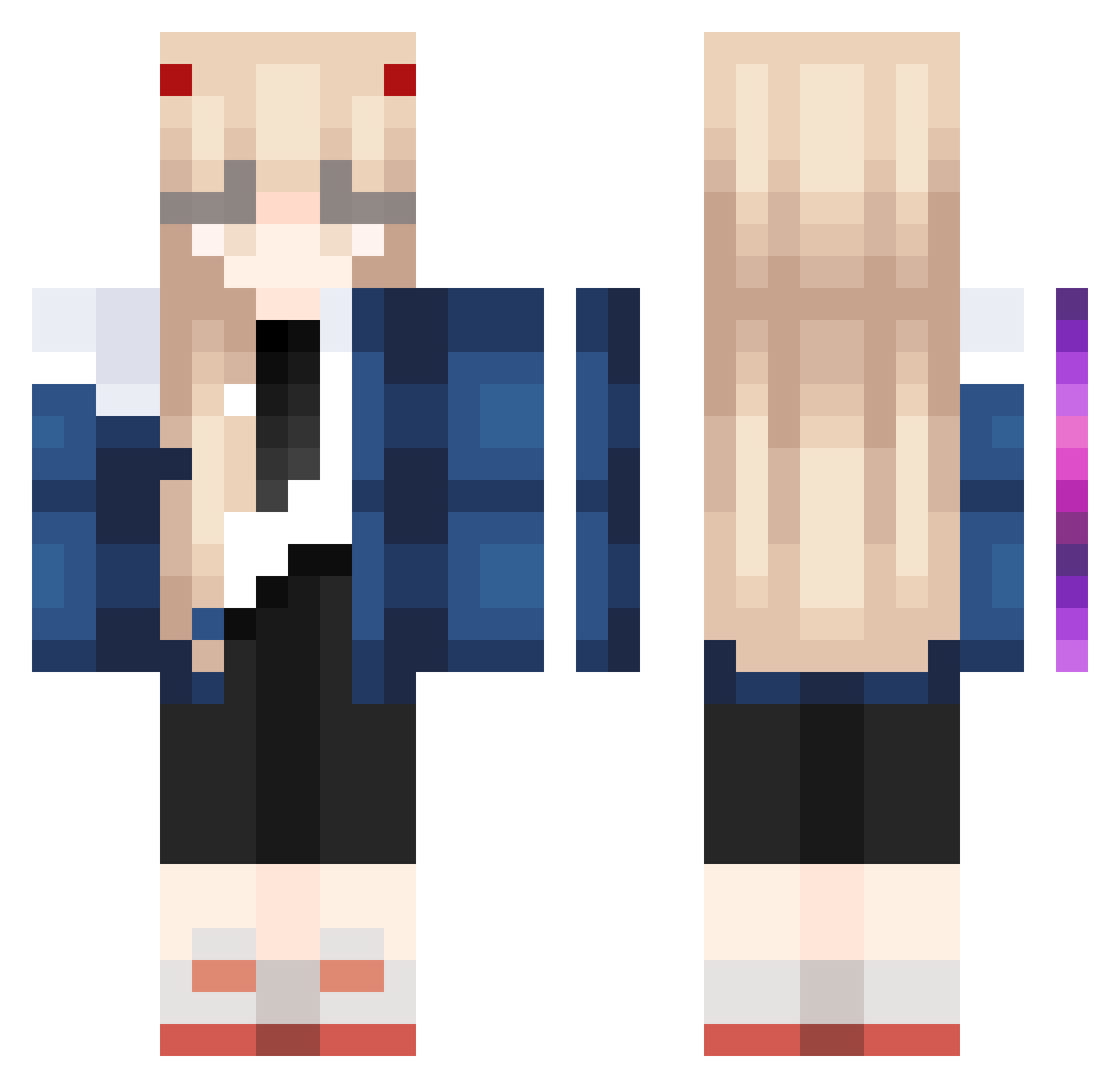
Current Minecraft skin of the player RonniSZ, loaded from the official Mojang API. Rotate the 3D model with your mouse or finger, then download the skin as a PNG file and use it in Minecraft: Bedrock Edition or Java Edition for free. When RonniSZ changes their skin, this page updates automatically and the old skin stays in the history below.
Other players with this skin (882)
RonniSZ was the 817th player we have seen with this skin, first spotted on 18.10.2026. The same skin was seen on these players. Open a nickname to see their current skin and skin history.
 Drawlen ksx1 Flux_xoxx SasIoverlxrd Mashiro_Shina eunhyu LelekaMeleka Blink619 Uzuranana luluking23 Gon3day0 JenithStar Ochiyo_ Anjuuuuuuu ael_67 gebura_1230 Adrianco205 Pudding_1O2 Pleasecheat Ark_Kiva Tatianad Carlota_xuan st4rzzwagg Kinokinokinoki SokaaChan Chantalitaaa saiko___1 lryuim kimobius Nagasaki114 yeon4n hachi7070 S8CE zittoppi mingmangmongmung FinerVase ZyloxKun Tht_Guy pxantomxxr shawnconley178 TheBestGamer2008 iamNemesis_ Chicken_Nice D3RPY_PON3 Luvellaa Lattina2517 Clery2137 whereiskiki mon820 Ghost8869 lilpetsi milkcassette IXxRadixXI melumagu Maerthaa JakiiBoii kmj030304 Beayemi alicekery NyaaCha
More Zero Two Minecraft skins
How to install the RonniSZ skin
- Press the Download button above to save the skin as a PNG file.
- Minecraft: Bedrock Edition (PE): open the Dressing Room from the main menu (or tap your character → Edit Character), go to Classic Skins → Owned, press the + (new skin) button, choose the downloaded PNG and pick the Classic (Steve) model. Works on PC and mobile; consoles cannot import custom skins.
- Minecraft: Java Edition: open the Minecraft Launcher, go to the Skins tab, click New Skin, load the PNG, pick the Classic (Steve) model and press Save & Use. You can also upload it at minecraft.net → Profile → Change Skin.
The skin does not show up after import - what should I do?
Restart Minecraft and open the Dressing Room again - imported skins sometimes appear only after a restart. Also make sure you selected the imported skin and picked the Classic (Steve) model.
Which model should I choose, Classic or Slim?
This skin is designed for the Classic (Steve) model. If you pick the wrong model, the arms of the skin will look stretched or squeezed.
Is the skin of RonniSZ free to download?
Yes. Press Download, save the PNG file and use it in Minecraft: Bedrock Edition or Java Edition - no payment or registration needed. The skin also works on multiplayer servers and Realms.
More skins
Looking for more? Go back to all Minecraft skins and check the top skins of the week, month and all time, or find any player's skin by nickname.