
Raven_O0O - Minecraft Skins & Skin History
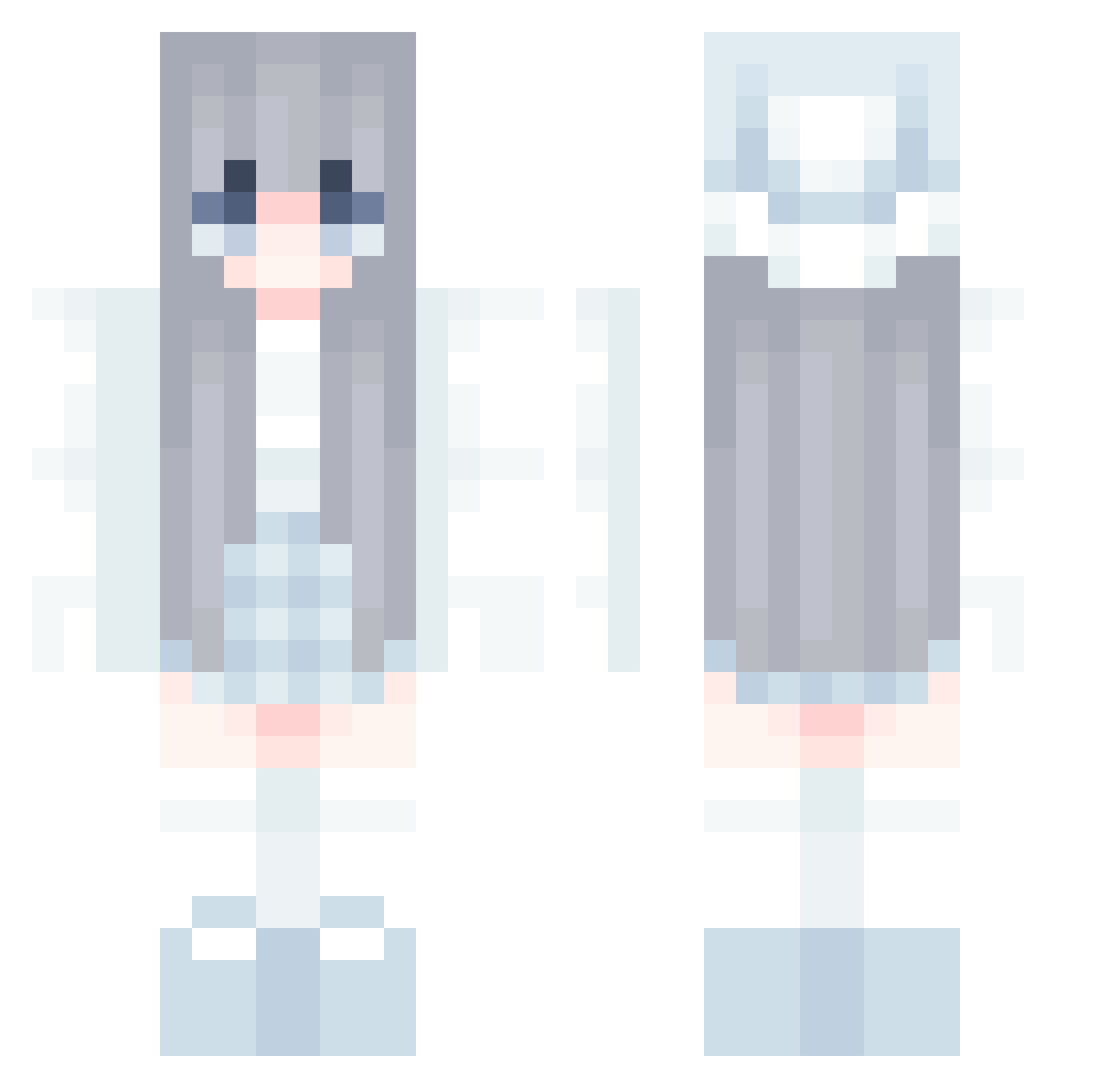
Current Minecraft skin of the player Raven_O0O, loaded from the official Mojang API. Rotate the 3D model with your mouse or finger, then download the skin as a PNG file and use it in Minecraft: Bedrock Edition or Java Edition for free. When Raven_O0O changes their skin, this page updates automatically and the old skin stays in the history below.
Other players with this skin (583)
Raven_O0O was the 108th player we have seen with this skin, first spotted on 13.08.2026. The same skin was seen on these players. Open a nickname to see their current skin and skin history.
 aeclown Noicewastaken Baby_Girl_02 JuliaEclipse Ultra0007 YY_yao Reversal_Time Hizuku_ Tan_TheMan Felarys59 moneyislife01 TMaja2014 blue_nepttune MrProperrr Gian_11 Minxatu Yunachan_30 Ssaint7 MAX_EL Elariss_ Immpandy wftec
 MugM7 Soggyu Cyiue suu1025 EthanSi2021 00_o0 superstarflys L_ku_ butts3x69 Clycia ScuffedToo Mi0Wu eralineyt Luckypasta23 CwPlay sh4rne mengjinY AK4RMA chona18 Lianator2021 pigeon002 HuskiAura eveventb excursionist987 Snobuns ning720 Dila75 lilicayaginuma Sam121699 zarsd123 PrinzessinSky 231456taiyaki Hamm2599 NCHANPRO Sophia1960 BledionGGTV Silverfangggg danzooo
More Winter Minecraft skins
How to install the Raven_O0O skin
- Press the Download button above to save the skin as a PNG file.
- Minecraft: Bedrock Edition (PE): open the Dressing Room from the main menu (or tap your character → Edit Character), go to Classic Skins → Owned, press the + (new skin) button, choose the downloaded PNG and pick the Classic (Steve) model. Works on PC and mobile; consoles cannot import custom skins.
- Minecraft: Java Edition: open the Minecraft Launcher, go to the Skins tab, click New Skin, load the PNG, pick the Classic (Steve) model and press Save & Use. You can also upload it at minecraft.net → Profile → Change Skin.
The skin does not show up after import - what should I do?
Restart Minecraft and open the Dressing Room again - imported skins sometimes appear only after a restart. Also make sure you selected the imported skin and picked the Classic (Steve) model.
Which model should I choose, Classic or Slim?
This skin is designed for the Classic (Steve) model. If you pick the wrong model, the arms of the skin will look stretched or squeezed.
Is the skin of Raven_O0O free to download?
Yes. Press Download, save the PNG file and use it in Minecraft: Bedrock Edition or Java Edition - no payment or registration needed. The skin also works on multiplayer servers and Realms.
More skins
Looking for more? Go back to all Minecraft skins and check the top skins of the week, month and all time, or find any player's skin by nickname.