
RabbiRat - Minecraft Skins & Skin History
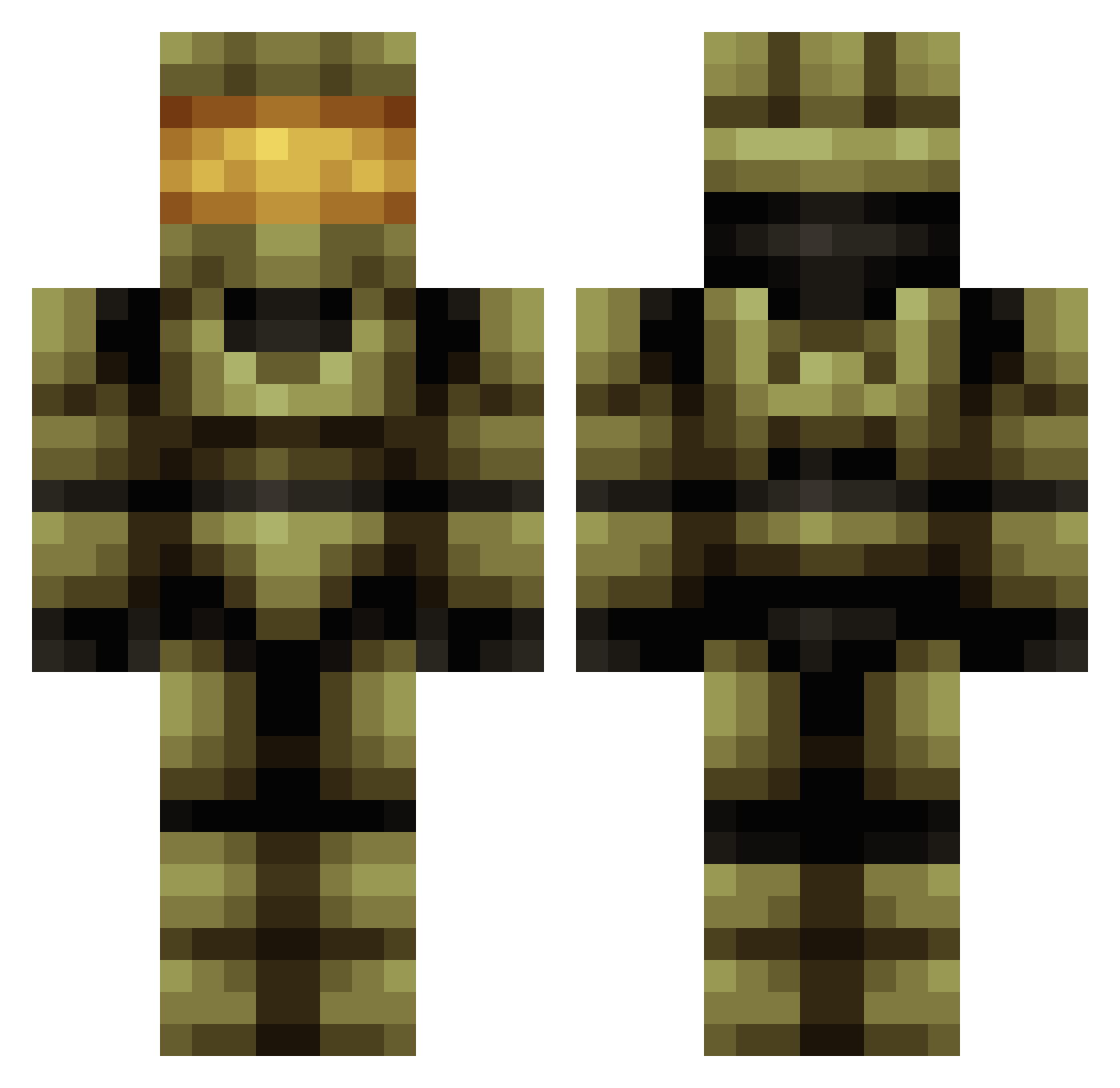
Current Minecraft skin of the player RabbiRat, loaded from the official Mojang API. Rotate the 3D model with your mouse or finger, then download the skin as a PNG file and use it in Minecraft: Bedrock Edition or Java Edition for free. When RabbiRat changes their skin, this page updates automatically and the old skin stays in the history below.
Other players with this skin (419)
RabbiRat was the 56th player we have seen with this skin, first spotted on 09.08.2026. The same skin was seen on these players. Open a nickname to see their current skin and skin history.
 Jumbomilch TheSenate94 AceKippers Fraggysama Navist Starsi Ruska_Karo Kombvt IamFerr infestedmedic RaccoonBoy005 Hakai95 Darkslicer666 nxtPrime JJboy22 finnedge WesJH ArcticRevolution PANUETF OCEANwave219 TapeMan01 Maverick_8977 ElSepul 0Frozen ChonKun123 YHL2010 tahalomaster SumoSKa MrAndo96 Gwachtler ThatGuyNick29 Mr_Claus1 Brusk490 IchbinJC
 X5176 Quinndude16 MRHERDODO DAT_BUCK SmokeeInVR TimoJay0 Newern berni2022 _Meopolis_ Wilderdudler AAnanAAnan Whit3Fire CATZILLA664 TheTurtleMAN47 MeatOfLoaf23 xuguangxi BamaDaveG Jacob_898 mkg111 fuxiai999 Pechol77 luisvillalpando1 Splgd YvngSoljah IDCGOAWAY GrantDotExe
More Master Chief Minecraft skins
See all 526 Master Chief skins
How to install the RabbiRat skin
- Press the Download button above to save the skin as a PNG file.
- Minecraft: Bedrock Edition (PE): open the Dressing Room from the main menu (or tap your character → Edit Character), go to Classic Skins → Owned, press the + (new skin) button, choose the downloaded PNG and pick the Classic (Steve) model. Works on PC and mobile; consoles cannot import custom skins.
- Minecraft: Java Edition: open the Minecraft Launcher, go to the Skins tab, click New Skin, load the PNG, pick the Classic (Steve) model and press Save & Use. You can also upload it at minecraft.net → Profile → Change Skin.
The skin does not show up after import - what should I do?
Restart Minecraft and open the Dressing Room again - imported skins sometimes appear only after a restart. Also make sure you selected the imported skin and picked the Classic (Steve) model.
Which model should I choose, Classic or Slim?
This skin is designed for the Classic (Steve) model. If you pick the wrong model, the arms of the skin will look stretched or squeezed.
Is the skin of RabbiRat free to download?
Yes. Press Download, save the PNG file and use it in Minecraft: Bedrock Edition or Java Edition - no payment or registration needed. The skin also works on multiplayer servers and Realms.
More skins
Looking for more? Go back to all Minecraft skins and check the top skins of the week, month and all time, or find any player's skin by nickname.