
P1cky - Minecraft Skins & Skin History
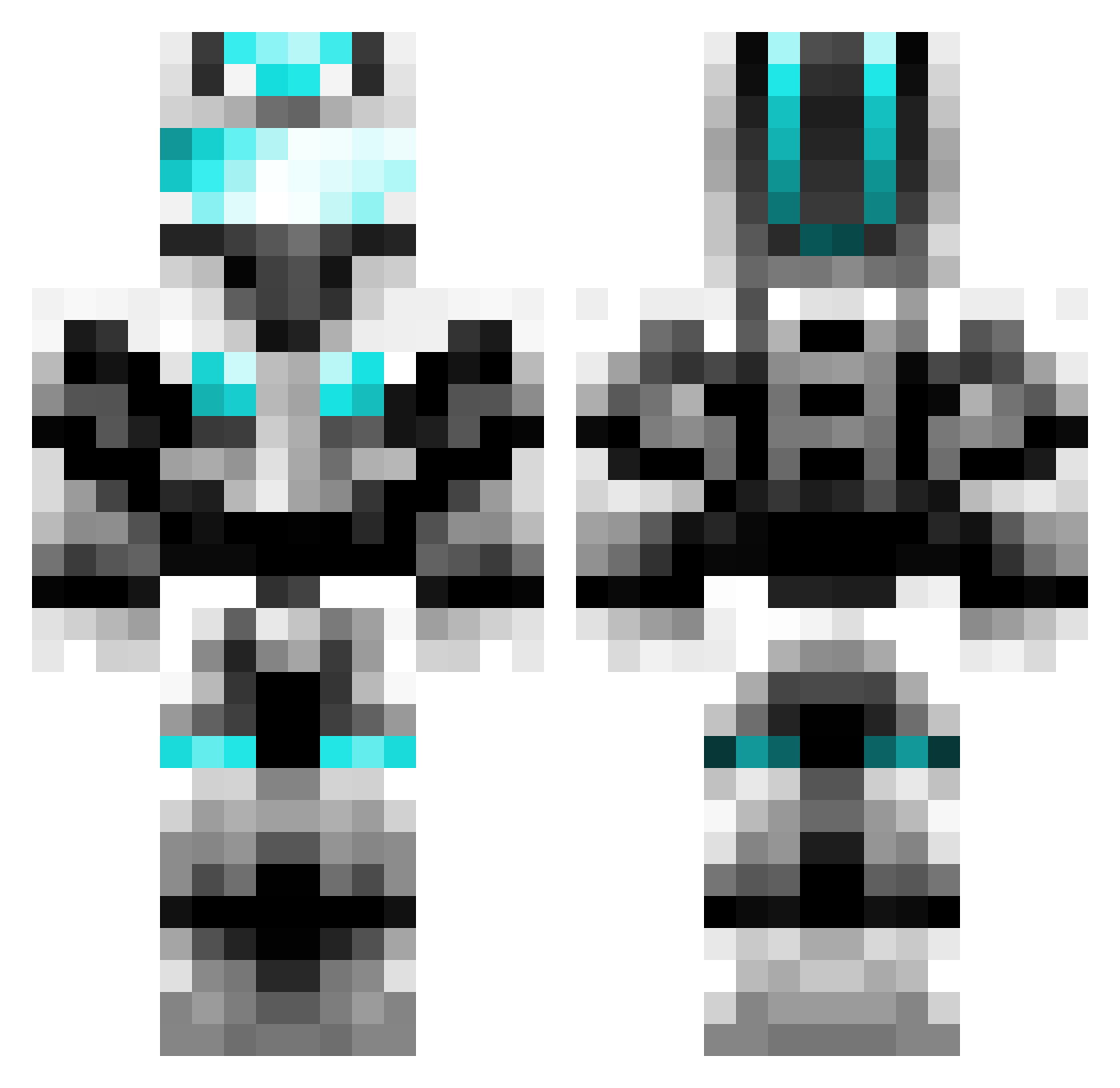
Current Minecraft skin of the player P1cky, loaded from the official Mojang API. Rotate the 3D model with your mouse or finger, then download the skin as a PNG file and use it in Minecraft: Bedrock Edition or Java Edition for free. When P1cky changes their skin, this page updates automatically and the old skin stays in the history below.
Other players with this skin (601)
P1cky was the 357th player we have seen with this skin, first spotted on 20.09.2026. The same skin was seen on these players. Open a nickname to see their current skin and skin history.
 Aligenc Beastmeneer riopallant123 walter_03 niti8 BadBenja Butterman1662 descoladores skilletmax Stoutalot Mineplayer_Fabi Ferniex Ryuken978 redwolf2000 Maggist skullboy21 bigben1385 SdTaiga Sir_Pinky 1Lukasz DarkForce987 XxFuryxX BEagles13 Xanthanarium Raymora Jint0 DrAssassins TheManHimself69 InformalDave Amish_Llama Ddyan Eon_Paladin giovanny111 ShengFengWuYingZ AlarmBanana Bruns1103 Link67lol BlackNocturn UltraDragon156 PyroticIon G1ngerus J4A4 Hunter4144 Ozzymortal INFERN0257 beating254 ruffysdeshon sptavi Ethan18071 John_Krmp chidude1 tomgalaxy99 MobkillerX Wujuson DaBeve95 mcdayday winnie9200 Nerd_me37 RKBallin apsbuilder13
More Cyber Soldier Minecraft skins
See all 43 Cyber Soldier skins
How to install the P1cky skin
- Press the Download button above to save the skin as a PNG file.
- Minecraft: Bedrock Edition (PE): open the Dressing Room from the main menu (or tap your character → Edit Character), go to Classic Skins → Owned, press the + (new skin) button, choose the downloaded PNG and pick the Classic (Steve) model. Works on PC and mobile; consoles cannot import custom skins.
- Minecraft: Java Edition: open the Minecraft Launcher, go to the Skins tab, click New Skin, load the PNG, pick the Classic (Steve) model and press Save & Use. You can also upload it at minecraft.net → Profile → Change Skin.
The skin does not show up after import - what should I do?
Restart Minecraft and open the Dressing Room again - imported skins sometimes appear only after a restart. Also make sure you selected the imported skin and picked the Classic (Steve) model.
Which model should I choose, Classic or Slim?
This skin is designed for the Classic (Steve) model. If you pick the wrong model, the arms of the skin will look stretched or squeezed.
Is the skin of P1cky free to download?
Yes. Press Download, save the PNG file and use it in Minecraft: Bedrock Edition or Java Edition - no payment or registration needed. The skin also works on multiplayer servers and Realms.
More skins
Looking for more? Go back to all Minecraft skins and check the top skins of the week, month and all time, or find any player's skin by nickname.