
Noris15 - Minecraft Skins & Skin History
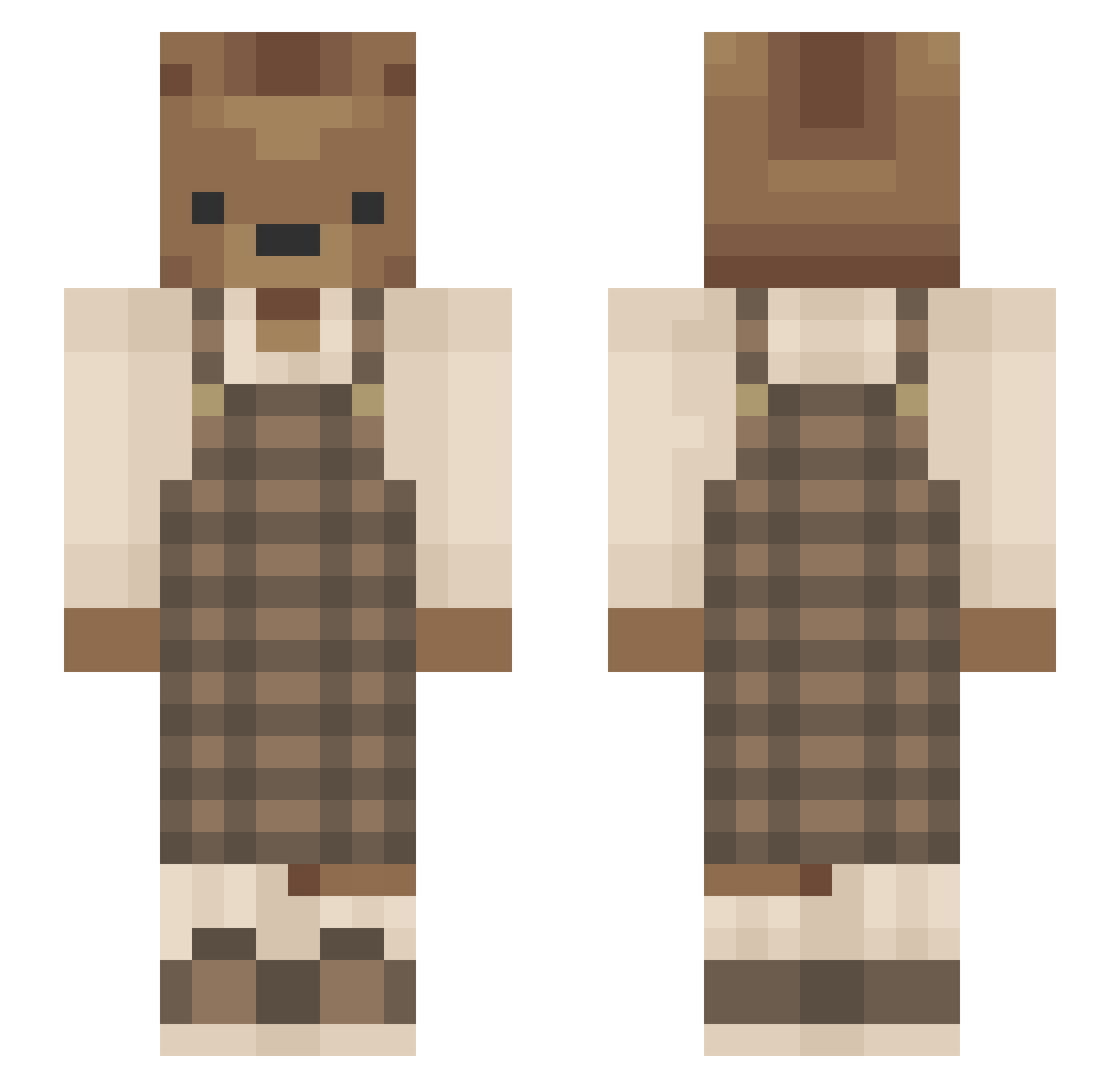
Current Minecraft skin of the player Noris15, loaded from the official Mojang API. Rotate the 3D model with your mouse or finger, then download the skin as a PNG file and use it in Minecraft: Bedrock Edition or Java Edition for free. When Noris15 changes their skin, this page updates automatically and the old skin stays in the history below.
Other players with this skin (637)
Noris15 was the 399th player we have seen with this skin, first spotted on 07.10.2026. The same skin was seen on these players. Open a nickname to see their current skin and skin history.
 notPxrish Bobobear678 Kika_a Sweetenerdan Terex5505 fsinetga0419 Elinuh ShadowWhite507 Verdamis1 appie2002 Do0cero Colorful ryebread97 Lecya misk0bisk0 Filoo8 Vallmou autumnvy Taylorgk 3mrey TinkerHatfield pipocalypse Hiyeshello_ RileyStark christopher4331 Lilo_Cat DanielHeide melodraamaa wuwucathy jesscollinss QueenMoran Mayootje Jady__ shewantstoleague thasara Erikmittet yutiwa xDilla NickAbi Woooly ioncannon2 BakedCookie0000 imshi2k SNAJJANG Snorlax1605 ZappinEm Paddington28 Myuoo Chyoe404 DasLeoni_ Carmellamoon Dadstix Leviathantic AaronHoy philkostecki feversend P0tatje Kostek123_YT M1sssy_ SaggingCactus
More Bear Minecraft skins
How to install the Noris15 skin
- Press the Download button above to save the skin as a PNG file.
- Minecraft: Bedrock Edition (PE): open the Dressing Room from the main menu (or tap your character → Edit Character), go to Classic Skins → Owned, press the + (new skin) button, choose the downloaded PNG and pick the Slim (Alex) model. Works on PC and mobile; consoles cannot import custom skins.
- Minecraft: Java Edition: open the Minecraft Launcher, go to the Skins tab, click New Skin, load the PNG, pick the Slim (Alex) model and press Save & Use. You can also upload it at minecraft.net → Profile → Change Skin.
The skin does not show up after import - what should I do?
Restart Minecraft and open the Dressing Room again - imported skins sometimes appear only after a restart. Also make sure you selected the imported skin and picked the Slim (Alex) model.
Which model should I choose, Classic or Slim?
This skin is designed for the Slim (Alex) model. If you pick the wrong model, the arms of the skin will look stretched or squeezed.
Is the skin of Noris15 free to download?
Yes. Press Download, save the PNG file and use it in Minecraft: Bedrock Edition or Java Edition - no payment or registration needed. The skin also works on multiplayer servers and Realms.
More skins
Looking for more? Go back to all Minecraft skins and check the top skins of the week, month and all time, or find any player's skin by nickname.