
NoahOKC - Minecraft Skins & Skin History
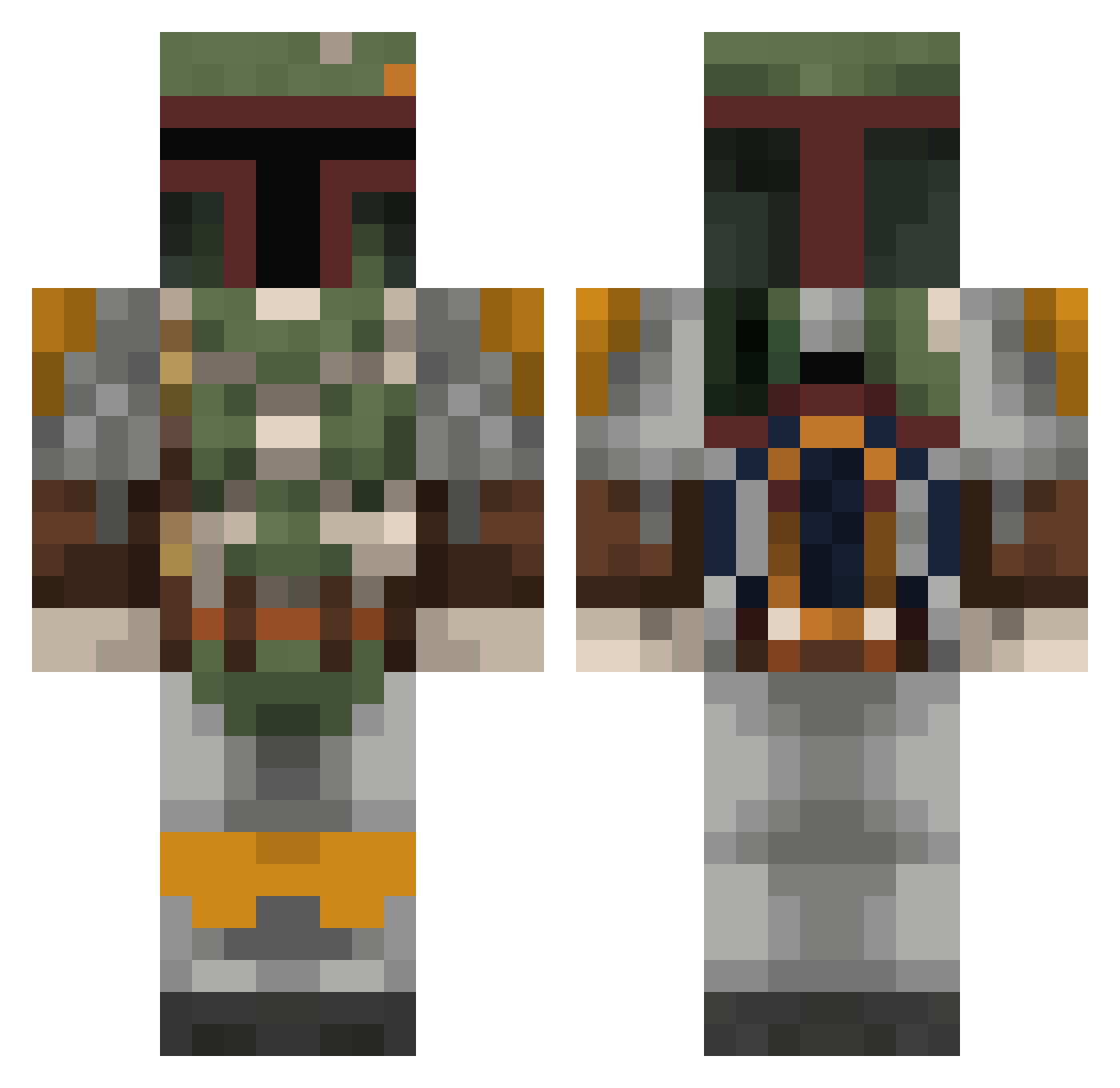
Current Minecraft skin of the player NoahOKC, loaded from the official Mojang API. Rotate the 3D model with your mouse or finger, then download the skin as a PNG file and use it in Minecraft: Bedrock Edition or Java Edition for free. When NoahOKC changes their skin, this page updates automatically and the old skin stays in the history below.
Other players with this skin (350)
NoahOKC was the 56th player we have seen with this skin, first spotted on 11.08.2026. The same skin was seen on these players. Open a nickname to see their current skin and skin history.
 zebrapant_spidey Hyonis Peyton7247 Chunkystuff Skulussa JCryptic77 TheDarkKnight667 Delicious_Beef BPthing DevourerOfPies Paulie19 Mandrek25 swagstark44444 foshmo Ender482 MrFrypan12 RichCoopa Duc939 Gamemas24 Machi4v3lly Royston1889 RoccoR321 flow2006
 RAIIIID Redremote Big_Burna420 draculias LankyBuoy KingRobb_Stark Klbklb Phiron DrCa99 milankzz As_0 JSchaust WhiskeyInDixie RookG Gmanstar echidnamitch12 Erebos2310 Just1cletus KCordero BasketBaller3364 bl1ni SBSpirou MMHGaming xRednaxelanx Potzer_ DuhEvaa MikaMeppel OhHenry92 samlinwc Tobolf90 Verien scaretoad BangryFett FatChawBongWater kutabangos irowboat_ Armageddon7100
More Boba Fett Minecraft skins
How to install the NoahOKC skin
- Press the Download button above to save the skin as a PNG file.
- Minecraft: Bedrock Edition (PE): open the Dressing Room from the main menu (or tap your character → Edit Character), go to Classic Skins → Owned, press the + (new skin) button, choose the downloaded PNG and pick the Classic (Steve) model. Works on PC and mobile; consoles cannot import custom skins.
- Minecraft: Java Edition: open the Minecraft Launcher, go to the Skins tab, click New Skin, load the PNG, pick the Classic (Steve) model and press Save & Use. You can also upload it at minecraft.net → Profile → Change Skin.
The skin does not show up after import - what should I do?
Restart Minecraft and open the Dressing Room again - imported skins sometimes appear only after a restart. Also make sure you selected the imported skin and picked the Classic (Steve) model.
Which model should I choose, Classic or Slim?
This skin is designed for the Classic (Steve) model. If you pick the wrong model, the arms of the skin will look stretched or squeezed.
Is the skin of NoahOKC free to download?
Yes. Press Download, save the PNG file and use it in Minecraft: Bedrock Edition or Java Edition - no payment or registration needed. The skin also works on multiplayer servers and Realms.
More skins
Looking for more? Go back to all Minecraft skins and check the top skins of the week, month and all time, or find any player's skin by nickname.