
NimbuSet_ - Minecraft Skins & Skin History
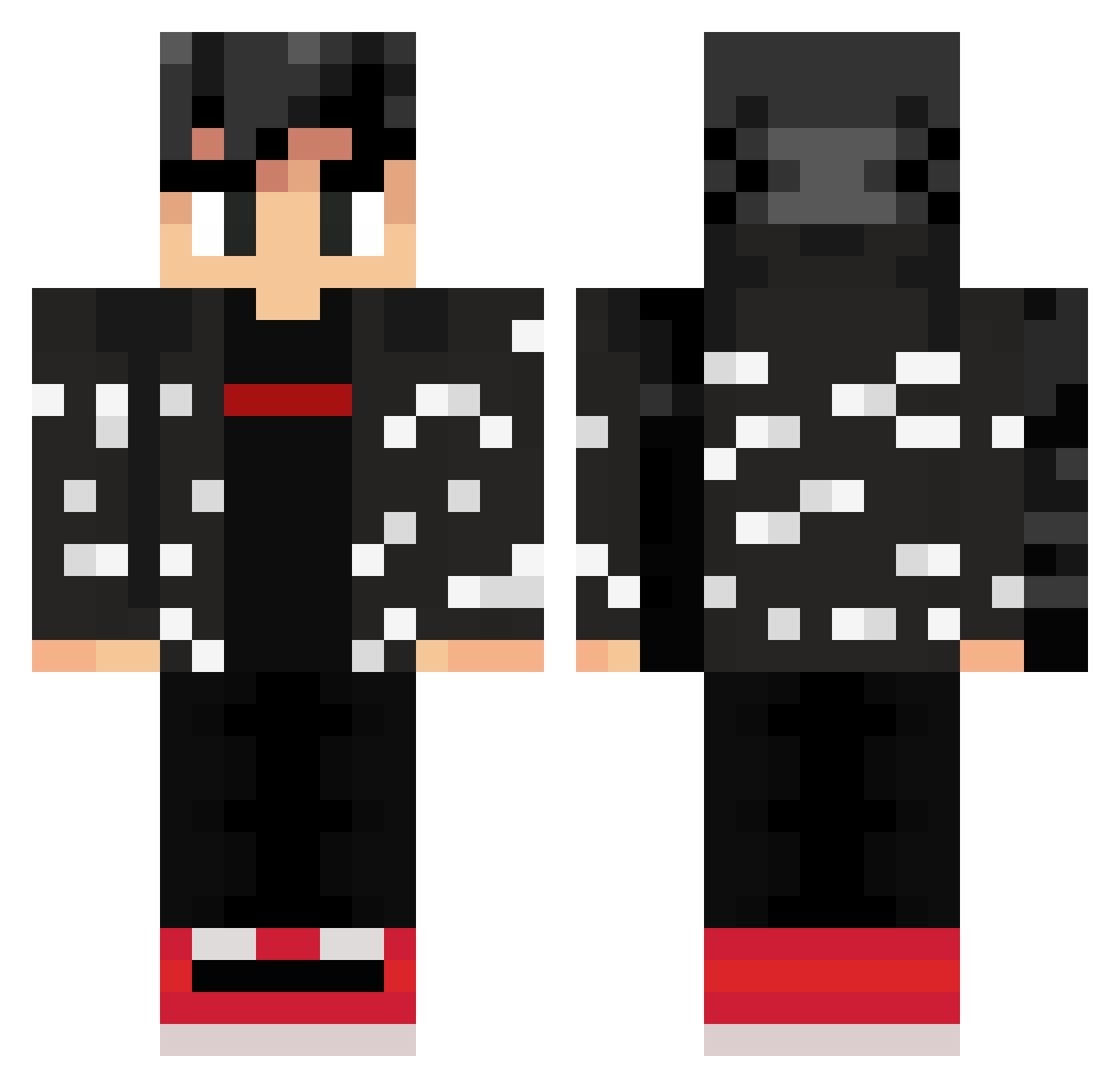
Current Minecraft skin of the player NimbuSet_, loaded from the official Mojang API. Rotate the 3D model with your mouse or finger, then download the skin as a PNG file and use it in Minecraft: Bedrock Edition or Java Edition for free. When NimbuSet_ changes their skin, this page updates automatically and the old skin stays in the history below.
Other players with this skin (309)
NimbuSet_ was the 180th player we have seen with this skin, first spotted on 30.09.2026. The same skin was seen on these players. Open a nickname to see their current skin and skin history.
 MucherOne BigSacc Delfinez the_modery Xx__AA7__xX Thacinicus POGGERLICIOUS raynewalker Gonxk_mattu The_Tacoman13 ThiccBoiRaddles ilytoxin androale Virgo_Goku Haircraft98 Gamble1987 lawlalot Reeyoz Diegoskyburgher Vyasheer Notmono_143 Benjajaw FeliPrax thug_goku Tommytito rhtxd _Portes_ MiamiDB ML4W ElCueca DauDinOzn1337 Alexvil1131 Jojogaming69 iAnsoni Diablo2409 DoctorPeralta SpaxFire Stinkynuts42 Matthew_Is_Fuego Momorigolo SirVaQ lucktwo mastermaves FlavienJuno100 grimrecon69 ilcatta_99 iTzMarziano sinoute natrusoo Wistar93 True3vo Rozasty NutMilky Booredom Tempo69 Dr_Devious10 Silencer107 OMGFULL IzyAngel xWilliam_
More Streetwear Minecraft skins
How to install the NimbuSet_ skin
- Press the Download button above to save the skin as a PNG file.
- Minecraft: Bedrock Edition (PE): open the Dressing Room from the main menu (or tap your character → Edit Character), go to Classic Skins → Owned, press the + (new skin) button, choose the downloaded PNG and pick the Classic (Steve) model. Works on PC and mobile; consoles cannot import custom skins.
- Minecraft: Java Edition: open the Minecraft Launcher, go to the Skins tab, click New Skin, load the PNG, pick the Classic (Steve) model and press Save & Use. You can also upload it at minecraft.net → Profile → Change Skin.
The skin does not show up after import - what should I do?
Restart Minecraft and open the Dressing Room again - imported skins sometimes appear only after a restart. Also make sure you selected the imported skin and picked the Classic (Steve) model.
Which model should I choose, Classic or Slim?
This skin is designed for the Classic (Steve) model. If you pick the wrong model, the arms of the skin will look stretched or squeezed.
Is the skin of NimbuSet_ free to download?
Yes. Press Download, save the PNG file and use it in Minecraft: Bedrock Edition or Java Edition - no payment or registration needed. The skin also works on multiplayer servers and Realms.
More skins
Looking for more? Go back to all Minecraft skins and check the top skins of the week, month and all time, or find any player's skin by nickname.