
NexusBR4 - Minecraft Skins & Skin History
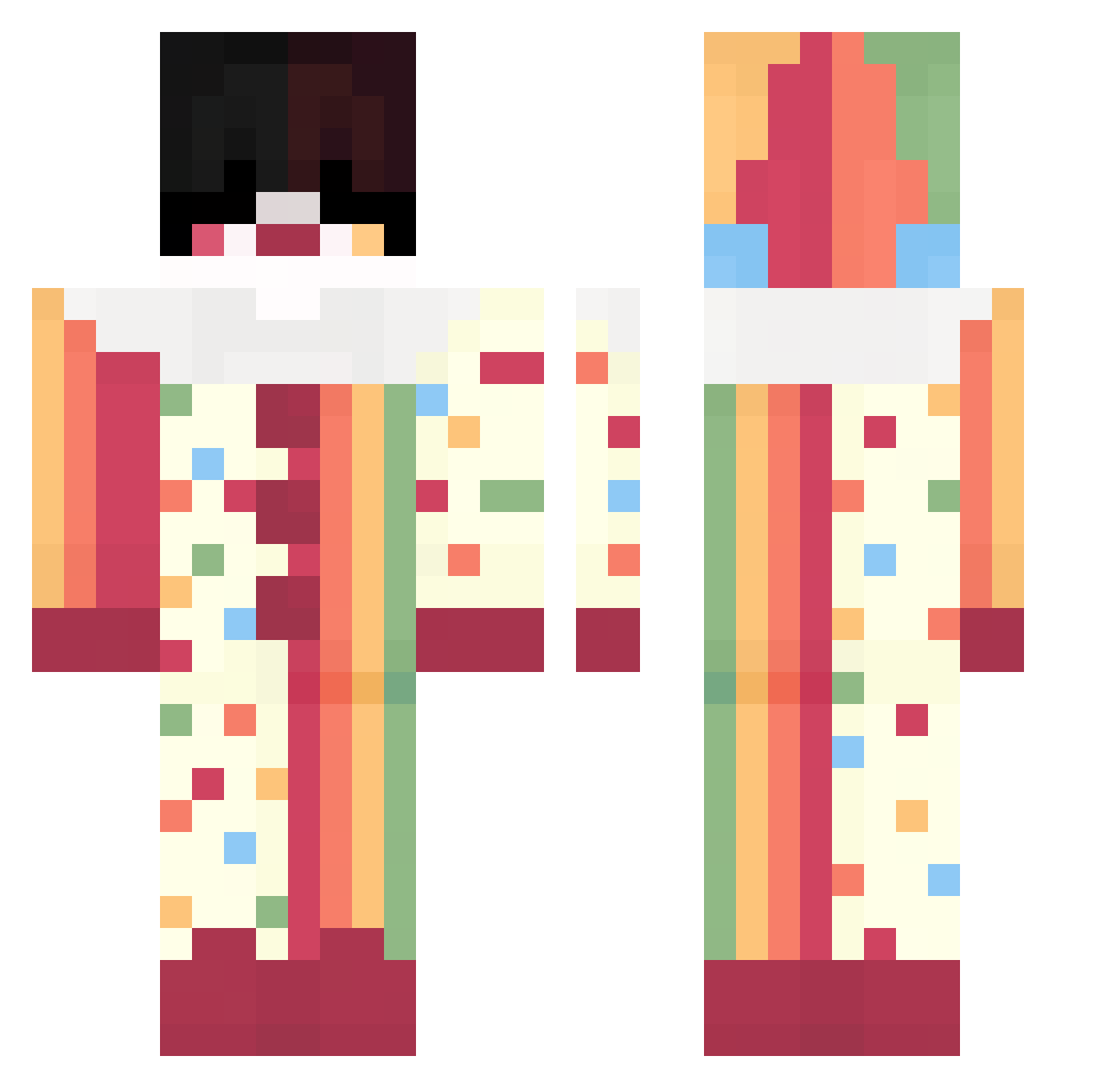
Current Minecraft skin of the player NexusBR4, loaded from the official Mojang API. Rotate the 3D model with your mouse or finger, then download the skin as a PNG file and use it in Minecraft: Bedrock Edition or Java Edition for free. When NexusBR4 changes their skin, this page updates automatically and the old skin stays in the history below.
Other players with this skin (64)
NexusBR4 was the 19th player we have seen with this skin, first spotted on 31.08.2026. The same skin was seen on these players. Open a nickname to see their current skin and skin history.
 Slapz600
 oBotinho
 9F3NTaNL V07ume Posuwacz AllExort qxez_ iim_Dark
 bloodyshield skibitary spxnglle FL4M3z IdkIGJayson Aptofobia Geykyume Krypt1cx Kayayayay ucalleddani SUB_3_
 __Kau__
 Veedixowy Talpa_europaea b1kzz ZevyZ_ RicardoFazMC pawtheticboy Wafaruu
 SmartBaKu LuckasF5 RockinDaNorth NoahEscarlata Ninja_Dan1el Choconostleee Tai2603
 pfod BUBS0N Satoru_Ilovemygf ne_cromanxer Port_guy embraxis DGlebD Staxzzzzz SuperNovaStarr metaniz Lwean5151 drcreeperxo BetterYeti UwUorNo Mukadinho BubblesOnWater younesmerzo rave3EmVob42 ZxLostxZ iwuwa Aleny_V AlanDuck corz51 Getax_01 Chesco1011 CyberrNic
More Jester Minecraft skins
How to install the NexusBR4 skin
- Press the Download button above to save the skin as a PNG file.
- Minecraft: Bedrock Edition (PE): open the Dressing Room from the main menu (or tap your character → Edit Character), go to Classic Skins → Owned, press the + (new skin) button, choose the downloaded PNG and pick the Classic (Steve) model. Works on PC and mobile; consoles cannot import custom skins.
- Minecraft: Java Edition: open the Minecraft Launcher, go to the Skins tab, click New Skin, load the PNG, pick the Classic (Steve) model and press Save & Use. You can also upload it at minecraft.net → Profile → Change Skin.
The skin does not show up after import - what should I do?
Restart Minecraft and open the Dressing Room again - imported skins sometimes appear only after a restart. Also make sure you selected the imported skin and picked the Classic (Steve) model.
Which model should I choose, Classic or Slim?
This skin is designed for the Classic (Steve) model. If you pick the wrong model, the arms of the skin will look stretched or squeezed.
Is the skin of NexusBR4 free to download?
Yes. Press Download, save the PNG file and use it in Minecraft: Bedrock Edition or Java Edition - no payment or registration needed. The skin also works on multiplayer servers and Realms.
More skins
Looking for more? Go back to all Minecraft skins and check the top skins of the week, month and all time, or find any player's skin by nickname.