
N_Elliot - Minecraft Skins & Skin History
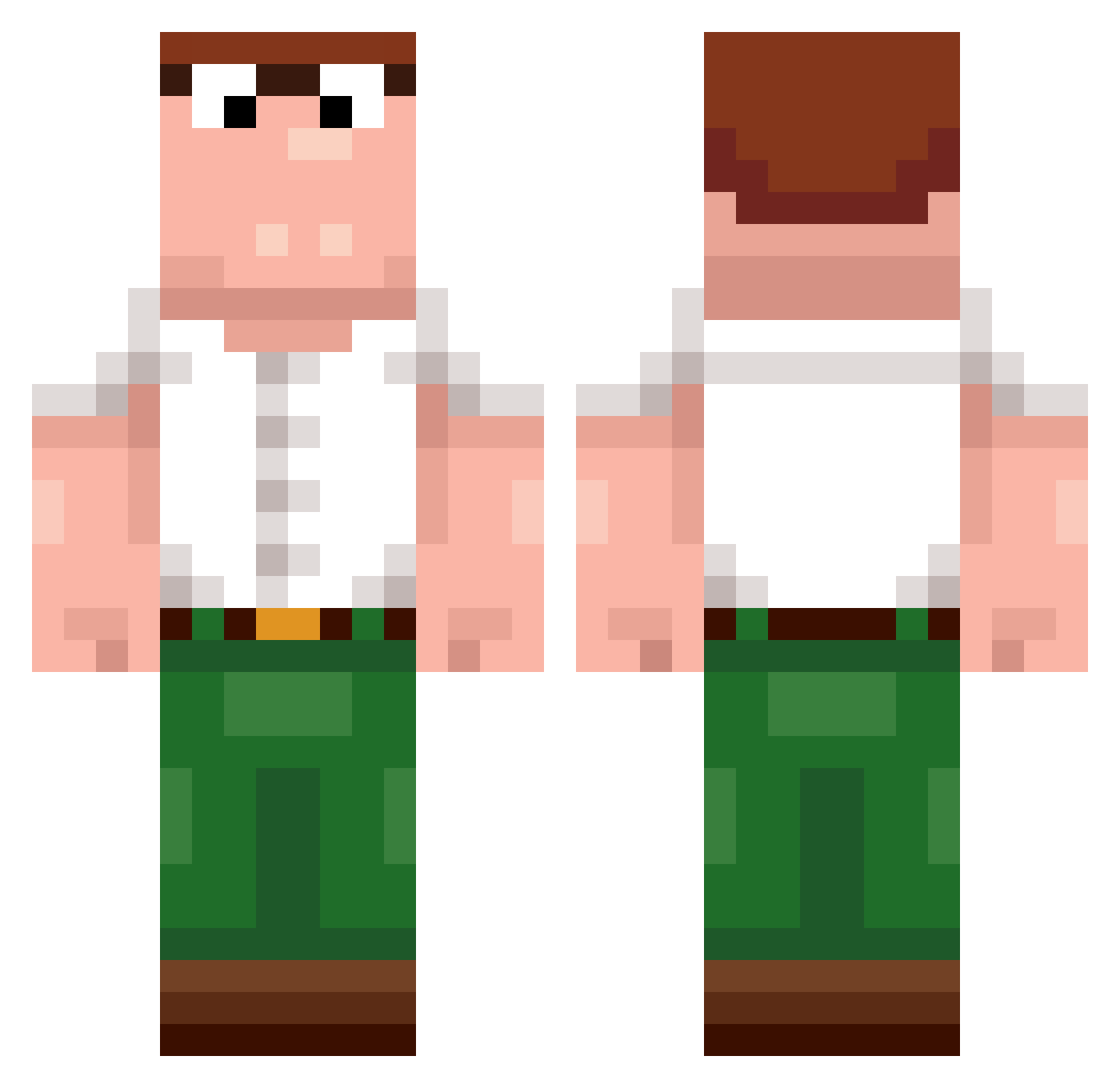
Current Minecraft skin of the player N_Elliot, loaded from the official Mojang API. Rotate the 3D model with your mouse or finger, then download the skin as a PNG file and use it in Minecraft: Bedrock Edition or Java Edition for free. When N_Elliot changes their skin, this page updates automatically and the old skin stays in the history below.
Other players with this skin (389)
N_Elliot was the 161st player we have seen with this skin, first spotted on 30.08.2026. The same skin was seen on these players. Open a nickname to see their current skin and skin history.
 mesutbedwarss
 Diddi1 Sidaaaaa Frostwalless zuado IcedArrow anton_po Cudiepie1 bojack_horsman Chicken0722
 Cqntaloupe badwers kimmo5833 Flurff Randalehoernchen lilanas 0Dion0 BayQvI MoritzGMB Dihless LovingDog analizim Toekage_ Pr0player77 MineralMincer Ig0tIk GOOFnOFF Hunto143 SivAdr2607 Stackai HowMuchCps d4y_Huzz_yf2 JohnRave Sihaidashuai Ashh_09 0Dewier 213n Xameleontas okaytimm Jbux7 the_l0nely_guy SmokeyWorld74490
 Veloci_Rex873 iiiniveddd zangez Dewiirrzz Vaes2 Varoon03 Paster_VN MoggedByMrSticks Lefloe_123 hytm_exe mihaha fwahh Dewier098 Idiot92423 Ricardo520520 illwasted MafiaSlime_ Dankey_
More Peter Griffin Minecraft skins
See all 204 Peter Griffin skins
How to install the N_Elliot skin
- Press the Download button above to save the skin as a PNG file.
- Minecraft: Bedrock Edition (PE): open the Dressing Room from the main menu (or tap your character → Edit Character), go to Classic Skins → Owned, press the + (new skin) button, choose the downloaded PNG and pick the Classic (Steve) model. Works on PC and mobile; consoles cannot import custom skins.
- Minecraft: Java Edition: open the Minecraft Launcher, go to the Skins tab, click New Skin, load the PNG, pick the Classic (Steve) model and press Save & Use. You can also upload it at minecraft.net → Profile → Change Skin.
The skin does not show up after import - what should I do?
Restart Minecraft and open the Dressing Room again - imported skins sometimes appear only after a restart. Also make sure you selected the imported skin and picked the Classic (Steve) model.
Which model should I choose, Classic or Slim?
This skin is designed for the Classic (Steve) model. If you pick the wrong model, the arms of the skin will look stretched or squeezed.
Is the skin of N_Elliot free to download?
Yes. Press Download, save the PNG file and use it in Minecraft: Bedrock Edition or Java Edition - no payment or registration needed. The skin also works on multiplayer servers and Realms.
More skins
Looking for more? Go back to all Minecraft skins and check the top skins of the week, month and all time, or find any player's skin by nickname.