
Myvernx - Minecraft Skins & Skin History
Current Minecraft skin of the player Myvernx, loaded from the official Mojang API. Rotate the 3D model with your mouse or finger, then download the skin as a PNG file and use it in Minecraft: Bedrock Edition or Java Edition for free. When Myvernx changes their skin, this page updates automatically and the old skin stays in the history below.
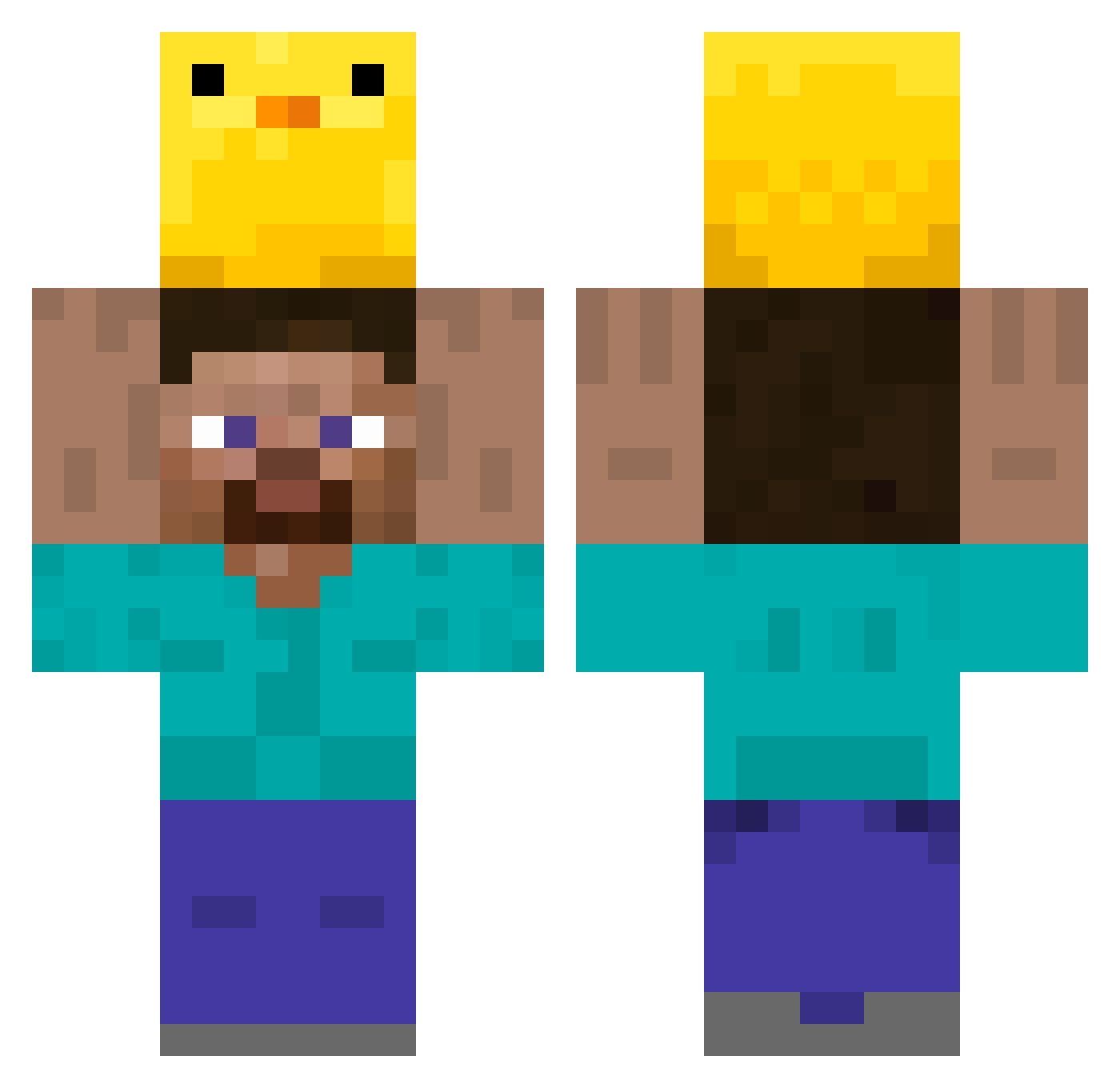
Other players with this skin (349)
Myvernx was the 99th player we have seen with this skin, first spotted on 27.08.2026. The same skin was seen on these players. Open a nickname to see their current skin and skin history.
 Karaam Crascraft Pastelzinho69 YozgatKANGALI66 wjllll buriburi666 Briefsnow OhGoshABug Nltr0boost Sendone Grougale Cynicaltown BekamDBZ Cotoboo Leo66115 Supafirehot56 trickters zCaioW egarcor Time2572 yakou___ tdatyler Rapuru kazumadarck
 Lirsad ImTom46 LauseLarry hvigs austj EatPantLol tzi_Icolz_06_15 Nest440 molladuck Taitai2263 Chales95 i1stz Yea6752 iEmersonn Zozobarjo LucaTraditional BoHRo4 Im_Tom16 Lores_SVK Jorgim456 zalalala RockShip92 BeeLee1988 SeaturtleRat FOR_YOURSELF LDJ14514 n3gativa Daminouu FATAZEN bell_xy DDD_blue JuanitoChavez eunsung450 S1kzzz Isiox59 alienjun1
More Holding Duck Minecraft skins
How to install the Myvernx skin
- Press the Download button above to save the skin as a PNG file.
- Minecraft: Bedrock Edition (PE): open the Dressing Room from the main menu (or tap your character → Edit Character), go to Classic Skins → Owned, press the + (new skin) button, choose the downloaded PNG and pick the Classic (Steve) model. Works on PC and mobile; consoles cannot import custom skins.
- Minecraft: Java Edition: open the Minecraft Launcher, go to the Skins tab, click New Skin, load the PNG, pick the Classic (Steve) model and press Save & Use. You can also upload it at minecraft.net → Profile → Change Skin.
The skin does not show up after import - what should I do?
Restart Minecraft and open the Dressing Room again - imported skins sometimes appear only after a restart. Also make sure you selected the imported skin and picked the Classic (Steve) model.
Which model should I choose, Classic or Slim?
This skin is designed for the Classic (Steve) model. If you pick the wrong model, the arms of the skin will look stretched or squeezed.
Is the skin of Myvernx free to download?
Yes. Press Download, save the PNG file and use it in Minecraft: Bedrock Edition or Java Edition - no payment or registration needed. The skin also works on multiplayer servers and Realms.
More skins
Looking for more? Go back to all Minecraft skins and check the top skins of the week, month and all time, or find any player's skin by nickname.