
Murphysama - Minecraft Skins & Skin History
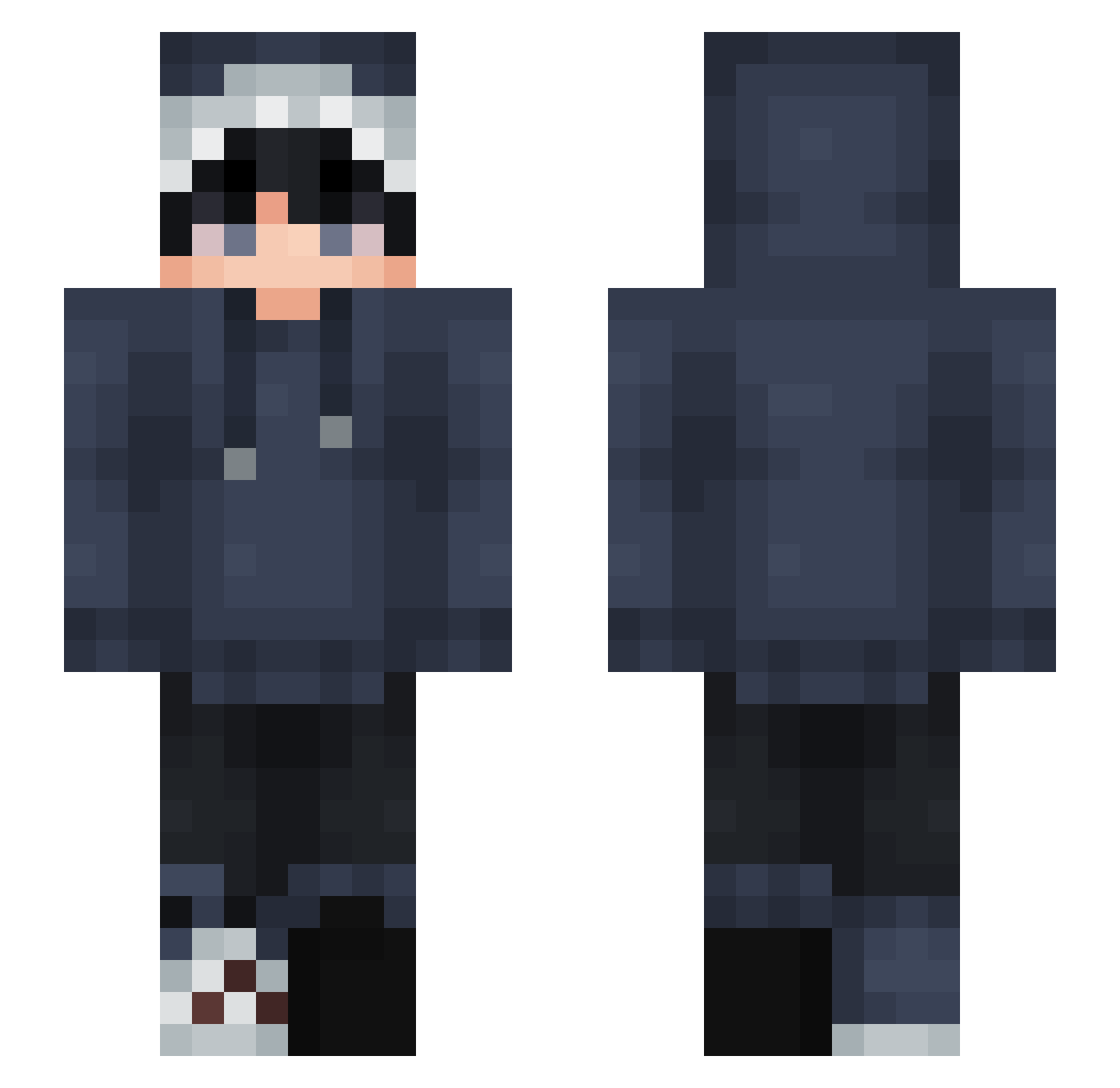
Current Minecraft skin of the player Murphysama, loaded from the official Mojang API. Rotate the 3D model with your mouse or finger, then download the skin as a PNG file and use it in Minecraft: Bedrock Edition or Java Edition for free. When Murphysama changes their skin, this page updates automatically and the old skin stays in the history below.
Other players with this skin (877)
Murphysama was the 351st player we have seen with this skin, first spotted on 10.09.2026. The same skin was seen on these players. Open a nickname to see their current skin and skin history.
 CACHAI DirtyFrog1005 rister233 GuyOnCyberspace Rinyu87 LmaoTaiga SharkeyT fresh_lettuce831 Octopiet GymCrafter Alexyellow13 ace_cool1122 tomari1227 Jameseer Hei_zai6 EinfachnurGustaf lace451k jeepivi19 Slatedd Belido violeteever Flytelz LogicWilliam 2125398 GGGaming666 AwkwardSnpai Lemir_ Joakitox Myth1_calz Real381 DeathLF8 DonutBrick ShadyDog PoPoli0 Calamitous2 jia_xin07 m0X_X0m BXLY__ LilBucky19 harry1101 TinyySushii R3unch mad_face SaltyPenguin5654 Hikarun3433 seekara py_m1n Natsu_0825 LaJiaoww SharkBite1904 __lumpy__ Pup_Universe 0bananahead0 oTaKaRakamo shaoyuan
 Icefalll wyflc GaHo_00 Junrow Chan_Mark
How to install the Murphysama skin
- Press the Download button above to save the skin as a PNG file.
- Minecraft: Bedrock Edition (PE): open the Dressing Room from the main menu (or tap your character → Edit Character), go to Classic Skins → Owned, press the + (new skin) button, choose the downloaded PNG and pick the Slim (Alex) model. Works on PC and mobile; consoles cannot import custom skins.
- Minecraft: Java Edition: open the Minecraft Launcher, go to the Skins tab, click New Skin, load the PNG, pick the Slim (Alex) model and press Save & Use. You can also upload it at minecraft.net → Profile → Change Skin.
The skin does not show up after import - what should I do?
Restart Minecraft and open the Dressing Room again - imported skins sometimes appear only after a restart. Also make sure you selected the imported skin and picked the Slim (Alex) model.
Which model should I choose, Classic or Slim?
This skin is designed for the Slim (Alex) model. If you pick the wrong model, the arms of the skin will look stretched or squeezed.
Is the skin of Murphysama free to download?
Yes. Press Download, save the PNG file and use it in Minecraft: Bedrock Edition or Java Edition - no payment or registration needed. The skin also works on multiplayer servers and Realms.
More skins
Looking for more? Go back to all Minecraft skins and check the top skins of the week, month and all time, or find any player's skin by nickname.