
MonkeyDestroyer8 - Minecraft Skins & Skin History
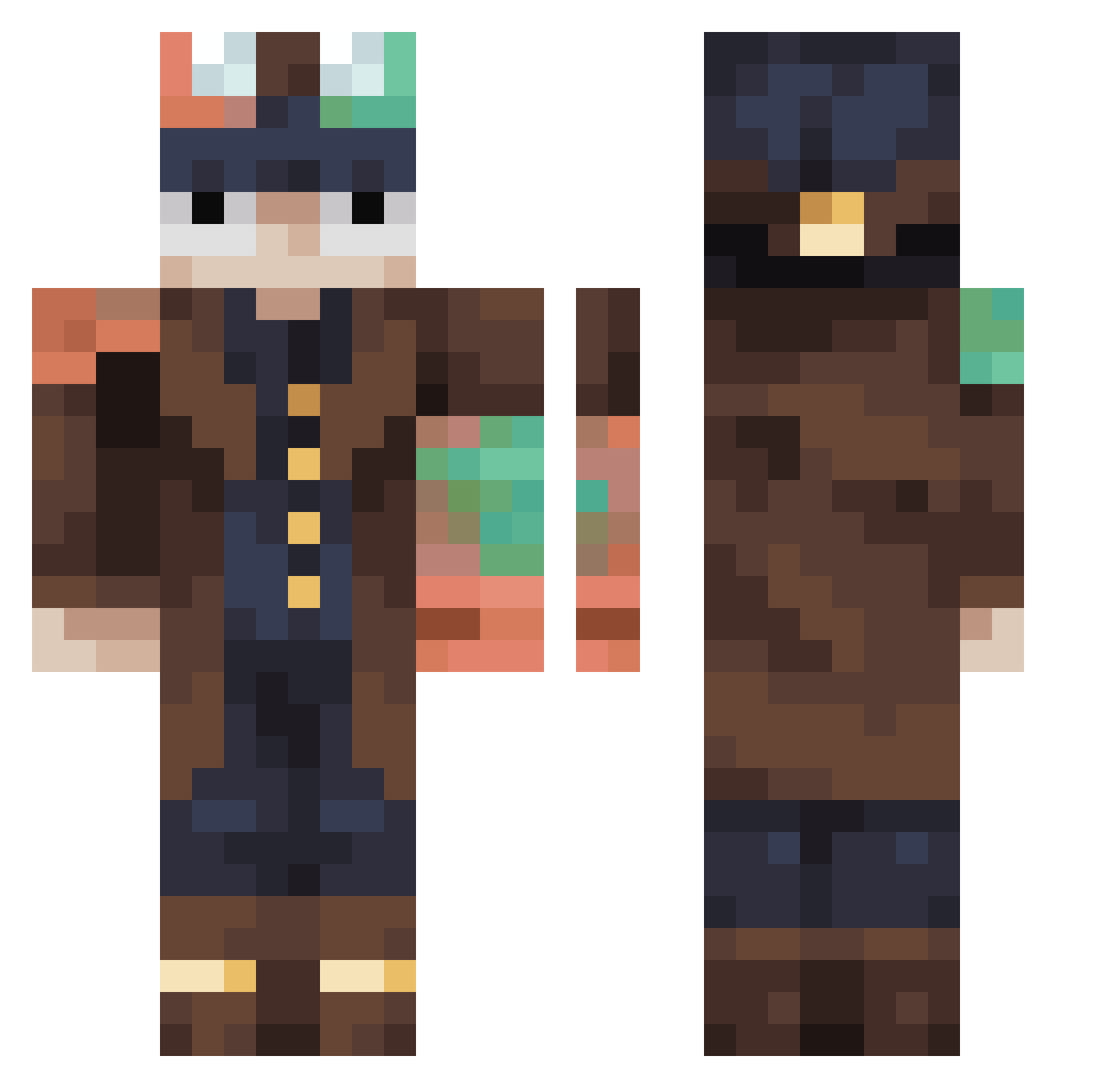
Current Minecraft skin of the player MonkeyDestroyer8, loaded from the official Mojang API. Rotate the 3D model with your mouse or finger, then download the skin as a PNG file and use it in Minecraft: Bedrock Edition or Java Edition for free. When MonkeyDestroyer8 changes their skin, this page updates automatically and the old skin stays in the history below.
Other players with this skin (457)
MonkeyDestroyer8 was the 29th player we have seen with this skin, first spotted on 31.07.2026. The same skin was seen on these players. Open a nickname to see their current skin and skin history.
 Schwupsi123
 Jovi1806 TZUSPC PaieFilho
 kloverov POSER92 WiktorKarate KingCoullion speedwobbles Sensei1256 christeeple macdonag progame1323 DragonSlayer1396 piece9326 un_men01 LucklessStoner Marteaux32
 TTVdingo22 Holtsendorf1 DOMINIKMC
 Fietzilla
 Woundxpme Fanzosdaddy EKLER41K_E4G Okarunv stava3918
 woodguyjake _Shaula_ SuperFartMaster4
 Threed0n Mirono05 TweedyMirror614
 Yairchoki kubaszczep Blonk_1 BlueFireKnightYT
 S_H_Q qwilzy2
 Gus556 FactNat andrewcromwell Zekester86 HIGHTRINITY NicPlayHD Vanzara
 CoruptedPurple
 Ziizuu tacocat138 kbk2024
 pinkangelie Sendman1001 lallo174 Kazukima_ Melnik710 ALFADESTROYER Olps_06
 HRHWJL ZXZek NicFN
More Steampunk Minecraft skins
How to install the MonkeyDestroyer8 skin
- Press the Download button above to save the skin as a PNG file.
- Minecraft: Bedrock Edition (PE): open the Dressing Room from the main menu (or tap your character → Edit Character), go to Classic Skins → Owned, press the + (new skin) button, choose the downloaded PNG and pick the Classic (Steve) model. Works on PC and mobile; consoles cannot import custom skins.
- Minecraft: Java Edition: open the Minecraft Launcher, go to the Skins tab, click New Skin, load the PNG, pick the Classic (Steve) model and press Save & Use. You can also upload it at minecraft.net → Profile → Change Skin.
The skin does not show up after import - what should I do?
Restart Minecraft and open the Dressing Room again - imported skins sometimes appear only after a restart. Also make sure you selected the imported skin and picked the Classic (Steve) model.
Which model should I choose, Classic or Slim?
This skin is designed for the Classic (Steve) model. If you pick the wrong model, the arms of the skin will look stretched or squeezed.
Is the skin of MonkeyDestroyer8 free to download?
Yes. Press Download, save the PNG file and use it in Minecraft: Bedrock Edition or Java Edition - no payment or registration needed. The skin also works on multiplayer servers and Realms.
More skins
Looking for more? Go back to all Minecraft skins and check the top skins of the week, month and all time, or find any player's skin by nickname.