
MissYinnn - Minecraft Skins & Skin History
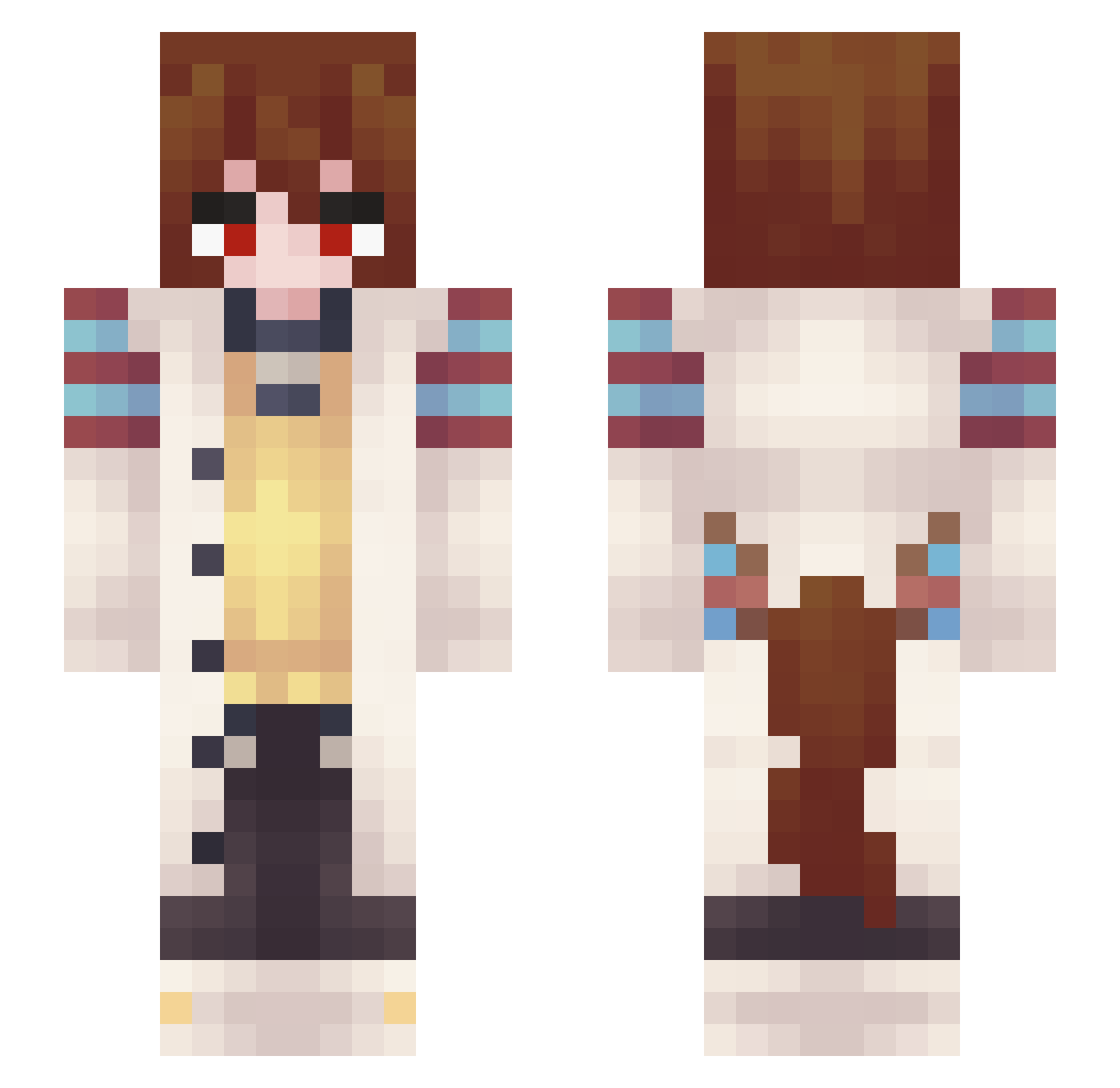
Current Minecraft skin of the player MissYinnn, loaded from the official Mojang API. Rotate the 3D model with your mouse or finger, then download the skin as a PNG file and use it in Minecraft: Bedrock Edition or Java Edition for free. When MissYinnn changes their skin, this page updates automatically and the old skin stays in the history below.
Other players with this skin (347)
MissYinnn was the 259th player we have seen with this skin, first spotted on 11.10.2026. The same skin was seen on these players. Open a nickname to see their current skin and skin history.
 Anigay SmokeJaguar SelocoTTV ROOROOKI LLuggage EricMO987 SPLOFLES No_no_ka ResbGG Jeruzalee ydaremo Night_TDS gelogtz Anzerg joonanh1475 reveroFremaG EGG_NOG_DOG sleepyrandom aladdin1573 Caramel_Pudding DasKomepetenz Frantifan BananerBread LingTong53 jqzer GingyTheGlock ignition123 Xx_Thad_xX CosmicTrio _SBR nez_chyon VicThorTheDemon Nicknak4004 Tartre KyosukeTheZero WrappedBurrito FrostieWuff enmafr meowzus_sr Keendarkman60 kirbo12546 scootalooty MrDominik2 vantasise Mitzi_Mitzi buttcrackistan Merilan Zifley jjkfan_1 Cake4Life_ SocolinSS frizzybman11 Stov0 Mortymate PiuPiup14 elod3k Misterrtp SpartanKeys Cowbruv24 Shilfre
More Anime Girl Minecraft skins
See all 13665 Anime Girl skins
How to install the MissYinnn skin
- Press the Download button above to save the skin as a PNG file.
- Minecraft: Bedrock Edition (PE): open the Dressing Room from the main menu (or tap your character → Edit Character), go to Classic Skins → Owned, press the + (new skin) button, choose the downloaded PNG and pick the Slim (Alex) model. Works on PC and mobile; consoles cannot import custom skins.
- Minecraft: Java Edition: open the Minecraft Launcher, go to the Skins tab, click New Skin, load the PNG, pick the Slim (Alex) model and press Save & Use. You can also upload it at minecraft.net → Profile → Change Skin.
The skin does not show up after import - what should I do?
Restart Minecraft and open the Dressing Room again - imported skins sometimes appear only after a restart. Also make sure you selected the imported skin and picked the Slim (Alex) model.
Which model should I choose, Classic or Slim?
This skin is designed for the Slim (Alex) model. If you pick the wrong model, the arms of the skin will look stretched or squeezed.
Is the skin of MissYinnn free to download?
Yes. Press Download, save the PNG file and use it in Minecraft: Bedrock Edition or Java Edition - no payment or registration needed. The skin also works on multiplayer servers and Realms.
More skins
Looking for more? Go back to all Minecraft skins and check the top skins of the week, month and all time, or find any player's skin by nickname.