
MineveR1 - Minecraft Skins & Skin History
Current Minecraft skin of the player MineveR1, loaded from the official Mojang API. Rotate the 3D model with your mouse or finger, then download the skin as a PNG file and use it in Minecraft: Bedrock Edition or Java Edition for free. When MineveR1 changes their skin, this page updates automatically and the old skin stays in the history below.
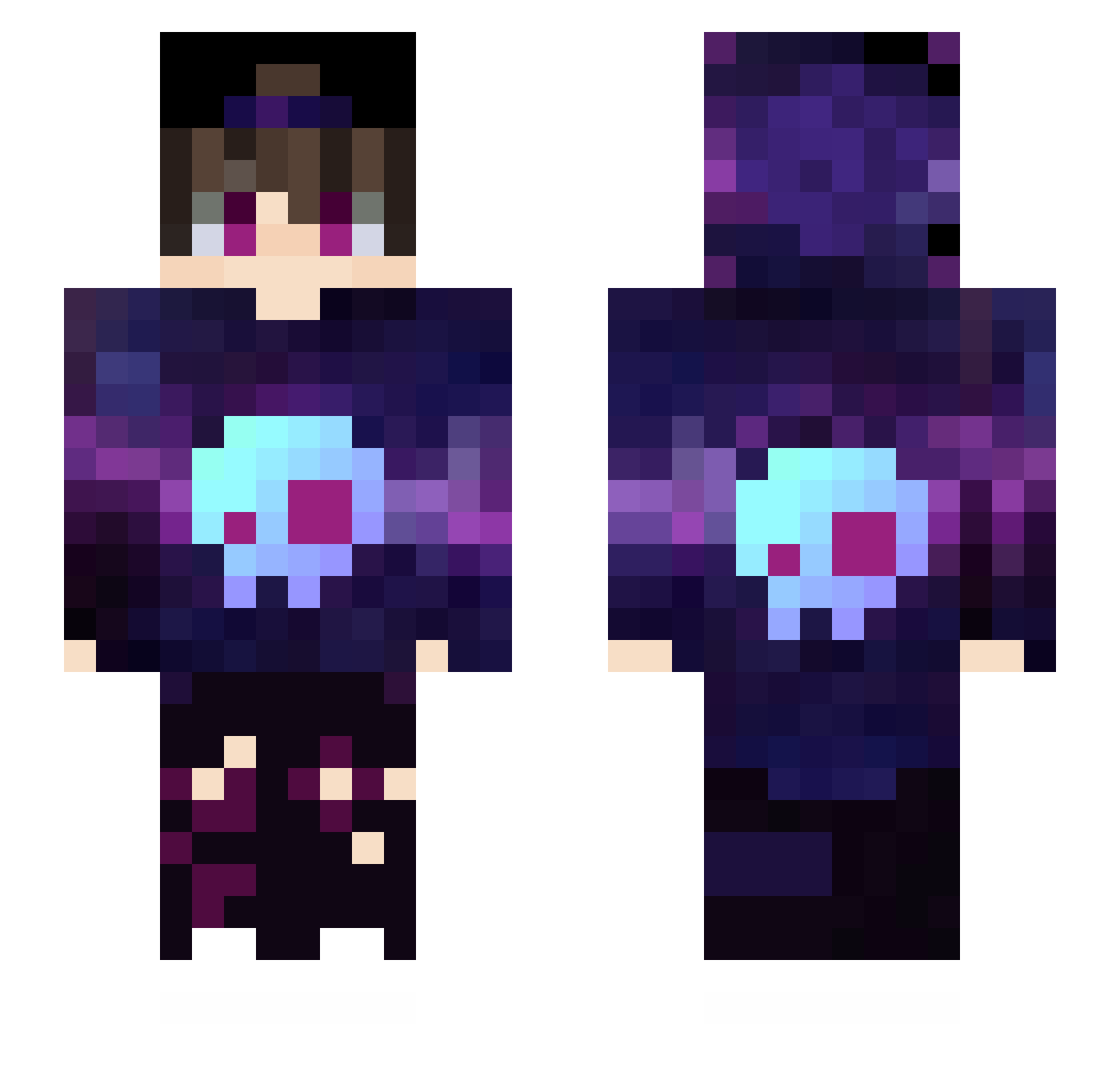
Other players with this skin (170)
MineveR1 was the 14th player we have seen with this skin, first spotted on 28.07.2026. The same skin was seen on these players. Open a nickname to see their current skin and skin history.
 longd118 IGIDai Evorex VCX_Xcwla Leonskiboyskadee
 Hokuru25 Closer996 nature0man kao_xiang abv520 Mao_Zia lu___ren SKUUUUU Ax1sss Auroral_LiQiu ExhaustPipe bIlacKk ZoroSo7 CiayCou zhan__kong xF1sh Kevinkyy LmaoBokisha xChocq Liuguicheng Duan_Ge Du_q BlackCat142 Shaun1216_TW WangFanChen Flamexshadow CHIZHILONG Scarecrowx JieYi_Love Yyan02 Luo____ye Echo_element masterawa CarinAyy jimengud UnscriptedReborn Knight251 Super_Invincible HeaYum hywc Bluesky_Li Ovrap JoeTheTallGuy Vegaeld VinceBoyWonder fffdz CHENstary yilmazDOGsit HAJEN200IQ shang573 musicsound1992 KersenS Avalache SpeLerInc BadBoy_l
More Skull Minecraft skins
How to install the MineveR1 skin
- Press the Download button above to save the skin as a PNG file.
- Minecraft: Bedrock Edition (PE): open the Dressing Room from the main menu (or tap your character → Edit Character), go to Classic Skins → Owned, press the + (new skin) button, choose the downloaded PNG and pick the Slim (Alex) model. Works on PC and mobile; consoles cannot import custom skins.
- Minecraft: Java Edition: open the Minecraft Launcher, go to the Skins tab, click New Skin, load the PNG, pick the Slim (Alex) model and press Save & Use. You can also upload it at minecraft.net → Profile → Change Skin.
The skin does not show up after import - what should I do?
Restart Minecraft and open the Dressing Room again - imported skins sometimes appear only after a restart. Also make sure you selected the imported skin and picked the Slim (Alex) model.
Which model should I choose, Classic or Slim?
This skin is designed for the Slim (Alex) model. If you pick the wrong model, the arms of the skin will look stretched or squeezed.
Is the skin of MineveR1 free to download?
Yes. Press Download, save the PNG file and use it in Minecraft: Bedrock Edition or Java Edition - no payment or registration needed. The skin also works on multiplayer servers and Realms.
More skins
Looking for more? Go back to all Minecraft skins and check the top skins of the week, month and all time, or find any player's skin by nickname.