
MineBoggle2000 - Minecraft Skins & Skin History
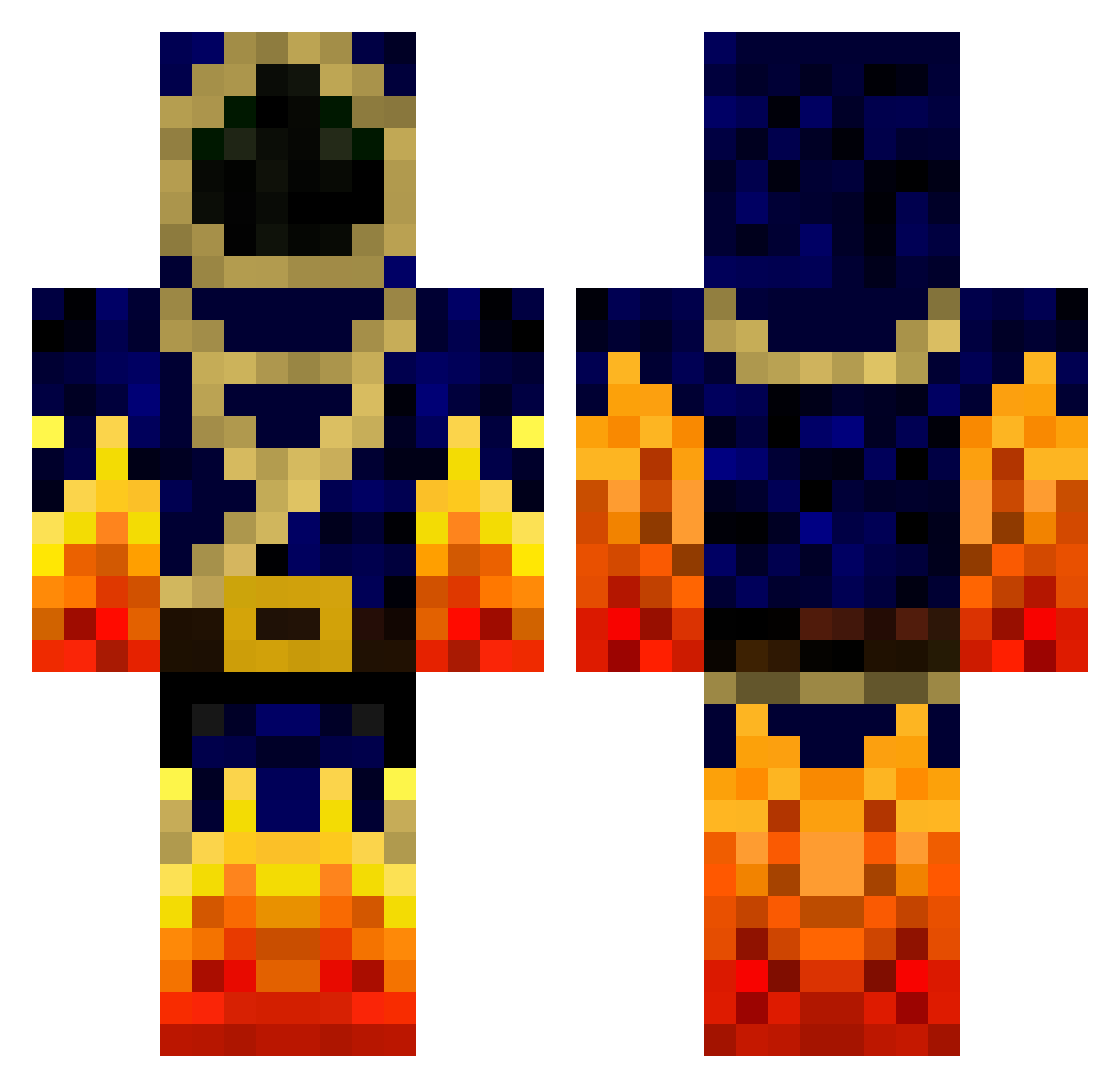
Current Minecraft skin of the player MineBoggle2000, loaded from the official Mojang API. Rotate the 3D model with your mouse or finger, then download the skin as a PNG file and use it in Minecraft: Bedrock Edition or Java Edition for free. When MineBoggle2000 changes their skin, this page updates automatically and the old skin stays in the history below.
Other players with this skin (778)
MineBoggle2000 was the 546th player we have seen with this skin, first spotted on 10.10.2026. The same skin was seen on these players. Open a nickname to see their current skin and skin history.
 griefer212 _jeasy23 CCZZXX diesa87 Jiscuz 0lympik iknowmyname33 Sir_Bolts Buddaboy24 _UltimatuM_ Axberg131 arion24 Evan200416 Ser4don mrginger01 Torchfist YO_FROGGY looni7 jcook50 DragonBall108 LORDRIFT98 spookyb00 Firedemon360 shadow_reaper14 Henceforth123 Zmelte Pandanium colton325 deivitf11 RiceAndPea Spanishlord13 RedstoneRun Manguth strijdheld roman0624 LilCreeper5696 Toxiquo gmh12345612 blaggbaskalla jola91 FredoBeutlin sean43mine1 TheBrain95 xfintux bigjshark vincent221999 Boa516 Tonxix deryogurt96 blackbreeze2 Tats13 ziyakaz yPhy Kaotic_wrath CSDette IateYourBacon erikhammarlund02 denidj1998 ZREX22 temp97685
More Mage Minecraft skins
How to install the MineBoggle2000 skin
- Press the Download button above to save the skin as a PNG file.
- Minecraft: Bedrock Edition (PE): open the Dressing Room from the main menu (or tap your character → Edit Character), go to Classic Skins → Owned, press the + (new skin) button, choose the downloaded PNG and pick the Classic (Steve) model. Works on PC and mobile; consoles cannot import custom skins.
- Minecraft: Java Edition: open the Minecraft Launcher, go to the Skins tab, click New Skin, load the PNG, pick the Classic (Steve) model and press Save & Use. You can also upload it at minecraft.net → Profile → Change Skin.
The skin does not show up after import - what should I do?
Restart Minecraft and open the Dressing Room again - imported skins sometimes appear only after a restart. Also make sure you selected the imported skin and picked the Classic (Steve) model.
Which model should I choose, Classic or Slim?
This skin is designed for the Classic (Steve) model. If you pick the wrong model, the arms of the skin will look stretched or squeezed.
Is the skin of MineBoggle2000 free to download?
Yes. Press Download, save the PNG file and use it in Minecraft: Bedrock Edition or Java Edition - no payment or registration needed. The skin also works on multiplayer servers and Realms.
More skins
Looking for more? Go back to all Minecraft skins and check the top skins of the week, month and all time, or find any player's skin by nickname.