
MikolajMC - Minecraft Skins & Skin History
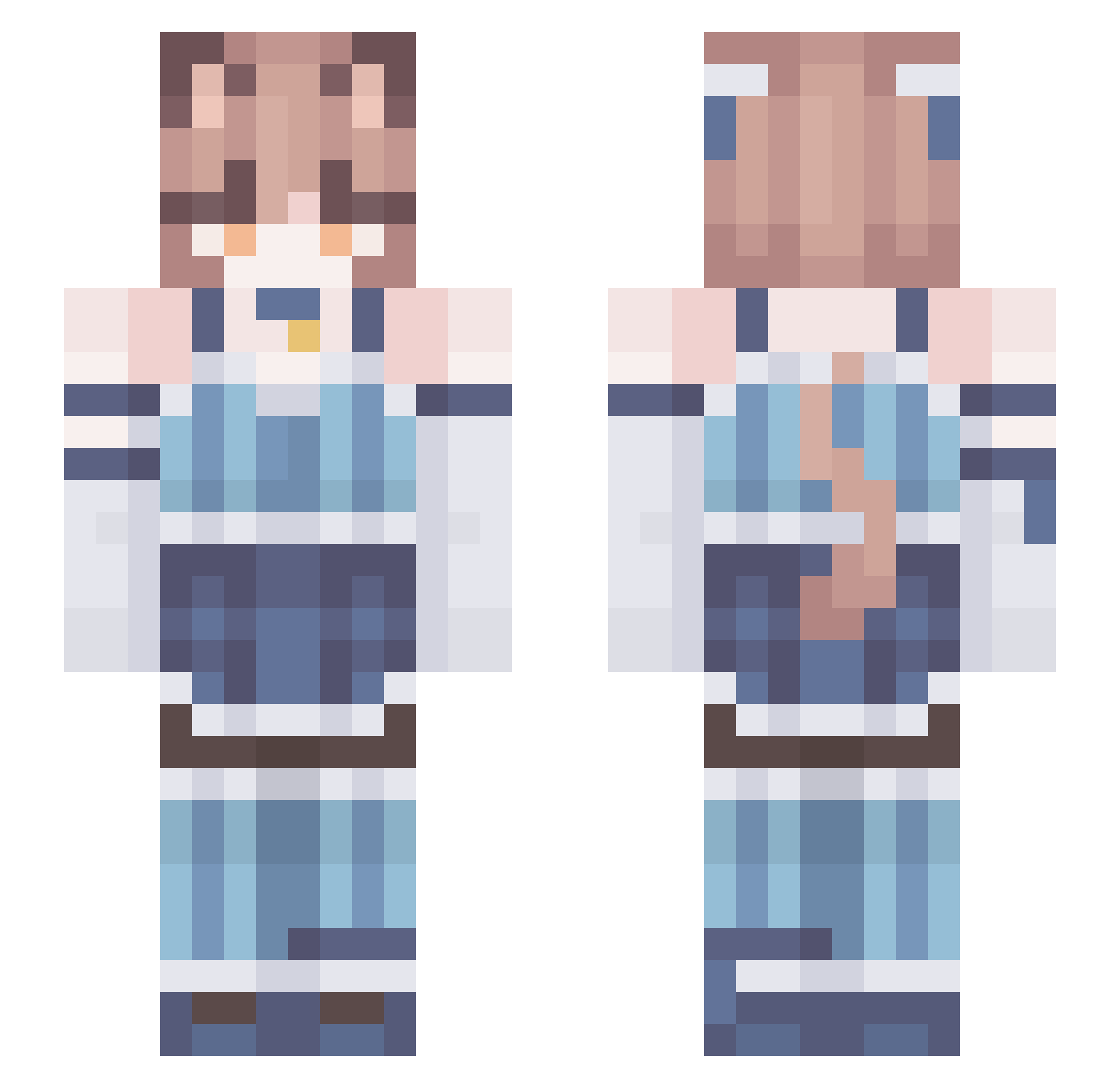
Current Minecraft skin of the player MikolajMC, loaded from the official Mojang API. Rotate the 3D model with your mouse or finger, then download the skin as a PNG file and use it in Minecraft: Bedrock Edition or Java Edition for free. When MikolajMC changes their skin, this page updates automatically and the old skin stays in the history below.
Other players with this skin (219)
MikolajMC was the 119th player we have seen with this skin, first spotted on 21.09.2026. The same skin was seen on these players. Open a nickname to see their current skin and skin history.
 Zelion1234 UwU_Nezumi_UwU Kitsu_16 derbrecher1224 SVET0U Indeedquestion RODZ_EE xKaelix ForkillinMaid Neige001 StarMishz Moran1110 noxjjlite Hilmen LesserButter GorillaGasse emir12000 TrApNyAn Coolman2333 apoastro requiemforyoou Symposim TreDerp meatworm_ DoubleSide6829 SpeechlessXDXD D1ad paqtom ZaynGMG Nikaimeni ScruftyBoy UraniumOre92 Radfree KittySune peregrimes pegparty CloudV2 Shadowstar0 femboysakura To_Jest_Arbuz TheArbiter YNF_Sheep typical_mayo wojtek225 Tu3na Seren1n OceXXes sindu_ GenaDosvidos 82v paradiseeeee JoliOlie EchidnasTeaLover sp4cy_ MagicalPyro uripex plywood42 fjordglimper D4RKS33R popfizz195
More Collar Minecraft skins
How to install the MikolajMC skin
- Press the Download button above to save the skin as a PNG file.
- Minecraft: Bedrock Edition (PE): open the Dressing Room from the main menu (or tap your character → Edit Character), go to Classic Skins → Owned, press the + (new skin) button, choose the downloaded PNG and pick the Slim (Alex) model. Works on PC and mobile; consoles cannot import custom skins.
- Minecraft: Java Edition: open the Minecraft Launcher, go to the Skins tab, click New Skin, load the PNG, pick the Slim (Alex) model and press Save & Use. You can also upload it at minecraft.net → Profile → Change Skin.
The skin does not show up after import - what should I do?
Restart Minecraft and open the Dressing Room again - imported skins sometimes appear only after a restart. Also make sure you selected the imported skin and picked the Slim (Alex) model.
Which model should I choose, Classic or Slim?
This skin is designed for the Slim (Alex) model. If you pick the wrong model, the arms of the skin will look stretched or squeezed.
Is the skin of MikolajMC free to download?
Yes. Press Download, save the PNG file and use it in Minecraft: Bedrock Edition or Java Edition - no payment or registration needed. The skin also works on multiplayer servers and Realms.
More skins
Looking for more? Go back to all Minecraft skins and check the top skins of the week, month and all time, or find any player's skin by nickname.