
Meister2211 - Minecraft Skins & Skin History
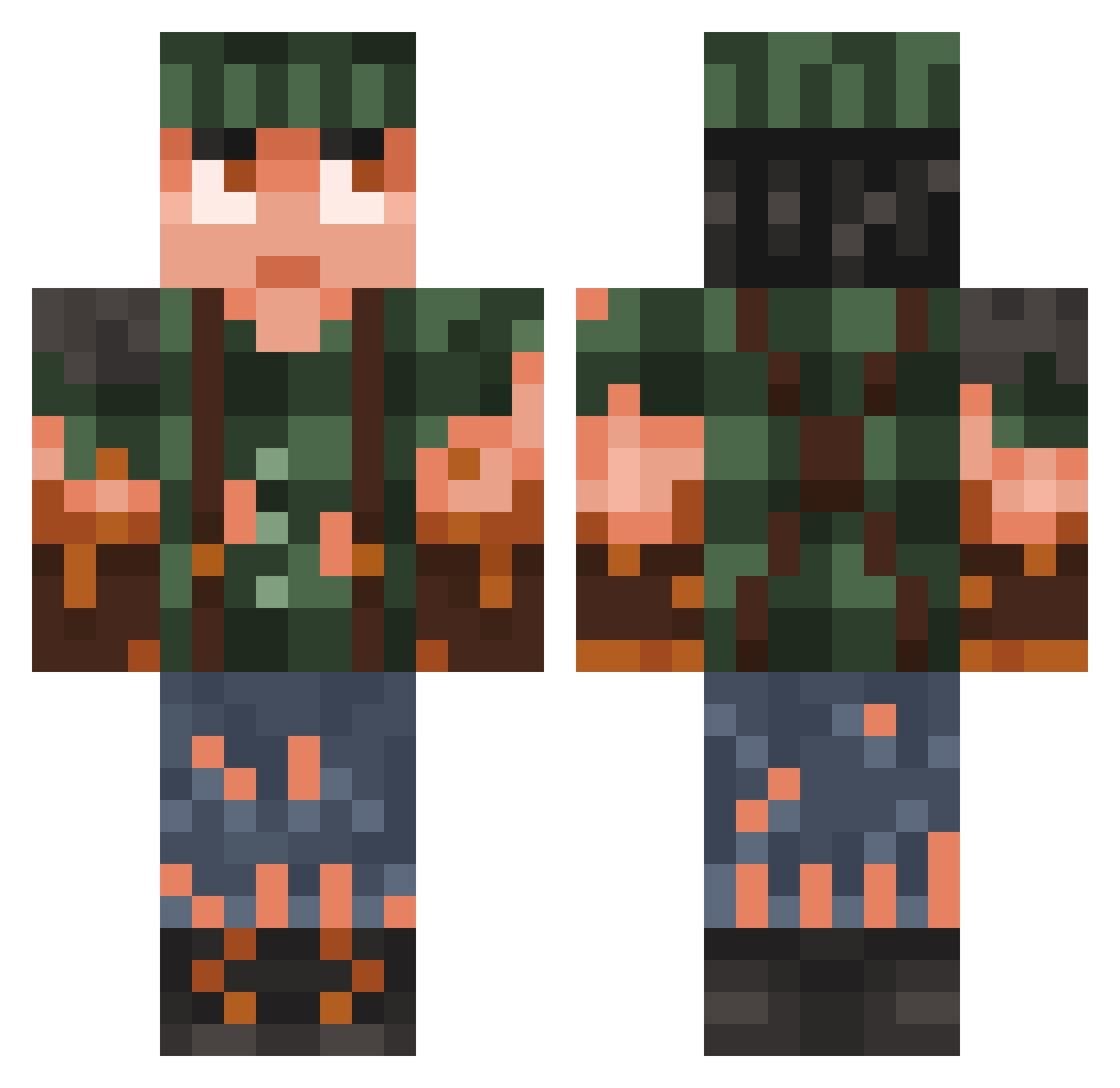
Current Minecraft skin of the player Meister2211, loaded from the official Mojang API. Rotate the 3D model with your mouse or finger, then download the skin as a PNG file and use it in Minecraft: Bedrock Edition or Java Edition for free. When Meister2211 changes their skin, this page updates automatically and the old skin stays in the history below.
Other players with this skin (937)
Meister2211 was the 451st player we have seen with this skin, first spotted on 19.09.2026. The same skin was seen on these players. Open a nickname to see their current skin and skin history.
 Zieronwolf pineappleballs3 Technixz Airbus93 Kahokaa Mythos_juli _KILLTECH_ zorph WurstFuss10 Pearson96x TimG045 Gillwan FARLUIGI9 SeasonsGill DrDoge1 kadogg1296 TheRealMuju Johnny__Utah LjjUN Jarelbert Cpl_Roebuck Krabka74 sweetyrain maniekbudowa bobbythijs Wing1433 ooPati CL_1201 K4lmin EucalyptusAlex SH4RK717 williambeaver69 Bothic Jade_wind Namikaaze EUTobey Fendt102s rlmc Robyca99 FIFIWiFi kabberdk ADA461 Aversejester926 Kemfo Arthurus2409 Drumy87 DasSchinkenbrot ScantGoat B_E_T_Z Thoschka Mylnric IT3R sewa95 PullMeUP Gold_Pigeon_Toe2 ForestLurker asdfmaster reThink23 test4 Tawnel
More Survivor Minecraft skins
How to install the Meister2211 skin
- Press the Download button above to save the skin as a PNG file.
- Minecraft: Bedrock Edition (PE): open the Dressing Room from the main menu (or tap your character → Edit Character), go to Classic Skins → Owned, press the + (new skin) button, choose the downloaded PNG and pick the Classic (Steve) model. Works on PC and mobile; consoles cannot import custom skins.
- Minecraft: Java Edition: open the Minecraft Launcher, go to the Skins tab, click New Skin, load the PNG, pick the Classic (Steve) model and press Save & Use. You can also upload it at minecraft.net → Profile → Change Skin.
The skin does not show up after import - what should I do?
Restart Minecraft and open the Dressing Room again - imported skins sometimes appear only after a restart. Also make sure you selected the imported skin and picked the Classic (Steve) model.
Which model should I choose, Classic or Slim?
This skin is designed for the Classic (Steve) model. If you pick the wrong model, the arms of the skin will look stretched or squeezed.
Is the skin of Meister2211 free to download?
Yes. Press Download, save the PNG file and use it in Minecraft: Bedrock Edition or Java Edition - no payment or registration needed. The skin also works on multiplayer servers and Realms.
More skins
Looking for more? Go back to all Minecraft skins and check the top skins of the week, month and all time, or find any player's skin by nickname.