
MattisOliver - Minecraft Skins & Skin History
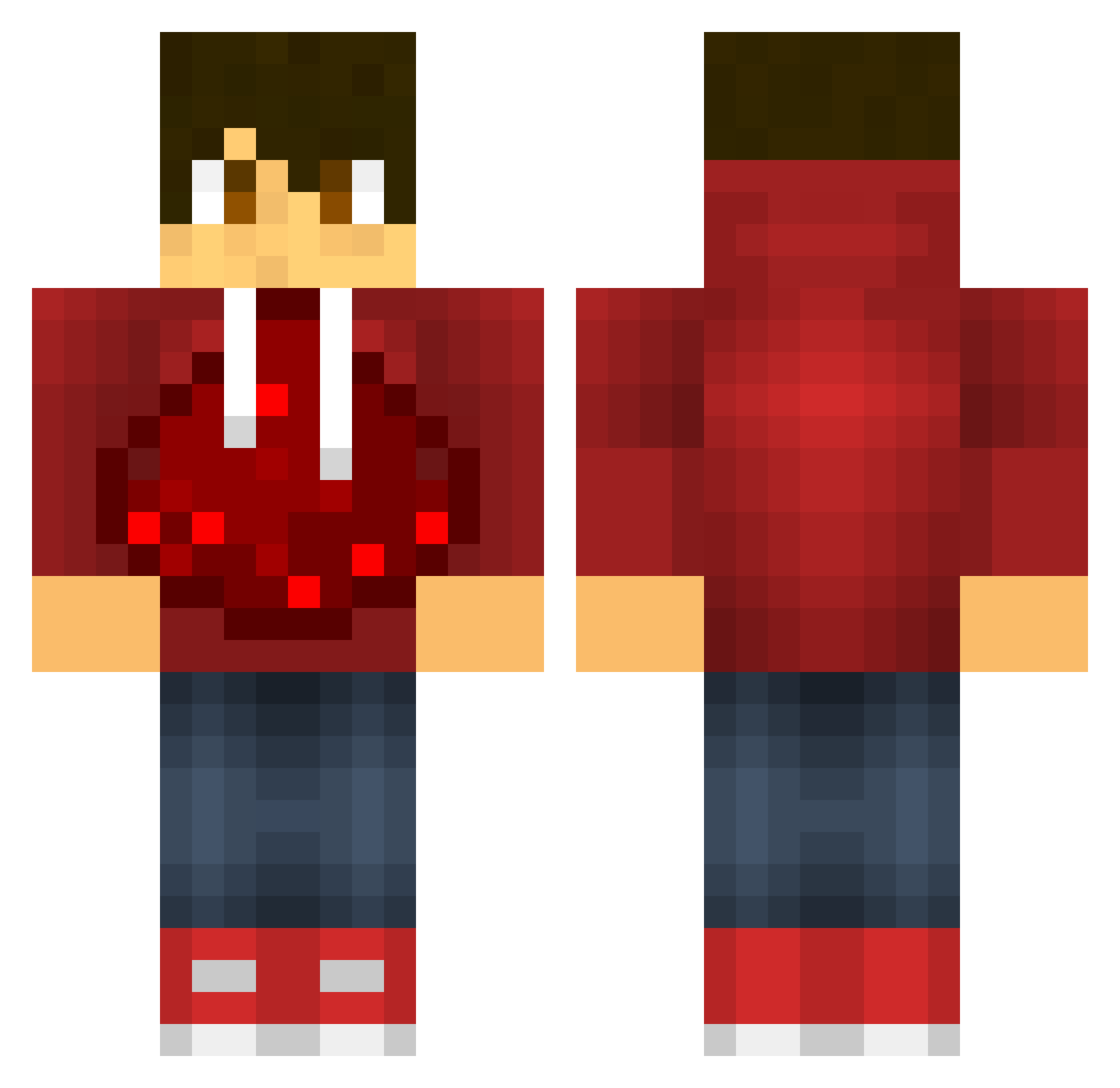
Current Minecraft skin of the player MattisOliver, loaded from the official Mojang API. Rotate the 3D model with your mouse or finger, then download the skin as a PNG file and use it in Minecraft: Bedrock Edition or Java Edition for free. When MattisOliver changes their skin, this page updates automatically and the old skin stays in the history below.
Other players with this skin (604)
MattisOliver was the 290th player we have seen with this skin, first spotted on 23.09.2026. The same skin was seen on these players. Open a nickname to see their current skin and skin history.
 Herobrine1155 Yolopixel bayraynor FelippeM DragonRush26 KingofRedstoners yobo_4000 mrporkins123 Juny2013 Andreas200310 Bee_Butt MasterEustache ShiningTrevor Skritan MartKillin qatar37 Toxado panda12820 LoukaDaBuzooka Noahisawesome14 Master_Redstone7 Tboy03 WillG566 Lseg stehpflanze12345 KillerShark77 ChopCraft787 GunnerPolice123 R3union20 Pkgaming123 sebo599 MizTV1 snake1240 AB1AB2 AllenHuang MinecraftGeekz Knoodle2413 Microscar13 E_Breiflabb leMufflpuf GirionXVI Faisal_gamerFTW aimer43 Curti_Jack minexraft999 creeperzone04 biggyx67 juddyfootbll James_Thomas2185 MEXICANTanker98 dfaojgfoiEWGF Timbo_744 Patsfan123456789 joeeparker chad2170 BunnyandBear123 XeonStrobe RedstonePF N0xF3r0x dragontec48
More Redstone Minecraft skins
How to install the MattisOliver skin
- Press the Download button above to save the skin as a PNG file.
- Minecraft: Bedrock Edition (PE): open the Dressing Room from the main menu (or tap your character → Edit Character), go to Classic Skins → Owned, press the + (new skin) button, choose the downloaded PNG and pick the Classic (Steve) model. Works on PC and mobile; consoles cannot import custom skins.
- Minecraft: Java Edition: open the Minecraft Launcher, go to the Skins tab, click New Skin, load the PNG, pick the Classic (Steve) model and press Save & Use. You can also upload it at minecraft.net → Profile → Change Skin.
The skin does not show up after import - what should I do?
Restart Minecraft and open the Dressing Room again - imported skins sometimes appear only after a restart. Also make sure you selected the imported skin and picked the Classic (Steve) model.
Which model should I choose, Classic or Slim?
This skin is designed for the Classic (Steve) model. If you pick the wrong model, the arms of the skin will look stretched or squeezed.
Is the skin of MattisOliver free to download?
Yes. Press Download, save the PNG file and use it in Minecraft: Bedrock Edition or Java Edition - no payment or registration needed. The skin also works on multiplayer servers and Realms.
More skins
Looking for more? Go back to all Minecraft skins and check the top skins of the week, month and all time, or find any player's skin by nickname.