
MORPHIUS1080p - Minecraft Skins & Skin History
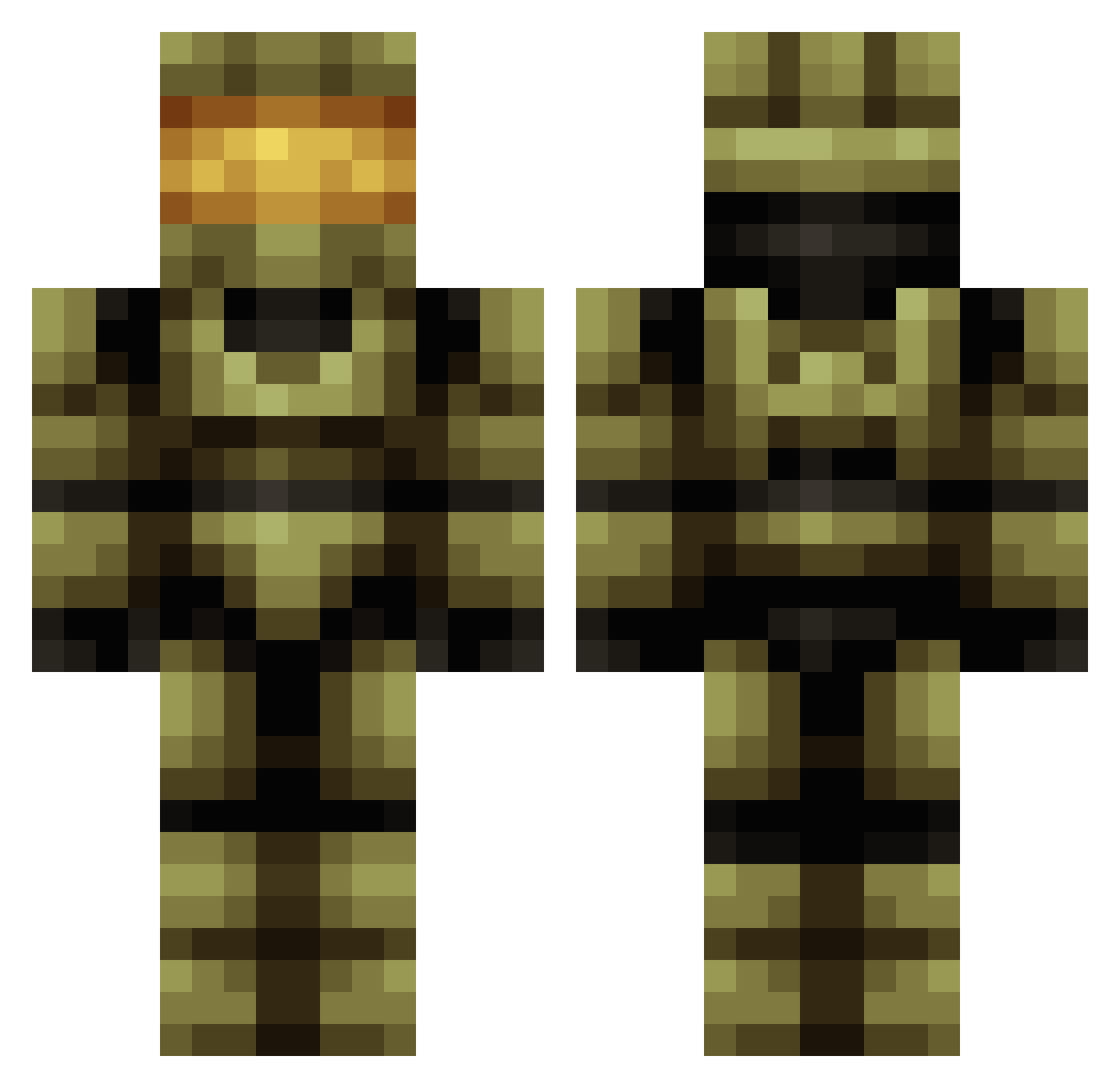
Current Minecraft skin of the player MORPHIUS1080p, loaded from the official Mojang API. Rotate the 3D model with your mouse or finger, then download the skin as a PNG file and use it in Minecraft: Bedrock Edition or Java Edition for free. When MORPHIUS1080p changes their skin, this page updates automatically and the old skin stays in the history below.
Other players with this skin (517)
MORPHIUS1080p was the 426th player we have seen with this skin, first spotted on 04.11.2026. The same skin was seen on these players. Open a nickname to see their current skin and skin history.
 akrobbin rafax22 Traxxas123 Toiletroll1337 johnnyboii69 Not_Kris dachloe cryfder_urddas DringusKhan Tomoshiki05 FrostyFred117 Labanowich PrimeNostalgia Nightmaresen LegoLink1234 timpson BuringZX Max1muslegend AyeWhodat MAXGAMEU wilfos Kanzen35 TheWigum Hammie_49 LatestTunic8013 mdosh Gengo_G WhatItDoBabieee Papaitojose dylzno1 luigi77771 sourzap_3 beggoo CabbageBroth machael88 ElChicarcas PAP8341 Pro_Pear_ nathan115 Miklanin _CoolBananas_ Aerosynaxis mastermya Lebuoy Jikokun longblonde 00minemyasspls00 BKT34 JojoBiah IKONIKGAMING Chazmania2404 St3fanator CoffeeDumps TheobruXX camliammaster RoyalTempest35 Chimera_1 semperfi22m LongshankLad2002 PinballCrack
More Master Chief Minecraft skins
See all 588 Master Chief skins
How to install the MORPHIUS1080p skin
- Press the Download button above to save the skin as a PNG file.
- Minecraft: Bedrock Edition (PE): open the Dressing Room from the main menu (or tap your character → Edit Character), go to Classic Skins → Owned, press the + (new skin) button, choose the downloaded PNG and pick the Classic (Steve) model. Works on PC and mobile; consoles cannot import custom skins.
- Minecraft: Java Edition: open the Minecraft Launcher, go to the Skins tab, click New Skin, load the PNG, pick the Classic (Steve) model and press Save & Use. You can also upload it at minecraft.net → Profile → Change Skin.
The skin does not show up after import - what should I do?
Restart Minecraft and open the Dressing Room again - imported skins sometimes appear only after a restart. Also make sure you selected the imported skin and picked the Classic (Steve) model.
Which model should I choose, Classic or Slim?
This skin is designed for the Classic (Steve) model. If you pick the wrong model, the arms of the skin will look stretched or squeezed.
Is the skin of MORPHIUS1080p free to download?
Yes. Press Download, save the PNG file and use it in Minecraft: Bedrock Edition or Java Edition - no payment or registration needed. The skin also works on multiplayer servers and Realms.
More skins
Looking for more? Go back to all Minecraft skins and check the top skins of the week, month and all time, or find any player's skin by nickname.